

Cookies are not the only way to recognise returning users. Analysing the digital fingerprint of a user's browser also makes tracking possible. Data protection law requires compliance with legal bases for this.
First of all: the term traffic data is meant purely technically here. Legally, it may have a different meaning. Instead of traffic data, one could more generally speak of metadata generated by network traffic.
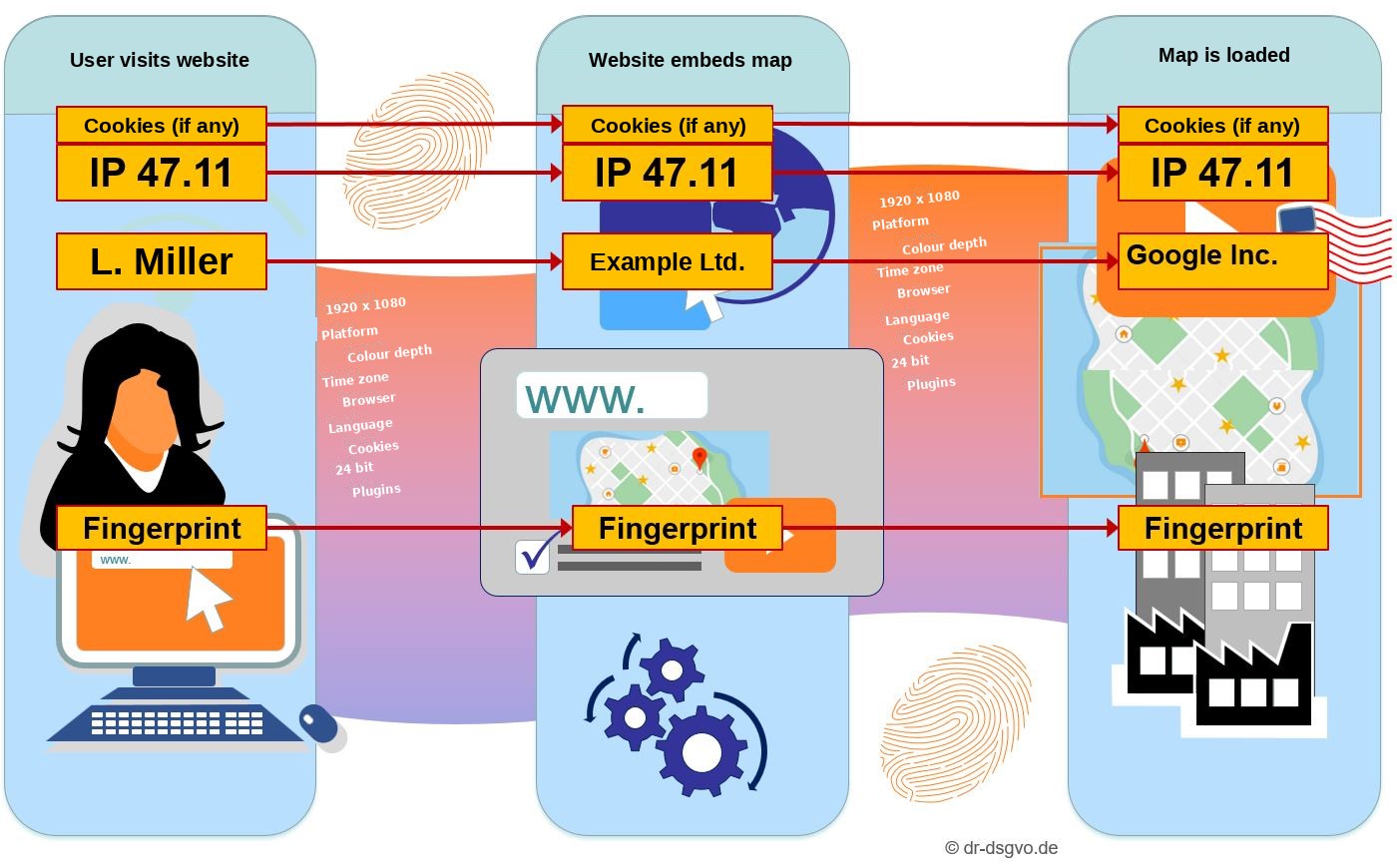
When a user visits a website, details about the configuration of the browser and the device used to access the website are transmitted to the website's server. These include, among other things, the screen resolution, language settings, the type of screen (touch screen yes/no, etc.) and the browser version. In addition, connection data is transmitted, including the requested address and the address from which the user clicked a link (referrer).
Every time a website or file is retrieved from the internet, the requester's IP address is transmitted together with the other data about the requester's computer system mentioned above. This data is often referred to as a browser fingerprint, device fingerprint, traffic data or telemetry data.
If a website embeds a tool such as Google Maps, this user-related data is also passed on to Google as the service provider.
Here is an excerpt of such a fingerprint that every visitor to a website leaves behind:
- Requested page (URL): webseite4711.de/genauer/pfad/
- Page you came from (for example by clicking a link, also called the referrer): www.anderewebseite.de/ein/pfad
- Time of request: 25 November 2020, 07:33:20
- IP address: 22.33.44.55
- Internet service provider (ISP): <provider name>
- Language: German
- Platform: Windows 10
- Screen resolution: 1440 × 900 pixels
- Colour depth: 24 bit
- Time zone: -60 minutes
- Touch screen support: Yes
- Browser plugins: Shockwave Flash 32.0.0.169, …
- Browser: Mozilla/5.0 (Windows NT 10.0; Win64; x64; rv:82.0) Gecko/2010123 Firefox/82.0
Just like IP addresses, this fingerprint is also passed on to all services embedded on a website, such as Google Maps. This makes it possible to establish a personal reference and thus to track the user by the fingerprint alone.
Google Analytics uses some of this data to recognise users. Google uses this data for its own purposes (possibly also to sell advertising more effectively). Google prohibits others from using fingerprinting:
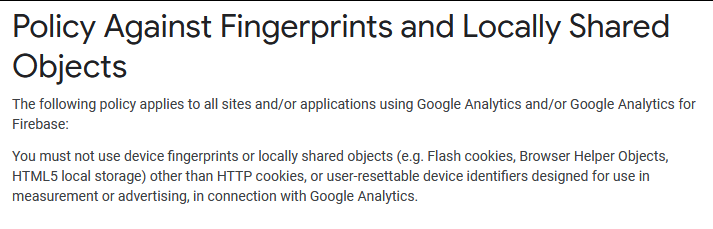
The statement refers to Google Analytics and shows that Google considers the ability of device fingerprinting to recognise users to be highly relevant. This is backed up by the patents mentioned below.
Tracking through digital fingerprints
With the help of the digital fingerprint, users can be identified and tracked. This is also referred to as tracking.
Google holds a patent that allows devices to be uniquely identified by their digital fingerprint: “The present invention is directed to methods and apparatus for uniquely identifying remote computing devices. More specifically, the invention is directed to fingerprinting a remote computing device in stages using information retrievable from a web browser.”
The patent also names the targeted delivery of advertising to users as a field of application:
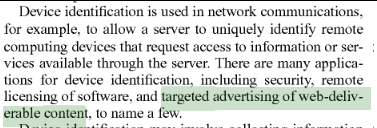
In this patent, an installed Google plugin and its version are also included in the fingerprinting:

Information about the installation status of the Google tool called Gears on the user's device was captured by Google's device fingerprinting. Gears has since been discontinued. This example shows how Google tools can be used to increase the quality of digital fingerprints for identifying users.
The patent also describes how fingerprinting can be carried out incrementally. The fingerprint may initially be formed only partially and then completed with data from later sessions and/or other devices (p. 12 of the patent, from line 32).
Another Google patent uses fingerprinting to detect waves of attackers. A third Google patent coins the term device fingerprinting.
A scientific paper demonstrates how users can even be recognised across browsers, i.e. when using two or more different browsers, with an accuracy of over 90%.
Independently of this, users can also be tracked using cookies and device identifiers (such as AAID from Apple or IDFA from Google).
The AmIUnique tool shows how unique your own fingerprint is and how unique each attribute is. As you can see, the database is huge and still produces unique matches:
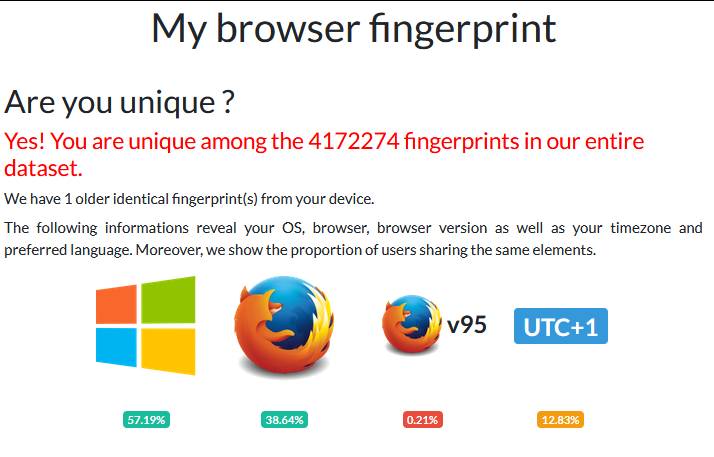
Panopticlick offers something similar.
Further sources on tracking users through fingerprinting can be found in the analysis on Dr. DSGVO of whether cookies are personal data.
I will soon describe how Google tracks users with so-called signals, quite officially and, as can be shown, with consent that is most likely unlawful. The graphic at the very beginning of this article shows how Google can track users across the internet and, according to its own account, does track them.
Is fingerprint data stored on the device?
Under the ePrivacy Directive, which is sometimes also called the Cookie Directive, storing information on the user's device requires consent unless it serves technically necessary purposes. The same applies to accessing information stored on the user's device.
However, the data that makes up the digital fingerprint is not stored on the user's device. The example of screen resolution makes this clear. The display resolution is a volatile configuration that is at most stored as a makeshift by the operating system. The operating system does this so that it can present the same screen resolution after a restart. The monitor displays the resolution it was last instructed to use. Of course, this instruction is only carried out if it specifies a valid resolution.
The data to which the ePrivacy Directive refers, on the other hand, is managed by the browser and can therefore be accessed directly by the browser. The browser in turn is influenced by websites that set or read cookies.
A cookie is under the direct influence of a website or the executing browser. The situation is different for the screen resolution. This is examined in more detail on Dr. DSGVO in the article on Matomo.
Types of fingerprint data
The following table briefly shows different categories of data that should be distinguished.
| Data value | Type of access | Critical? |
|---|---|---|
| IP address | Implicit | Yes, if stored |
| Screen resolution | Explicit, directly via variable | No |
| Colour depth | Explicit, directly via variable | No |
| User agent | Implicit | Yes, if stored |
| Referrer | Implicit | No, unless the URL contains individual variables |
| Time of access | Implicit | No, except possibly when numerous points in time are recorded |
| Time zone | Explicit, directly via variable | No |
| Cookies | Implicit | Yes. Possibly uncritical for first-party session cookies |
| Installed fonts | Explicit, via canvas/CSS measurement | Yes – highly individual |
| Canvas fingerprint | Explicit, via rendering differences | Yes – high uniqueness |
| Do Not Track setting | Explicit, directly via variable | No |
| Browser language(s) | Explicit, directly via variable | No, except for rare combinations |
For each category, the table indicates how critical collecting the respective data value appears on reasonable consideration. This makes it possible to derive whether a fingerprint can be justified on the basis of legitimate interest. In particular, data obtained by simple variable access, i.e. without having to calculate anything, appears uncritical when considered on its own.
Further fingerprinting options include the evaluation of hardware metrics and network topologies. The following two tables provide an overview.
Hardware & system
| Data value | Type of access | Critical? |
|---|---|---|
| Number of CPU cores | Explicit, via navigator.hardwareConcurrency | No, but can be combined |
| Device memory (RAM class) | Explicit, via navigator.deviceMemory | No, but can be combined |
| Touch screen support | Explicit, directly via variable | No |
| Gyroscope/accelerometer | Explicit, via DeviceMotion API | Yes – highly individual |
| Battery status | Explicit, via Battery API | Yes – classified as a tracking vector |
Network & connection
| Data value | Type of access | Critical? |
|---|---|---|
| Connection type (WiFi/LTE…) | Explicit, via Network Information API | No |
| WebRTC local IP | Implicit, via ICE candidates (leak) | Yes – often bypasses VPN |
| HTTP headers (Accept, Encoding…) | Implicit | No, except in combination |
| TLS fingerprint (JA3) | Implicit, server-side | Yes – hardly controllable |
Behavioural data (behavioural fingerprinting)
Evaluating behavioural patterns is also possible, but must be classified as critical from a data protection perspective.
| Data value | Type of access | Critical? |
|---|---|---|
| Mouse movement patterns | Explicit, via event listener | Yes – biometric |
| Typing behaviour (keystroke dynamics) | Explicit, via event listener | Yes – biometric |
| Scrolling behaviour | Explicit, via event listener | Yes, in the case of profiling |
| Click patterns | Explicit, via event listener | Yes, in the case of profiling |
Legal requirements
As the CJEU already held in its judgment of 22 November 2012 (case C-119/12, para. 23), traffic data may only be used exceptionally and for legitimate, necessary purposes. According to the CJEU judgment of 2 March 2021 (case C-746/18, para. 45), even public authorities are prohibited from accessing people's traffic data to prosecute criminal offences unless these are serious. This applies all the more to companies in the private sector.
According to the CJEU (judgment of 19 October 2016, case 142/15, para. 64 – judgment on IP addresses), online media services may also only collect personal (and thus personally identifiable) data if this is technically necessary.
According to the order of the Federal Constitutional Court (BVerfG) of 18 December 2016 (case 1 BvR 142/15, para. 37), the right to informational self-determination is potentially endangered by the possibility of linking different data and must be protected against this.
Section 15(3) TMG stipulates that an option to object must exist when user profiles are created. If cookies are used for this, consent (Art. 4 No. 11 GDPR) must be obtained beforehand in accordance with the Federal Court of Justice (BGH) ruling on Planet49.
In my opinion, however, neither the ePrivacy Directive (via Section 15(3) TMG according to the BGH ruling on Planet49) nor Section 25 TTDSG (from December 2021) applies, because the data of the digital fingerprint is not stored on the user's device according to the standards of the ePrivacy Directive.
Otherwise, the principle of data minimisation applies (Art. 5(1)(c) GDPR). The article names further principles of data processing, such as purpose limitation, which must be communicated (privacy notice, consent request). Data protection must also be ensured by design (Art. 25 GDPR). Art. 32 GDPR requires the security of processing, for example by working with pseudonymised data.
Is your website GDPR compliant?
100% free
No hidden costs
Lightning fast
Results in seconds
No sign-up
Get started right away
Detailed report
Full version for small budget
The Article 29 Working Party, the predecessor of the European Data Protection Board, has published an opinion on device fingerprinting. According to it, the fingerprint would require consent under the ePrivacy Directive. In principle, I cannot agree with this, especially if the IP address is not stored in full, a session lasts no longer than, say, 24 hours and fingerprint data is not collected excessively (see also the table on data categories above). The opinion can be understood to mean that the Working Party is referring to fairly extensive data use for creating a device fingerprint, for which it considers consent to be necessary. The latter need not be disputed, but it should be noted that moderate use of traffic data appears to be permissible on the basis of legitimate interest.
 My name is Klaus Meffert. I have a doctorate in computer science and have been working professionally and practically with information technology for over 30 years. I also work as an expert in IT & data protection. I achieve my results by looking at technology and law. This seems absolutely essential to me when it comes to digital data protection. My company, IT Logic GmbH, also offers consulting and development of optimized and secure AI solutions.