

Google is moving scam detection in Chrome's Enhanced Protection to its servers and additionally checks copied commands. For companies this means weighing the protection gain against the data transmitted. This article clarifies what Google documents, what is merely a vendor claim and what remains open.
New Chrome protection features at a glance
On 20 October 2026 the Chrome team presented new protection features in a post on the Google blog. They include Chrome Gemini scam detection, which will now work on the server side. In addition there is a clipboard check against so-called ClickFix attacks. According to the announcement, both apply only to Safe Browsing's Enhanced Protection, not to Standard Protection.
The announcement matters to admins and data protection officers for two reasons. First, it promises protection against a type of attack that bypasses classic download filters. Second, more data is transferred to Google to achieve it. Press reports such as those by BleepingComputer and Help Net Security summarise the announcement. They say nothing about control in the enterprise or about the data protection assessment.
The following describes what has changed, which data Chrome transmits in Enhanced Protection, which policy fixes the operating mode and how the decision can be documented. Open points are marked as such. This article is not legal advice.
What Google changed in Chrome's scam detection
According to the Google blog, Chrome now has two warning levels: pages are classified as "suspicious" or "dangerous". The new "suspicious" level applies when Enhanced Protection is enabled. Google does not state the false alarm rate for this new category.
The second change concerns Gemini. Last year Chrome already deployed a Gemini-based detection of tech support scams locally on the device for Enhanced Protection users on supported devices. Now a more powerful Gemini model on Google's servers is added. According to the blog it assesses the brand shown, the intent of the page and a scam probability. Safe Browsing combines this result with the domain's reputation and other signals into an overall verdict. Fake antivirus alerts and fake browser updates are now covered as well.
The server-side analysis is to be extended to all users with Enhanced Protection enabled. The post gives no schedule or regions, including for the EU. Any statement on this would be speculation and therefore remains open.
On data minimisation Google writes that page text is analysed only if a page shows very clear scam indicators. Transmitted content is said to be processed transiently, not logged, not stored and not used to train models. This is a vendor claim. According to the sources reviewed, there is no independent verification.
The marketing message is that Enhanced Protection users are "ten times safer" than with Standard Protection. This is a claim by Google. How the figure was determined could not be traced in the sources reviewed, and there is no independent verification. It is therefore only of limited use as a basis for decisions.
ClickFix protection: what happens in the clipboard check
In ClickFix, a user is tricked on a web page into running a command themselves. Typical is a fake check ("I am not a robot") or a supposed error message. One click copies a command to the clipboard, after which it is to be pasted into the Windows Run dialog, a terminal or PowerShell. The copied text often differs from what the page displays. Because the user starts the command themselves, many automatic protection mechanisms do not apply. Microsoft describes the technique in detail and considers it widespread. A more recent Microsoft post from August 2026 also covers a campaign of this kind.
This is exactly where the new Chrome feature comes in. If Chrome detects that a suspicious command has been copied by an Enhanced Protection user, the clipboard content is cleaned of personal data and sent to Safe Browsing for analysis. If the verdict is "dangerous", Chrome shows a warning. Google states the system is designed for high precision so as not to disturb legitimate developer activity where possible.
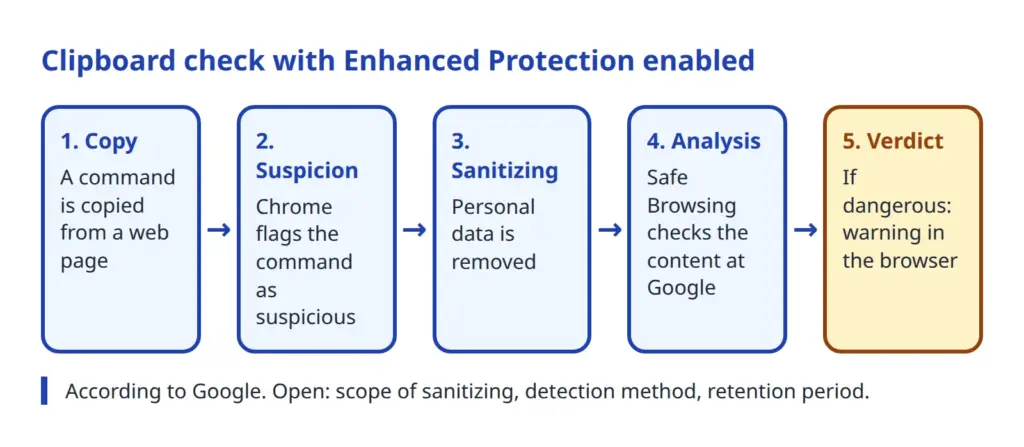
Two subtleties matter for the assessment. First, for the clipboard check the Google blog explicitly names Safe Browsing, not Gemini. Reports often mention both features together, but according to the sources they are not equivalent. Second, it remains open what exactly the cleaning removes, how a command is recognised as suspicious and how long Google keeps the data.
Safe Browsing Enhanced Protection: data protection and transmitted data
Which data Chrome transmits in each mode is described in the Chrome help page on Safe Browsing. In Standard Protection, Chrome compares visited addresses with a local list. An obfuscated part of the URL goes through a privacy server, and a small amount of visual features of pages is checked. In Enhanced Protection, Chrome shares more: visited URLs, a small sample of page content, downloads, extension activity and system information. If a Google account is signed in, this information is linked to the account.
According to the announcement, new are the page text for strong scam indicators and the cleaned, suspicious command from the clipboard. The help page names neither a retention period nor different treatment of enterprise accounts. Whether managed profiles behave differently is therefore not documented.
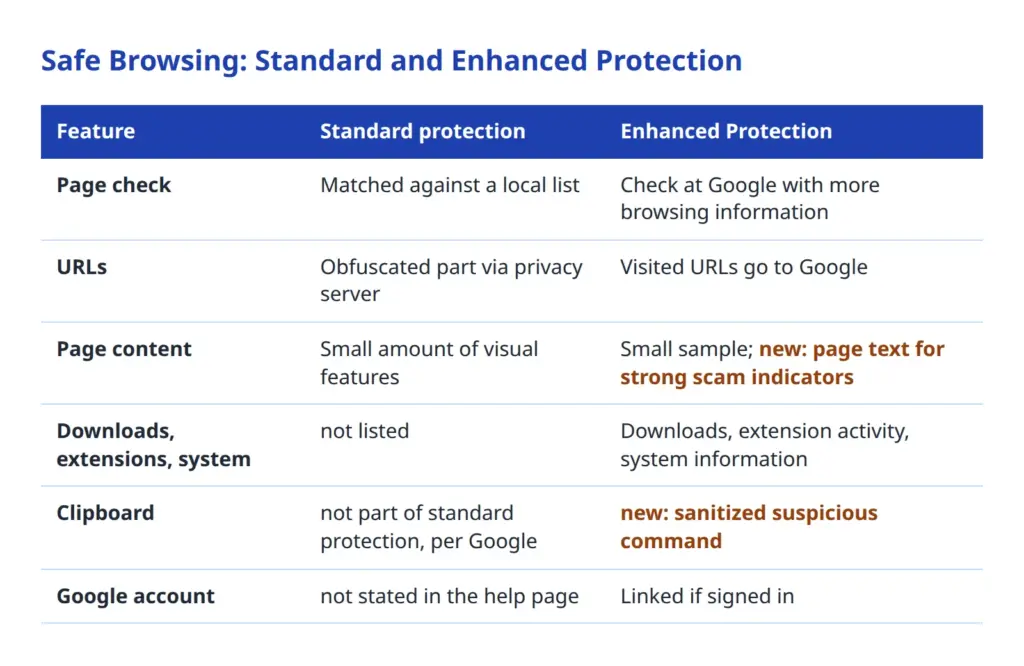
Three points stand out from a data protection perspective. Linking to the Google account potentially turns technical data into employee data. Despite the cleaning, the clipboard can contain content not intended for third parties, such as internal identifiers or parts of configurations. And the detection logic runs entirely at Google, so its workings cannot be verified from outside.
Standard Protection has its own additional policy concerning the path of the obfuscated URL hashes. The policy definition SafeBrowsingProxiedRealTimeChecksAllowed allows sending partial hashes through a proxy via Oblivious HTTP in standard mode and is ignored if Safe Browsing is disabled or set to enhanced. This shows how differently the two modes are built. More on Chrome and data flows can be found in the article on incognito mode in Chrome (in German).
Controlling Chrome Gemini scam detection in the enterprise: SafeBrowsingProtectionLevel
The key lever for admins is the policy SafeBrowsingProtectionLevel. According to the policy definition in the Chromium source code there are three values:
- 0 (NoProtection): Safe Browsing is never active.
- 1 (StandardProtection): Safe Browsing is always active in standard mode. This is the default.
- 2 (EnhancedProtection): Safe Browsing is always active in enhanced mode. According to the description this brings better protection but requires sharing more browsing information with Google.
If the policy is set as mandatory, users cannot change the setting. If it is not set, Chrome works in standard mode and users can switch the mode themselves. The policy applies to Chrome on desktop and ChromeOS from version 83, on Android from 87 and on iOS from 88. It can be set per profile and can also be merely recommended.
According to the available sources, there is no documented individual switch just for the Gemini check or the clipboard check.
Neither the Google blog nor the press mentions admin control. In the policy definitions in the Chromium source code, the SafeBrowsing folder contains entries on deep scanning, proxied real-time checks and the allowlist, among others, but none that explicitly names the clipboard check. This is a finding at the time of research. Before deciding, check the official list at chromeenterprise.google/policies and the release notes directly, as well as the display at chrome://policy on a test device.
One distinction is important. The policies in the GenerativeAI group concern other things. For example, GeminiSettings controls the availability of the Gemini app integration for users. That it also affects the server-side scam detection in Safe Browsing is documented nowhere and would be an assumption. Likewise, the policy SafeBrowsingExtendedReportingEnabled stands for a different function, namely reports. According to its definition it is deprecated and has had no effect since Chrome 145. Additional information for Safe Browsing has since been enabled via Enhanced Protection with SafeBrowsingProtectionLevel. Deep scanning of downloads also has its own policy, SafeBrowsingDeepScanningEnabled.
Google's guide to Chrome security configuration lists SafeBrowsingProtectionLevel among the policies that prevent changes by users. It is an older document and does not cover the new features. Check the wording before using it in internal documents.
In practice a sober check is worthwhile. A policy with value 2 enforces enhanced mode. Whether the new features then apply to a device depends on rollout, version and platform. It is also not documented whether the Gemini analysis applies equally to enterprise licences, Chrome Browser Cloud Management, Android and iOS.
Protection or transmission: weighing it up for data protection and IT
Four questions help with the decision. How high is the ClickFix risk in your own environment? Which types of data actually go to Google? How is the transmission made transparent to employees? And how is the decision documented?
The risk is real: Microsoft describes the technique as widespread, and it hits office workstations as well as developer machines. The benefit of Enhanced Protection, however, is documented only as a vendor claim. The ten-fold figure is a claim by Google and not independent proof that damage was prevented.
On the other side is the transmission. Enhanced Protection sends URLs, content samples, downloads, extension activity and system information. Now page text and clipboard commands are added. Anyone processing employee data must check whether the processing is necessary and how it is justified. For the employment context, Art. 88 GDPR gives member states leeway (article in German). If there is a works council, clarify early whether co-determination is affected.
| Option | Advantage | Disadvantage |
|---|---|---|
| Enforce Standard Protection (value 1) | Less data to Google, uniform setting, no bypass by users | No new Gemini check, no clipboard check, no "suspicious" warning level |
| Enforce Enhanced Protection (value 2) | New features available according to Google, uniform protection | More data transmission, account linking, documentation and information duties |
| Leave unset (user choice) | Little effort | Inconsistent state, no control, hard to document |
| Disable Safe Browsing (value 0) | No transmission to Safe Browsing | Loss of a basic protection, hard to justify |
The table does not replace an assessment of the individual case. It shows that the question is not "protection on" or "protection off" but which part of the data should be processed at Google.
Google's role is also open. Whether Google acts as controller or processor for Chrome use in the enterprise, which legal basis applies and whether the processing is contractually regulated cannot be answered from the sources reviewed. This is a task for review, for example with regard to Art. 28 GDPR (article in German) and the contract documents of the Chrome or Workspace licence in use. A rough overview of data flows in AI functions is offered by the article AI and data protection: how much does your assistant know about you.
May a company enable Safe Browsing Enhanced Protection in Chrome even though page text and copied commands then go to Google?
A short checklist is enough for the documentation:
- Record the purpose and necessity of enabling it, including the alternatives considered.
- List the data types from the Chrome help and the Google announcement, marking open points.
- Review Google's role and the contractual basis and file the result.
- Inform employees and, where applicable, involve the works council.
- Add an entry to the record of processing activities.
- Set a review date, because features and policies can change.
ClickFix protection beyond the browser
The browser warns; it does not prevent anything. The actual execution takes place in the operating system, and there the user decides. A protection concept against ClickFix therefore consists of several layers.
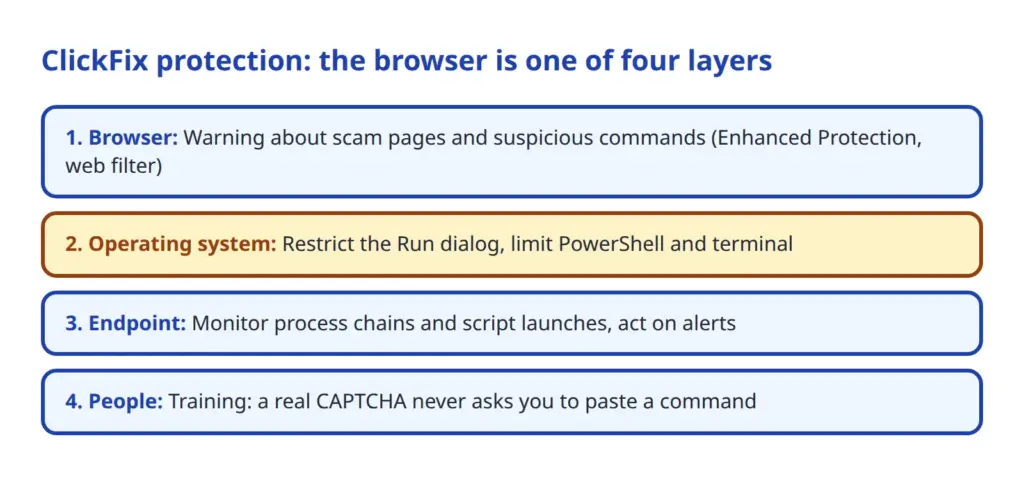
At operating system level, Microsoft recommends in its analysis of ClickFix blocking the Run dialog when it is not needed. The RunMRU registry entry also helps with tracing. Where PowerShell and the command prompt are not necessary for all employees, they can be restricted.
At endpoint level, process chains in which a browser or Explorer starts a script or a system program should be monitored. Commands that download files from the network are also conspicuous. Endpoint protection alerts should be evaluated and not just collected. A web filter additionally reduces the number of scam pages that are reachable at all.
Finally, there are the people. A short training with a single mnemonic helps: a real CAPTCHA never asks you to paste a command. Background on fraudulent messages is described in Phishing and the authenticity of electronic messages (in German).
What is still open and how admins proceed
According to the sources, several questions remain unanswered:
- There is no documented policy that controls only the Gemini check or only the clipboard check.
- Rollout schedule and regions, including for the EU, are not stated.
- Whether managed profiles or enterprise licences behave differently is not documented. Application on Android and iOS is equally open.
- The scope of the cleaning, the detection method and the retention period are not described.
- Google's role (controller or processor) and the legal basis for enterprise use are not documented.
- The false warning rate for the new "suspicious" level has not been published.
- The assurance of transient processing and the ten-fold claim have not been independently verified.
A manageable sequence of steps is enough for a sensible approach. First, take stock of the current state: which Chrome version is running, and is SafeBrowsingProtectionLevel set? The chrome://policy page shows this on a test device. Then a pilot group is a good idea, such as IT or development, in which Enhanced Protection is set as mandatory. In this group you can observe which warnings appear and whether legitimate workflows are disrupted.
In parallel, watch the release notes and the policy list at chromeenterprise.google/policies. Should Google introduce individual control in future, that changes the weighing. It is also sensible to ask Google in writing for statements on its processing role, retention period and the cleaning of the clipboard, and to file the reply.
At the end stands the documented decision with reasons, date and review date. Whether Enhanced Protection is enforced, left optional or excluded in the company is a case-by-case decision. What matters is that it is made deliberately, rests on documented facts and can be traced later.
 My name is Klaus Meffert. I have a doctorate in computer science and have been working professionally and practically with information technology for over 30 years. I also work as an expert in IT & data protection. I achieve my results by looking at technology and law. This seems absolutely essential to me when it comes to digital data protection. My company, IT Logic GmbH, also offers consulting and development of optimized and secure AI solutions.