


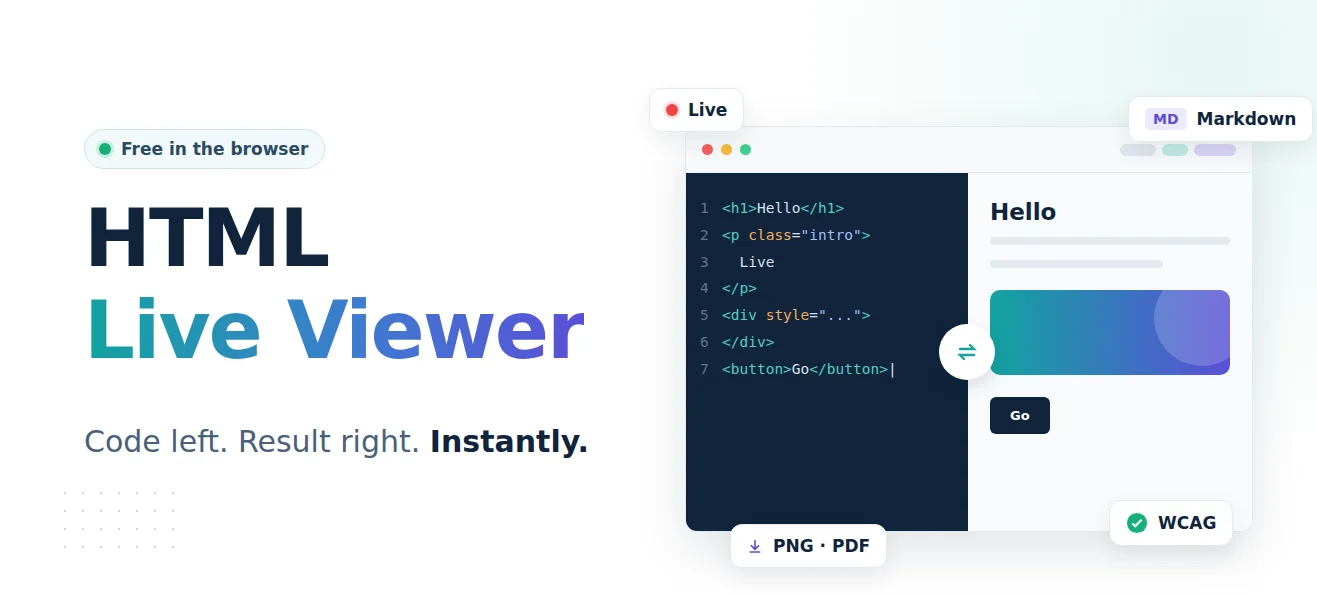
Anyone who works regularly with HTML, CSS or JavaScript knows the situation: a few lines of code are written, the browser is opened, the page is reloaded, and only then does the typo become apparent. Back to the editor, correct it, reload. Again and again. Without a good HTML viewer, this back and forth costs time, interrupts the workflow and turns what is actually a creative process into a fiddly chore.
The HTML Live Viewer solves this problem completely. Free of charge, without registration, directly in the browser.
What is the HTML Live Viewer?
The HTML Live Viewer is a browser-based development tool that combines a code editor and a live preview side by side. Whatever is entered on the left appears immediately on the right, without loading times, without page refreshes, without distraction.
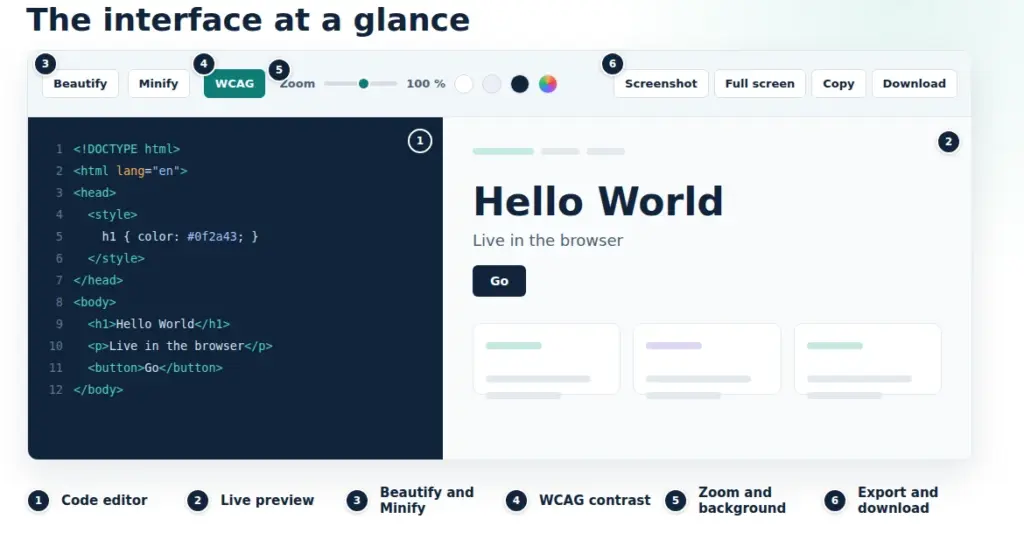
What makes it special: the tool is fully secured on the server side and requires neither installation nor an account. Open the URL, enter HTML, and the preview appears live.
The features at a glance
Live preview: see instantly what you are creating
The heart of the tool is the real-time preview. The editor on the left and the preview window on the right are permanently synchronised. Every change is rendered immediately.
That sounds simple, but in practice it is an enormous productivity gain. Especially when working with layouts, colours, typography or animations, direct visual feedback is indispensable. Relationships are understood more quickly, and experiments can be carried out spontaneously.
The preview is embedded in a secured iframe, so that even more complex HTML documents with their own JavaScript are rendered reliably and securely.
Markdown support: direct rendering in the preview window
The HTML Live Viewer automatically detects whether HTML or Markdown has been entered in the editor. If Markdown is detected, it is converted on the server into cleanly formatted HTML and rendered directly in the preview window, including headings, lists, tables, code blocks and blockquotes in an appealing reading style.
A blue notice bar above the preview indicates when Markdown has been detected and provides the export options right there.
Beautify: structure unreadable code instantly
Minified or unformatted HTML code (one single long line, no indentation, everything squeezed together) is a common challenge in everyday work.
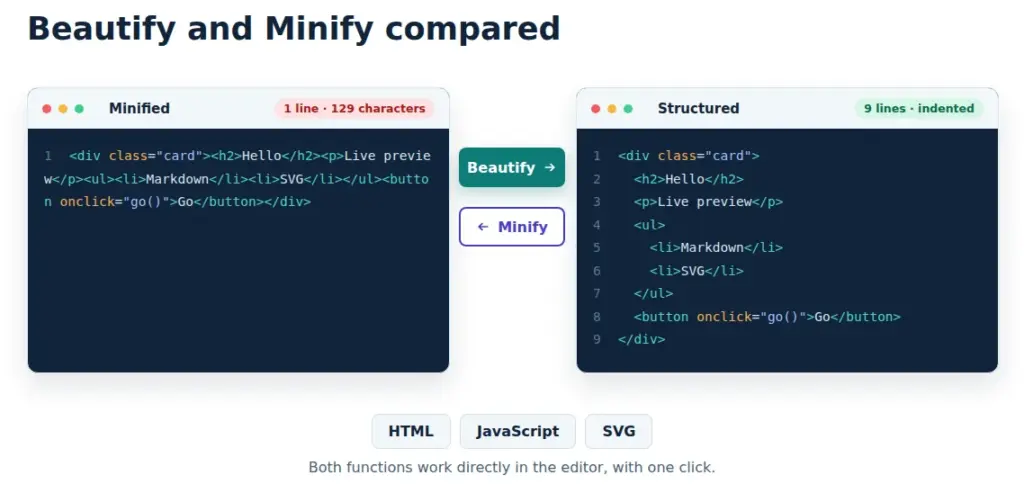
The Beautify function of the HTML Live Viewer turns such code into neatly indented, readable source code with a single click. This applies not only to HTML, but also to embedded JavaScript and SVG markup. Ideal for code reviews, debugging, understanding unfamiliar codebases and preparing machine-generated markup.
Minify: compress code at the push of a button
The opposite direction: the Minify function removes all superfluous spaces, comments and line breaks and reduces HTML, JavaScript and SVG to the absolute minimum. The result is compact code that is transferred faster, which is important for performance optimisation and production environments.
Both functions work directly in the editor, without having to visit an external website or copy code manually.
Automatic contrast improvement according to the WCAG standard
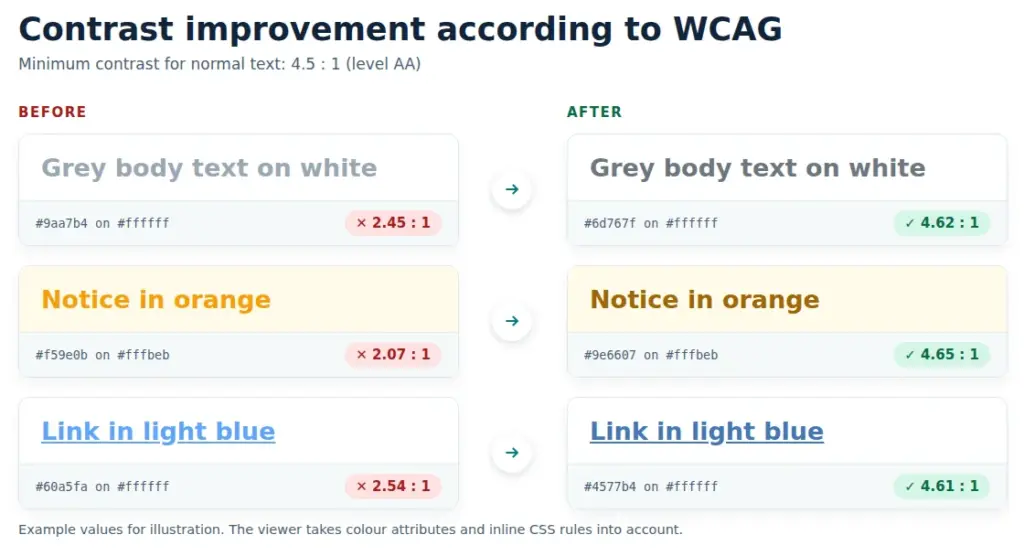
A feature that is rarely found in comparable tools: with a single click, the HTML Live Viewer analyses the colours used in the document and automatically adjusts them so that the requirements of the WCAG standard (Web Content Accessibility Guidelines) are met. Both direct colour attributes and inline CSS rules are taken into account and adjusted.
This makes the viewer a valuable tool not only for development, but also for the accessible design of web content, without manually reworking individual colour values. Especially in regulated industries or for publicly accessible web offerings, where accessibility is required by law, this feature saves considerable effort.
Full-screen mode: the preview without distraction
The full-screen button opens the current preview in a new browser tab as a fully rendered, standalone page. No editor environment, no toolbar, just the result.
This mode is particularly useful for presentations or for checking how a layout behaves on a large screen.
Zoom factor: scale the preview as required
The integrated zoom slider lets you scale the preview from 25% to 200%. This makes it possible to check how a layout looks on very small screens, or to zoom in to examine details of the rendering.
This is not a browser zoom that enlarges the entire page, but a targeted scaling of the preview area. An important difference that allows full control over scale and context.
Adjust the background colour: context is everything
Anyone who develops HTML fragments or transparent SVGs knows the problem: a white component on a white background is invisible. The HTML Live Viewer offers a background colour control directly in the toolbar.
With one click you can switch between predefined colours or use a colour picker to select exactly the background colour that matches the target context.
Screenshot export: save the preview as PNG
The screenshot button renders the current preview on the server with Chromium and returns it as a high-quality PNG file. The width and height of the screenshot can be freely selected, and four quick-select presets are also available: HD (1280 × 720), Full HD (1920 × 1080), 2K (2560 × 1440) and 4K (3840 × 2160).
The result is pixel-perfect and corresponds to what a real Chrome browser renders, regardless of the editor's zoom level.
Particularly well thought out: if the HTML code contains CSS animations, a switch lets you choose whether they should be frozen for the screenshot (immediate standstill via injected CSS), whether to wait two seconds until the animations have reached a defined state, or whether the screenshot is taken without intervention. This keeps the rendering result under control at all times.
PDF export: directly from the tool
The result can be saved as a PDF both from the screenshot dialogue and during Markdown export. For HTML content, the server-rendered Chromium image is converted directly into a PDF. For Markdown documents, Word (.docx) and OpenDocument (.odt) are also available as export formats, without external tools, without detours.
This combination makes the HTML Live Viewer a complete output pipeline: from input through preview to a print-ready document.
Copy and download: carry on working directly
In addition to the visual work, the editor offers two practical helper functions: Copy transfers the entire code to the clipboard with one click. Download saves it as an .html file. No detours, no additional steps.
HTML Live Viewer as part of an AI chain
This is one of the most exciting areas of application for the tool: as a link in an AI-supported workflow.
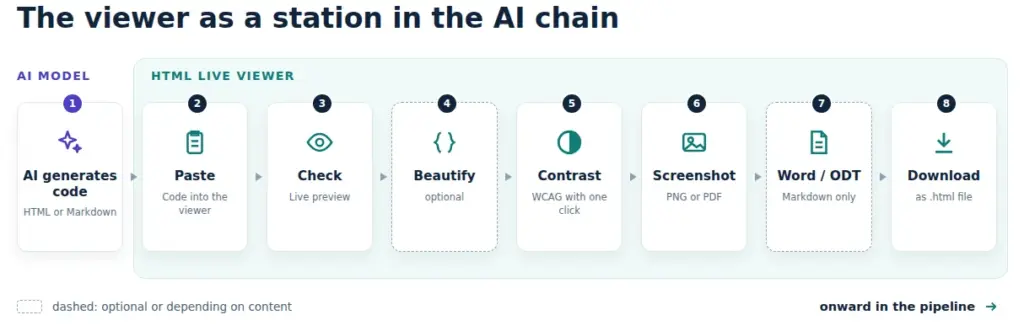
Modern AI models such as Claude, GPT or Gemini generate complete, working HTML on request: landing pages, forms, visualisations, infographics, interactive widgets. The quality is often impressive. The question is: how can the result be checked quickly and reliably?
The HTML Live Viewer is the ideal intermediate station for this:
- AI generates HTML or Markdown code
- Paste the code into the HTML Live Viewer
- Immediate visual check in the live preview
- Optional: Beautify for better readability, make adjustments
- Contrast check at the push of a button with the WCAG function
- Screenshot (PNG or PDF) for documentation or sharing
- Export as Word or ODT for Markdown content
- Download for the next step in the pipeline
No detour via local files, no setting up a development environment, no browser tab chaos. The viewer becomes the visual validation station in a fully browser-based workflow.
This also applies to SVG generation: AI models are increasingly producing complex SVG graphics. With the HTML Live Viewer and its built-in background colour control, these can be checked for correctness, scaled and exported immediately.
Extra: GDPR Quick Check
The HTML viewer features a built-in GDPR quick check. It analyzed your source code for privacy flaws. This seems more important then ever, as more and more code is produced by an AI. The result is like this:
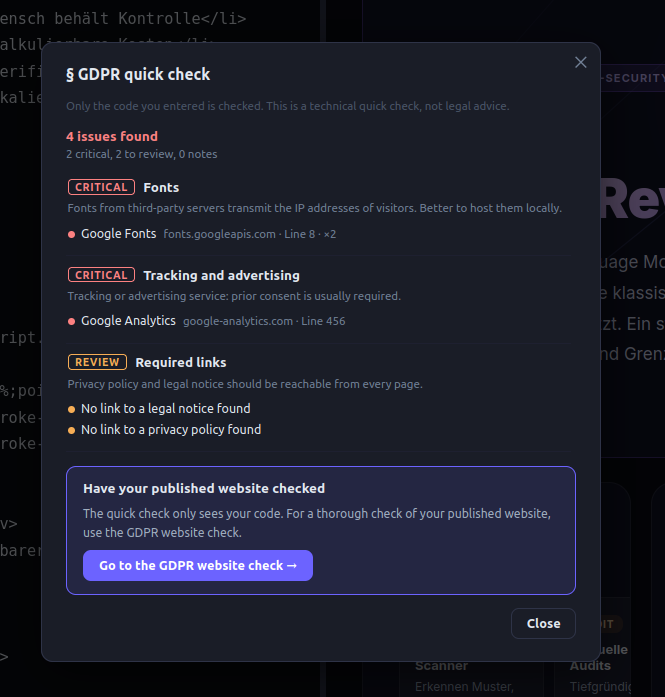
A more sopisticated online check can be ecxecuted by pressing the button in the screen.
Free HTML viewer: no registration, no account
The HTML Live Viewer can be used completely free of charge. No registration is required, no account, no email address. Open the URL and you can start working immediately.
The tool is operated by IT Logic GmbH, a company specialising in secure, optimised web and software solutions. The focus is on privacy-compliant, lean infrastructure without unnecessary dependencies.
More free tools
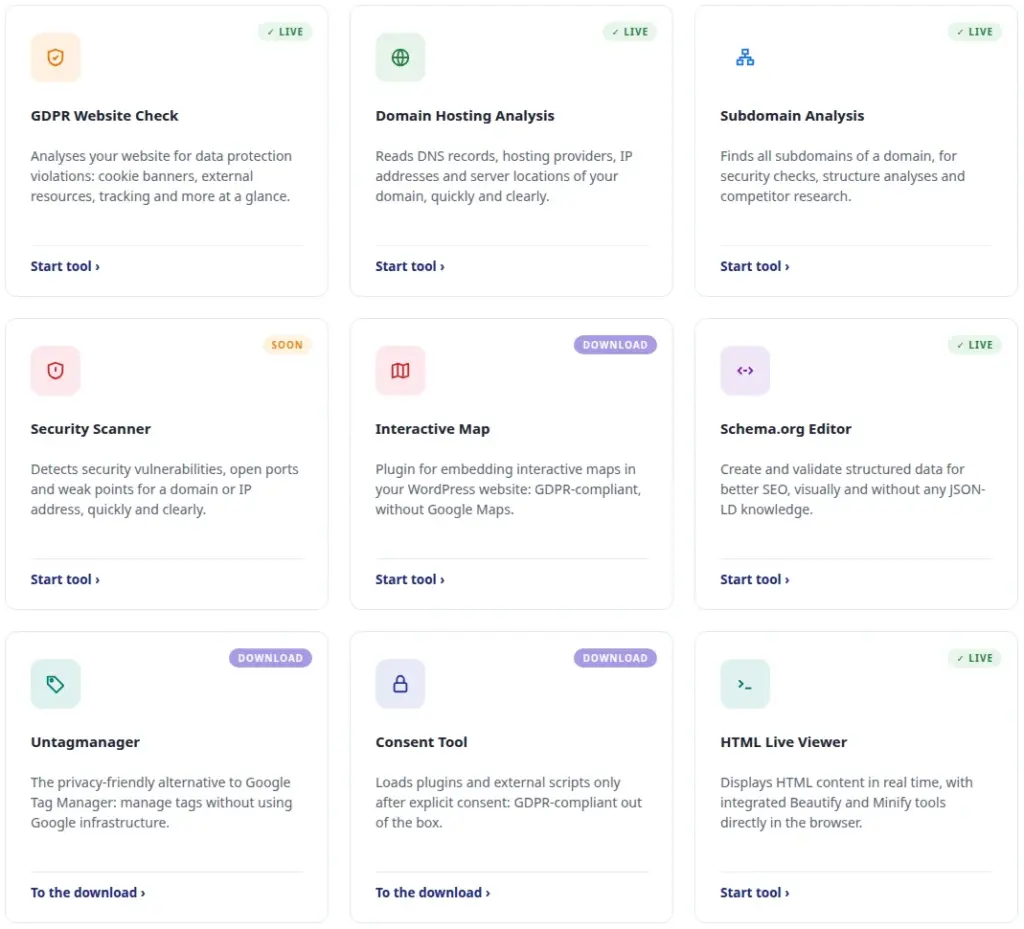
The HTML Live Viewer is not the only free tool in the portfolio. Anyone who works regularly with websites, domains or data protection issues will find more useful helpers here:
Online Website Check Analyses a website for aspects relevant to data protection law and technical weaknesses: fast, automated, without installation. https://dr-dsgvo.de/webseiten-check/
Subdomain Scanner Finds all reachable subdomains of a domain. Useful for security analyses, inventories and relaunch projects. https://dr-dsgvo.de/subdomain-scanner/
Domain & Web Hosting Analysis Provides detailed information on DNS records, hosting infrastructure, SSL certificates and technical key data of a domain. https://dr-dsgvo.de/domain-hosting-analyse/
All tools are free, browser-based and can be used without registration.
Conclusion
The HTML Live Viewer is neither a toy nor a niche product for a small target group. It is a serious tool for anyone who works regularly with HTML, CSS, JavaScript, SVG or Markdown, from beginners to experienced developers, from designers to AI users.
Live preview, Markdown rendering, screenshot export with animation control, PDF/Word/ODT export, Beautify, Minify, zoom, background control, WCAG contrast improvement, download: every feature arose from a real need and solves a specific problem. The combination makes the viewer one of the most useful browser-based development tools currently freely available.
No installation, no configuration, no registration.
Try it now
The HTML Live Viewer is available immediately and free of charge at:
https://meffert42.com/htmlviewer
Open the URL, enter HTML, and see live what you are creating.
 My name is Klaus Meffert. I have a doctorate in computer science and have been working professionally and practically with information technology for over 30 years. I also work as an expert in IT & data protection. I achieve my results by looking at technology and law. This seems absolutely essential to me when it comes to digital data protection. My company, IT Logic GmbH, also offers consulting and development of optimized and secure AI solutions.