

Anyone working with AI tools today usually thinks of ChatGPT, Microsoft Copilot or Google Gemini. These services are convenient, available instantly and technically impressive. Yet they share a fundamental trait that is rarely discussed: they do not learn for you. Every session starts from zero. The knowledge you bring into conversations does not stay with you – it flows into foreign systems that you can neither control nor influence.
This article looks at an alternative that is technically mature, privacy-compliant and economically superior in the long run: personalized, locally operated AI. No hype, no product advertising – just a factual overview of concepts, possibilities and limits.
What is a personalized AI?
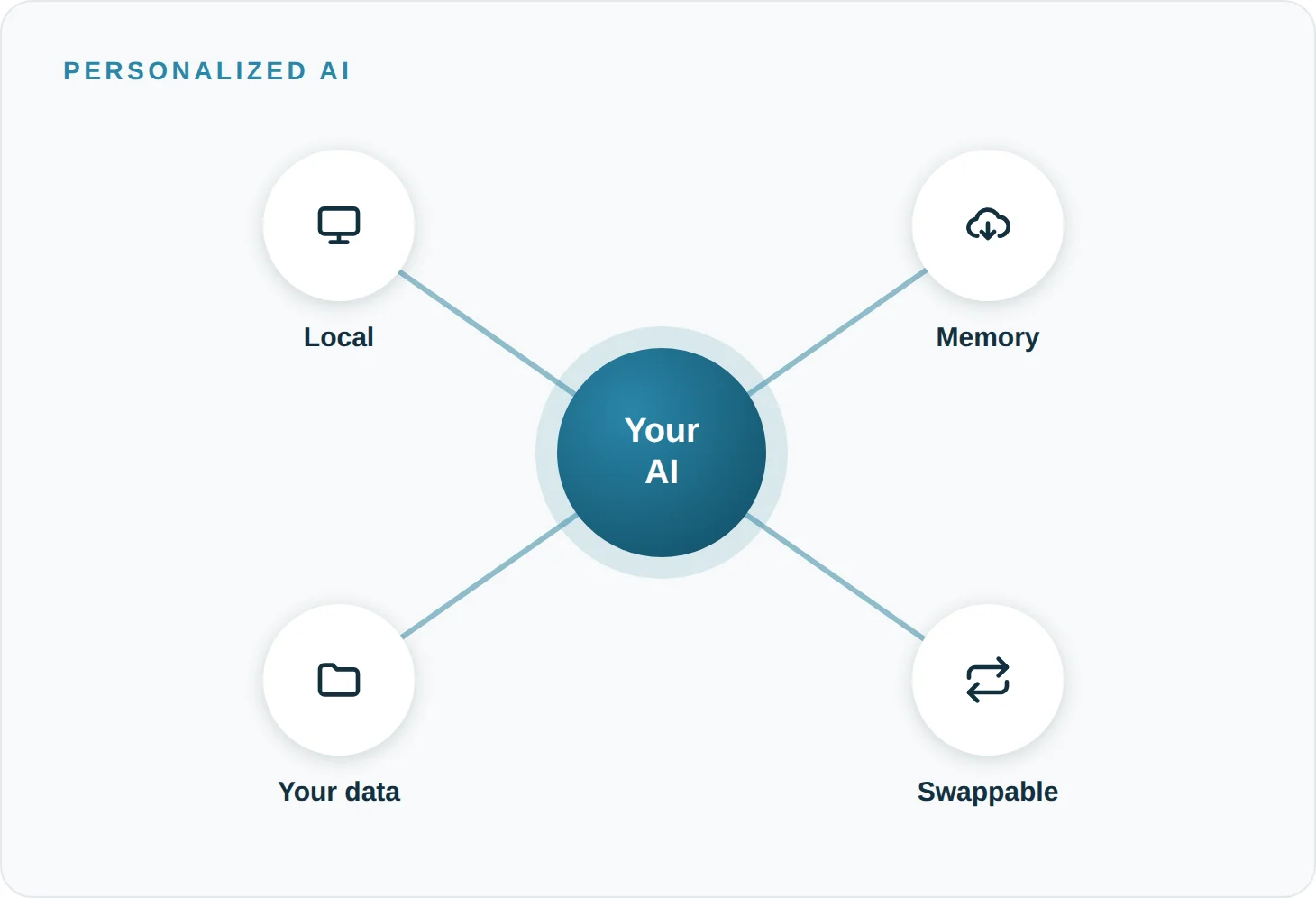
A personalized AI is not a special product and not a separate class of model. It is a configuration: a language model is run locally and combined with its own knowledge and memory layer, built from your documents, conversations and work processes.
The result is a system that:
- knows and uses your professional context
- permanently stores relevant information from conversations
- can work with your own documents, knowledge bases or company data
- is model-independent: the underlying AI model can be swapped without losing the knowledge that has been built up
The decisive difference from cloud AI: the knowledge is not stored in the model itself (which, for pretrained models, is not possible without considerable effort), but in a separate, controlled knowledge infrastructure that belongs to you.
How does it work technically?
The underlying concept is called RAG – Retrieval-Augmented Generation. In simple terms:
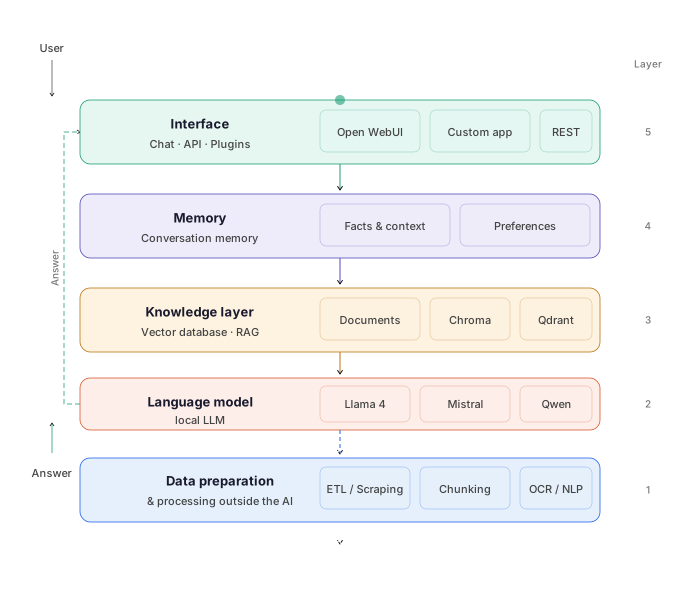
Your documents, notes, emails or databases are transferred into a vector database. This database can be searched very quickly for semantically similar content – that is, by meaning rather than by keywords. When you ask a question, the system first searches the database for relevant passages and hands them to the language model together with your question. The model then answers not from its general training, but specifically on the basis of your own information.
However, the supposed intelligence of AI also carries risks, because false or biased data can lead to misleading results. To better understand the limits of AI-based insights, AI bias should be taken into account.
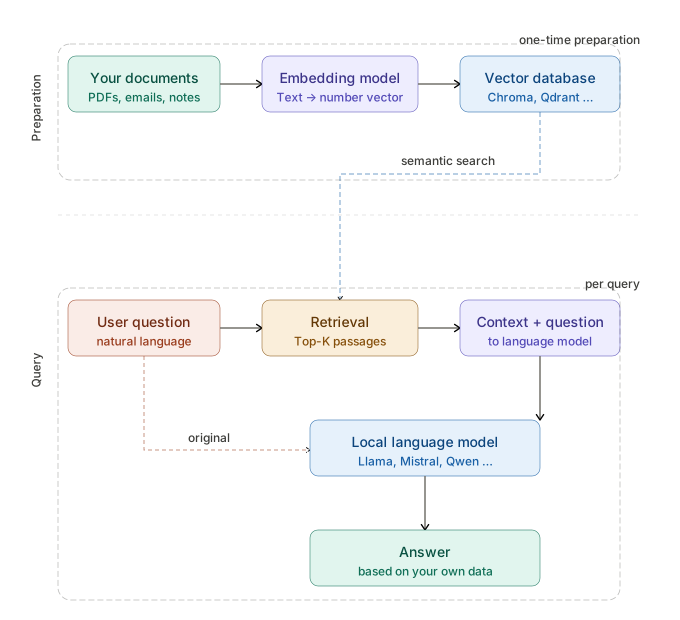
RAG is complemented by memory systems that extract relevant facts from conversations and store them in a structured way – comparable to an intelligent notebook that knows what matters.
Common open-source tools for this setup include:
- Ollama – simple local model management
- LM Studio – graphical interface for local models
- AnythingLLM – RAG system with document integration
- Open WebUI – browser-based interface for local models
- Chroma, Qdrant, Weaviate – local vector databases
- LangChain, LlamaIndex – frameworks for orchestration
All of these tools are free and actively developed.
Data security, data protection and digital sovereignty
This aspect is of central importance for companies, public authorities and anyone who works with sensitive information.
What happens to data with cloud AI?
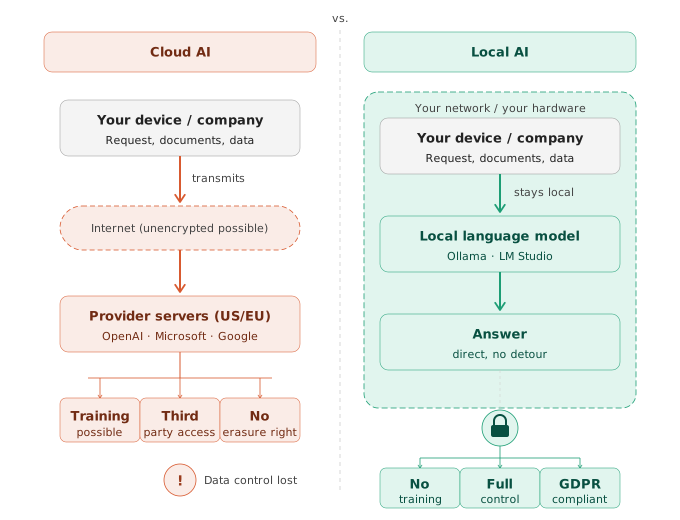
When you use ChatGPT, Copilot or Gemini and upload documents, paste in text or ask questions about internal topics, this data leaves your network. Depending on the terms of use and the plan, the following applies:
- Data may be used to improve models (depending on settings and contract)
- Data is stored on servers that are often located outside the EU
- In a business context, real risks arise: trade secrets, customer data and strategic plans could be disclosed unintentionally
- The provider technically has access to the transmitted content – regardless of contractual assurances
Microsoft offers enterprise plans for Copilot under which, according to the contract, no training data use takes place. Nevertheless, the data leaves your own network and is processed on Microsoft infrastructure. For many regulated industries – healthcare, law, public administration, financial services – this is not acceptable.
Local AI and the GDPR
A locally operated AI processes data exclusively on your own hardware. There is:
- no data transfer to external services
- no third-party provider involved in the processing chain
- no dependence on the privacy policies of a US company
- full control over retention periods, access rights and deletion processes
This makes local AI systems one of the few AI approaches that can be operated in sensitive environments without elaborate data protection impact assessments.
Digital sovereignty as a strategic goal
Digital sovereignty means keeping control over your own digital infrastructure, your own data and your own work processes. In the context of AI, this specifically means:
- Independence from the provider: no company can cut off your access, raise prices or change the terms of use
- Independence from the model: the underlying AI model is replaceable – you are not tied to a particular technology
- Control over the knowledge built up: what your AI has learned about you, your company and your processes belongs to you
For mid-sized companies and public institutions in particular, this aspect is strategically relevant. Knowledge is a competitive advantage – whoever outsources it to foreign systems gives up part of that advantage.
Microsoft Copilot compared with local AI
Microsoft Copilot is currently the most discussed AI assistant in the enterprise environment. The tight integration into Microsoft 365 – Word, Excel, Outlook, Teams – makes it attractive to many organizations. A factual comparison, however, shows where its limits lie.
What Copilot does well
- Summarizing emails and meetings within Microsoft 365
- Drafting text in Word and Outlook
- Simple data analyses in Excel
- Integration into existing Microsoft workflows without additional setup
Where Copilot structurally reaches its limits
No lasting memory beyond sessions
Copilot does not store personalized context beyond individual sessions. Every interaction starts without any knowledge of who you are, how you work or what was relevant in past conversations. There are contextual improvements within Microsoft 365 (e.g. access to your own documents), but no true cumulative learning.
Limited document work at scale
Copilot can access SharePoint documents, but processing large volumes of documents (e.g. thousands of contracts, technical manuals or archive documents) is intended neither conceptually nor economically. The model has a limited context window and no persistent vector database for your own content.
No customizability of the model
Copilot is based on GPT-4 and cannot be customized, fine-tuned or replaced by your own models. Anyone with specific requirements – such as a model that understands the technical language of a particular industry especially well – has no way to influence this.
Data protection and data sovereignty
Even with enterprise plans, data is processed on Microsoft infrastructure. For industries with high regulatory requirements, this is often an exclusion criterion.
Vendor dependency
Copilot's functionality, pricing and availability are entirely in Microsoft's hands. Price increases, feature changes or the discontinuation of the service are beyond the user's influence.
Side-by-side comparison
| Feature | Microsoft Copilot | Local AI |
|---|---|---|
| Lasting learning | No | Yes |
| Data sovereignty | Restricted | Complete |
| Document work at scale | Limited | Scalable |
| Model customization | Not possible | Fully possible |
| Vendor dependency | High | None |
| GDPR compliance | Restricted | Fully possible |
| Cost with many users | High (per user) | Fixed infrastructure costs |
Ways to optimize a personalized AI
This aspect is hardly discussed in public, yet it is one of the most significant differences between local and cloud AI: a locally operated, personalized AI can be optimized in practically every dimension.
Model fine-tuning
Open-source models such as Llama 4, Mistral or Gemma can be fine-tuned on your own data. This means the model does not only learn from context (as with RAG), but is trained on language style, technical terminology and specific tasks. A law firm can train a model that understands contract language precisely. A public authority can train a model that knows administrative language and processes.
With Copilot or ChatGPT this is not possible. You use the model as the provider supplies it.
To be honest about practice, though: model training is often neither necessary nor sensible. In the inspection of components for defects through AI image analysis, however, it is very sensible and necessary.
System instructions and personality
Local AI systems can be given detailed, persistent system instructions that fundamentally shape their behavior: tone, depth of expertise, output format, understanding of their role. These instructions apply persistently – not just for a single session.
Specialized knowledge bases
While cloud AI draws on general knowledge, a local AI can access any number of specialized knowledge sources: internal manuals, legal databases, technical documentation, historical project data, customer files. The vector database can be extended continuously.
Agentic workflows
Local models can be integrated into automated workflows that handle several steps autonomously: read a document, analyze it, summarize it, categorize it, forward it. These so-called agents can be connected to local systems such as databases, file systems or internal APIs – without any data leaving the company.
Continuous improvement through feedback
Because the system is entirely under your own control, feedback can be collected systematically and used for improvement – both for the knowledge base and for future fine-tuning.
None of this is possible with Copilot, ChatGPT or Gemini. These systems are designed as products, not as customizable infrastructure.
Cost analysis: what local AI really costs
An honest cost analysis has to distinguish between different usage scenarios. The good news: local AI is economically competitive in almost all scenarios – and considerably cheaper in many.
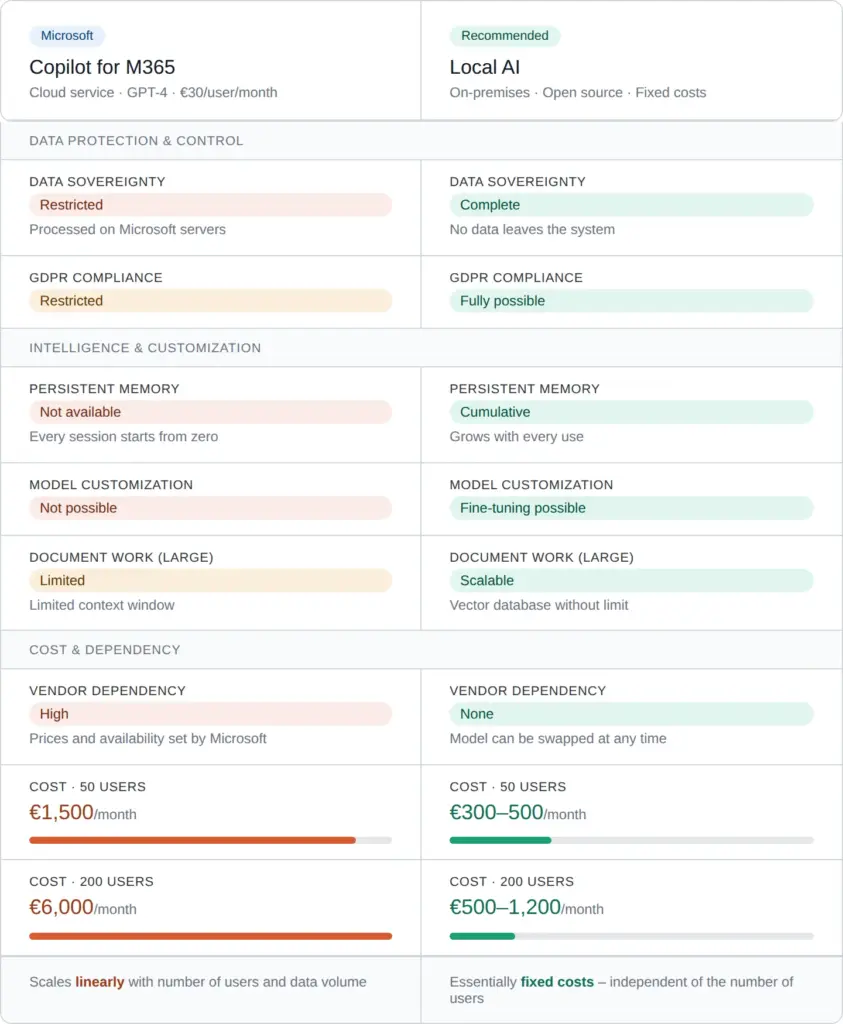
Comparison of Microsoft Copilot vs. local AI (approximate figures)
Semi-professional use: individuals, freelancers, small teams
In this range, the demands on response time and parallel processing are low. A laptop or desktop computer with 16–32 GB of RAM is entirely sufficient for small to mid-sized models (4B–13B parameters).
- Hardware: an existing computer or a new purchase from about €1,500
- Running costs: electricity (a few cents per hour)
- Software: free (Ollama, AnythingLLM, Open WebUI, GPT4ALL)
- Waiting times: a few seconds per answer – acceptable for most tasks
For comparison: ChatGPT Plus costs €20 per month per person, offers no lasting memory and no document integration at scale. API usage – for example to query your own documents – is billed per token and quickly runs to three figures per month with intensive use. Once companies have started using AI through the API, they want more and more. Then €800 quickly becomes €3,000, per application segment !? Good thing American companies almost never raise their prices (irony).
Professional use: companies, authorities, administration
In a professional environment, fast response times, parallel use by several employees and the processing of large volumes of documents are required. More powerful hardware is needed here.
Your own hardware (on-premises):
A server with one or two professional GPUs (e.g. NVIDIA A10, RTX 5090 or similar) costs from €2,000 to buy. This allows models with 12B–70B parameters to run smoothly, with quality comparable to GPT-4.
Rental option:
For organizations that do not want to run their own hardware, there are data center providers (exclusively in Germany or the EU) that rent out GPU servers by the hour or by the month. Costs: depending on the configuration, from about €300–800 per month including maintenance and operation. The data does leave your own site, but stays within the EU and under GDPR-compliant conditions.
What Copilot costs by comparison:
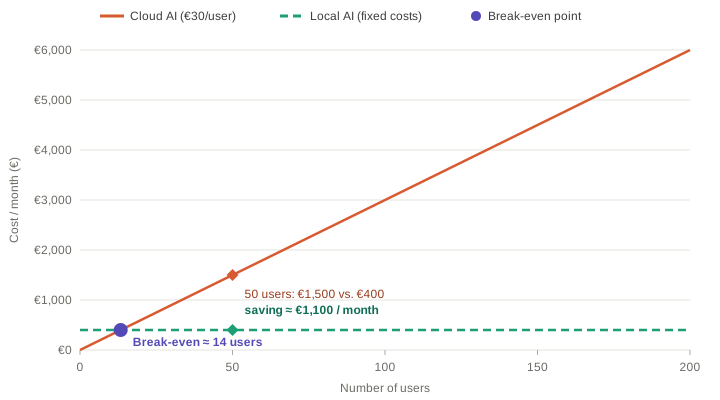
Microsoft Copilot for Microsoft 365 currently costs about €30 per user per month (as of 2024, depending on the contract). With 50 employees that is €1,500 per month, with 200 employees €6,000 – and that without lasting knowledge storage, without customizability and without any way to process large volumes of documents economically.
Cost comparison: cloud AI (linear) vs. local AI (fixed costs) – the curves intersect depending on the number of users.
The problem with API costs for document work
Many companies are considering using the APIs of ChatGPT (OpenAI), Gemini (Google) or Claude (Anthropic) to query their own documents. Using them is technically simple, but economically problematic:
- Costs arise per processed token (unit of text) – both when reading in and when answering
- A single query over a large document can cost several cents – that sounds like little, but with hundreds of daily queries it quickly adds up to several hundred euros per month
- The costs are variable and hard to plan
- With thousands of documents (contract archives, technical documentation, knowledge bases), full indexing through cloud APIs is simply uneconomical
A local vector database with a locally operated model processes the same queries at fixed costs (hardware and electricity) – the cost per query tends toward zero.
Cost comparison at a glance
| Scenario | Cloud AI (monthly) | Local AI (monthly) |
|---|---|---|
| Individual | €20–50 (subscription) + API costs | < €5 (electricity) |
| 10 employees | €300 (Copilot) | €50–150 (share of hardware) |
| 50 employees | €1,500 (Copilot) | €300–500 (server rental) |
| 200 employees | €6,000 (Copilot) | €500–1,200 (server rental) |
| Document work (10,000 docs) | €500–2,000+ (API) | Fixed costs included |
The figures are guidelines and may vary depending on provider, contract and intensity of use. They do, however, illustrate the structural cost logic: cloud AI scales linearly with the number of users and the data volume. Local AI essentially has fixed costs.
Which models are suitable for local operation?
The market for open language models has developed rapidly over the last two years. The following models are particularly relevant for local operation:
For basic hardware (8–16 GB RAM):
- Llama 3.2 (3B, 8B) – from Meta, very good all-round performance
- Mistral 7B / Mistral Nemo – fast, economical, strong in quality
- Phi-3 Mini / Phi-3.5 – from Microsoft Research, surprisingly capable for its size
- Gemma 2 (2B, 9B) – from Google, good for text tasks
For mid-range hardware (24–48 GB VRAM):
- Llama 3.1 70B (quantized) – close to GPT-4 level
- Qwen 2.5 72B – strong in multilingualism and reasoning
- Mixtral 8x7B – efficient mixture-of-experts architecture
For professional hardware:
- Llama 3.1 405B (and newer) – one of the strongest publicly available models
- Command R+ (Cohere, and newer) – optimized specifically for RAG applications
All of the models mentioned are freely available and can be installed with a single command through local platforms.
Limits and honest restrictions
A complete picture also requires a look at the limits of local AI.
Setup effort: The initial setup requires basic technical knowledge. For non-technical users, professional support in building the infrastructure is recommended.
Current world knowledge: Local models have a training cutoff and no internet access (unless explicitly connected). For tasks that require up-to-the-minute information, a web search add-on is necessary.
Absolute model quality: The strongest proprietary models (GPT-5, Claude Opus and Fable) still have a measurable lead in certain complex reasoning tasks. That gap, however, keeps shrinking.
Maintenance: Local systems have to be maintained, updated and scaled when needed. That is not a big effort, but it is not zero effort either.
Conclusion: when does building a personalized AI pay off?
A personalized, locally operated AI pays off if at least one of the following criteria applies:
- You regularly work with sensitive or confidential data
- You want your AI to know your context, your technical language and your way of working
- You want to make large volumes of your own documents intelligently searchable
- You need an AI solution for several employees and want to avoid license costs
- You want to be independent of a particular provider
- You want to expand and customize your AI infrastructure in the long term
For occasional, general tasks without data protection concerns, cloud AI services can be sensible and sufficient. For everything that requires depth, continuity, customizability and data security, building your own AI infrastructure is the strategically superior decision.
The knowledge you invest in your AI grows with every use. It belongs to you – and in the long run, that is a considerable advantage.
When local AI is worth it instead of ChatGPT or Copilot is explained in the overview of local AI in business.
 My name is Klaus Meffert. I have a doctorate in computer science and have been working professionally and practically with information technology for over 30 years. I also work as an expert in IT & data protection. I achieve my results by looking at technology and law. This seems absolutely essential to me when it comes to digital data protection. My company, IT Logic GmbH, also offers consulting and development of optimized and secure AI solutions.