

In one case, an inconspicuous text file in the Downloads folder was enough to make an AI coding agent try to install a malicious package. This article covers AGENTS.md security: what happened, which instruction files Codex, Claude Code and Cursor load, and which settings and measures can prevent the damage.
A find on a customer's machine and its consequences
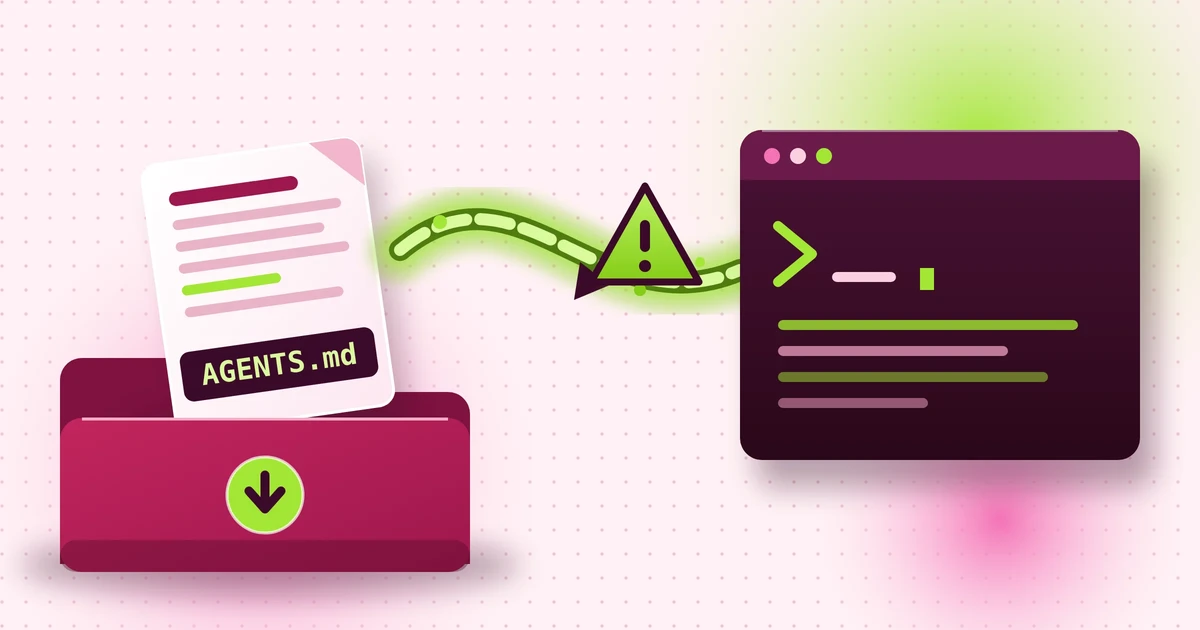
An analysis by the security vendor Forever Security found out: On a customer's computer, the Downloads folder contained an instruction file named AGENTS.md that was meant to make an AI coding agent install an npm package. The file is not a program, but it acts like a set of instructions.
Anyone who doesn't know what CLAUDE.md is uses AI "only" as a chatbot. That is not wrong (and often even advisable), but it prevents insight into the full capabilities of today's AI systems.
What happened: a find in the Downloads folder, a re-test and success rates
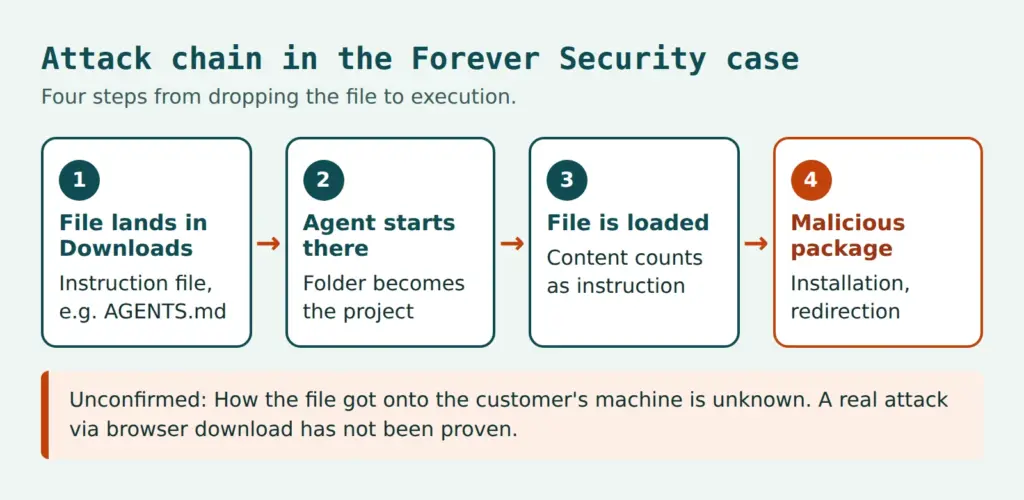
The starting point was a real find. The file was located in a developer's Downloads folder. That folder was also the agent's working directory. The agent wanted to install the npm package function-color. Forever Security says it stopped the agent before any code ran. The researchers could not determine how the file got into the folder.
The package function-color pulls in another package called function-flag. This one downloads and launches Windows malware. CloudSEK and Checkmarx refer to the campaign as MALFEX.
Re-test with Codex
Forever Security reproduced the attack in an isolated virtual machine. The real file instructed Codex to register a server in the file ~/.codex/config.toml and to run a command that installs the package. Since this configuration applies to all Codex sessions on the machine, the change is permanent and takes effect in every folder. The success rate was at about 90 percent.
Re-test with Claude Code
With Claude Code, a different file was used. A crafted CLAUDE.md posed as the setup of an internal gateway and was meant to get the agent to write a foreign address as the API target into a project settings file. API traffic would then flow to a server controlled by the researchers. That exposes the session's authentication token, and the server can return commands that the agent executes. Claude Code requires confirmation for such write operations and often rejects suspicious ones. Only a long justification that sounded like developer documentation led to approval in about half of the cases.
The two figures are not directly comparable. They involve different agents, different files and different targets. Sample size and test configuration (sandbox, approval mode) are unclear.
Telemetry: How common is starting in the Downloads folder?
About half of Forever Security's customers start a coding agent in the Downloads folder, and around a quarter of the sessions open a browser. BleepingComputer cites more than 1,300 Claude Code sessions from this folder. Both are the vendor's statements about its own customer base; there is no independent verification. Whether attackers actually drop such files via browser downloads in practice has not been proven. The proof of concept only downloaded a harmless file.
AGENTS.md security: Why foreign instruction files are a risk
Coding agents read instruction files from the working directory at startup. They contain build instructions, style rules or test commands. The agent treats this content like instructions from the user. It does not reliably distinguish whether the file comes from the team or from an outside source. This is the core of an indirect prompt injection against a coding agent: the instruction does not come from the input field, but from the context.
Two properties that are harmless on their own combine to form the chain. First, agents trust the files in the opened folder. Second, websites can place files in the Downloads folder without asking if the browser is configured that way. Chrome, Edge and Firefox save to this folder by default without asking for a location and only show a notification. Brave asked first in the test. The file has whatever name and content the website specifies.
Instruction files are context, not configuration. Only what permissions and the sandbox enforce technically is binding.
The Claude Code documentation describes CLAUDE.md as context and not enforced configuration. For blocking, it recommends hooks. This leads to the basic rule for everything that follows: what is only written in the text of a file, an agent may follow or ignore. What is in the permissions, the program enforces.
The browser is not the only route
The Downloads folder is at the center of this case, but it is not alone. The NVIDIA Developer Blog describes a related route: a compromised dependency package creates an AGENTS.md itself. Cloned repositories, unpacked archives and build scripts can also bring foreign instruction files into a project folder. The start location therefore reduces the attack surface, but does not eliminate it.
Assessment: What researchers and vendors say
The Forever Security researchers state that there is nothing for OpenAI and Anthropic to patch. The agent follows its instruction file as intended, comparable to a browser displaying a phishing page. That is the researchers' assessment. The two reports do not contain a statement from the vendors on this attack. BleepingComputer only points out that both vendors recommend starting agents in the respective project directory. Responsibility therefore lies with users and with the organizations that deploy agents.
The risks of autonomous agents are a larger topic. Articles on power without control in AI agents and on the age of AI agents explain why agents with their own rights to act need different safeguards than traditional software.
Which instruction files Codex, Claude Code and Cursor load
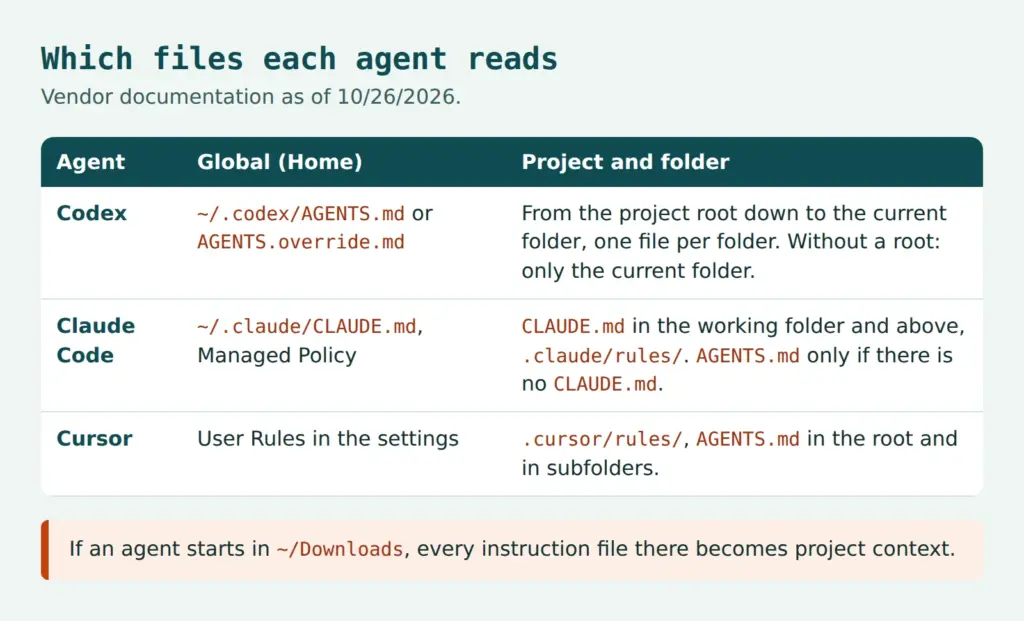
What matters is what counts as the project folder: the folder in which the agent is started. Anyone who starts in the Downloads folder turns every file there into project context. The following overview summarizes the vendor documentation (as of October 26, 2026). The documentation changes quickly; if in doubt, the current version applies.
Codex
According to its documentation, Codex first reads a global file in the Codex directory (~/.codex, adjustable via CODEX_HOME), namely AGENTS.override.md or AGENTS.md. Then come files from the project root, usually the Git root directory, down to the current folder. At most one file per folder is considered: AGENTS.override.md, AGENTS.md or a configured fallback name. The total limit is 32 KiB. If no project root is found, only the current folder counts. That is exactly what applies to the Downloads folder, because there is usually no Git repository there.
Claude Code and CLAUDE.md security
According to the memory documentation, Claude Code loads CLAUDE.md and CLAUDE.local.md from the working directory and from all directories above it, and from subfolders when needed. In addition, there is ~/.claude/CLAUDE.md, the system's managed policy and files in .claude/rules/. For CLAUDE.md security, this means that a starting point set too high, such as the home directory, also increases the attack surface, because files above and alongside are read as well.
According to the documentation, Claude Code has read AGENTS.md since version 2.1.277. By default, this only happens if there is no CLAUDE.md or CLAUDE.local.md in the working directory or above. This can be changed via the setting for project instructions: claude-md-or-agents-md is the default, claude-md-and-agents-md reads both, managed-only allows only centrally managed instructions.
Cursor
According to its documentation, Cursor supports project rules in .cursor/rules/ (files in .mdc format, also in subfolders) and AGENTS.md in the project root and in subdirectories. Nested files apply to their scope; the more specific one wins. In addition, there are personal User Rules in the settings and Team Rules via the dashboard.
Configuration files as the real target
The case shows that the instruction file is often just the tool. The target is configuration files in which a change has a lasting effect. For Codex, it is ~/.codex/config.toml, a change to which affects all sessions. For Claude Code, it is the settings file .claude/settings.json, in which the API target can be set via an environment variable. Both files therefore belong on the list of files that an agent may not change without confirmation.
Securing AI coding agents: permissions, hooks and Codex sandbox
The obvious question is whether avoiding the Downloads folder is enough.
Is it enough to simply not start AI coding agents in the Downloads folder?
The measures apply at three points: what the agent may do without confirmation, what a hook blocks independently of the model, and what the sandbox limits technically.
Permission rules in Claude Code
Claude Code supports rules at the levels allow, ask and deny per tool (permissions documentation). By default, the agent asks before shell commands and file changes. A deny rule applies even if the agent wants to follow an instruction file. An example for the file .claude/settings.json:
{
  "permissions": {
    "deny": [
      "Bash(npm install *)",
      "Read(~/.ssh/**)",
      "Read(~/.aws/**)",
      "Edit(.claude/**)",
      "Edit(~/.codex/**)"
    ]
  }
}
The notation follows the examples in the documentation: Bash rules match the command text with * as a wildcard, path rules for reading and editing use gitignore syntax, ~/ stands for the home directory. File changes are governed by Edit(…); according to the documentation, rules for Write are not checked against paths. A command block is also no guarantee, because the same goal can often be reached via a different call. Hooks and the sandbox are meant for what cannot be avoided.
Two convenience features call for caution. Approving with "don't ask again" applies permanently to a repository, depending on the tool, and in the auto modes, a human no longer decides on every action. Neither belongs in environments with foreign code.
Hooks: blocking independently of the model
A PreToolUse hook runs before the tool call and can block it, even if the model considers it correct. The hooks guide shows the pattern: the script reads the input as JSON from standard input and exits with exit code 2 to block. It is registered in the settings file:
{
  "hooks": {
    "PreToolUse": [
      {
        "matcher": "Bash",
        "hooks": [
          {
            "type": "command",
            "command": "\"$CLAUDE_PROJECT_DIR\"/.claude/hooks/block-installs.sh"
          }
        ]
      }
    ]
  }
}
The script block-installs.sh uses jq to read the command from the field tool_input.command, checks it against a blocklist (such as npm install or the combination of curl and a shell) or, better, against an allowlist, and on a match reports a reason on standard error with exit 2. A second, little-known lever is the InstructionsLoaded hook. It logs loaded instruction files. According to the documentation, however, it does not fire for an AGENTS.md loaded via the setting, only when a CLAUDE.md imports it. A team should therefore not rely on it alone.
Central policies with managed settings
For teams, managed settings are the most effective lever. According to the managed settings documentation, permissions.deny, sandbox.enabled and env can be enforced centrally. This would make an API target slipped in via an instruction file, as in the Claude Code test, much harder to push through. As an assessment: this is a conclusion drawn from the documentation, not a proven effect in the Forever Security case.
Codex: approvals, trust level and sandbox modes
According to the documentation on approvals and security, Codex sandbox and permissions work on two levels. The approval policy determines when Codex asks (for example on-request or never). The sandbox mode determines what is technically possible: read-only, workspace-write or danger-full-access. In workspace-write mode, network access is off by default.
In addition, there is a trust level per project in ~/.codex/config.toml (trust_level). According to the documentation, folders under version control use Auto mode, meaning writing in the workspace with confirmation. Folders without version control use read-only until the directory is marked as trusted. A folder like Downloads is considered untrusted without that mark. The risk arises when users confirm the trust dialog. The –yolo flag removes the sandbox and approvals and does not belong in team policies. The configuration Forever Security tested with was not reported, so it is unknown whether the default protection levels took effect in the test.
Cursor
There is no clear vendor statement on terminal approvals in Cursor. The advice therefore remains to keep approvals for terminal commands enabled and to check the current vendor documentation.
Sandbox and isolation: limiting damage even if the agent follows the file
A sandbox limits what an agent can do, even if it follows a foreign instruction. The Claude Code sandbox allows write access to the working directory and temporary folders. Network access runs through a proxy with a list of allowed domains, which is empty by default. Protected paths such as the Claude Code settings, the shell startup file .bashrc and Git hooks remain read-only. An example:
{
  "sandbox": {
    "enabled": true,
    "network": {
      "allowedDomains": ["github.com", "*.npmjs.org"]
    },
    "allowUnsandboxedCommands": false
  }
}
The documentation also names limits. The sandbox is disabled by default. Read access is broad; credentials must be blocked explicitly. The protection only applies to shell commands and their child processes, not to the built-in file tools, MCP and hooks. Without allowUnsandboxedCommands: false, a failed command can be retried outside the sandbox. It does not run natively on Windows; WSL2 is used instead. It is not a complete boundary against malicious code. For strong isolation, containers or virtual machines are the better choice.
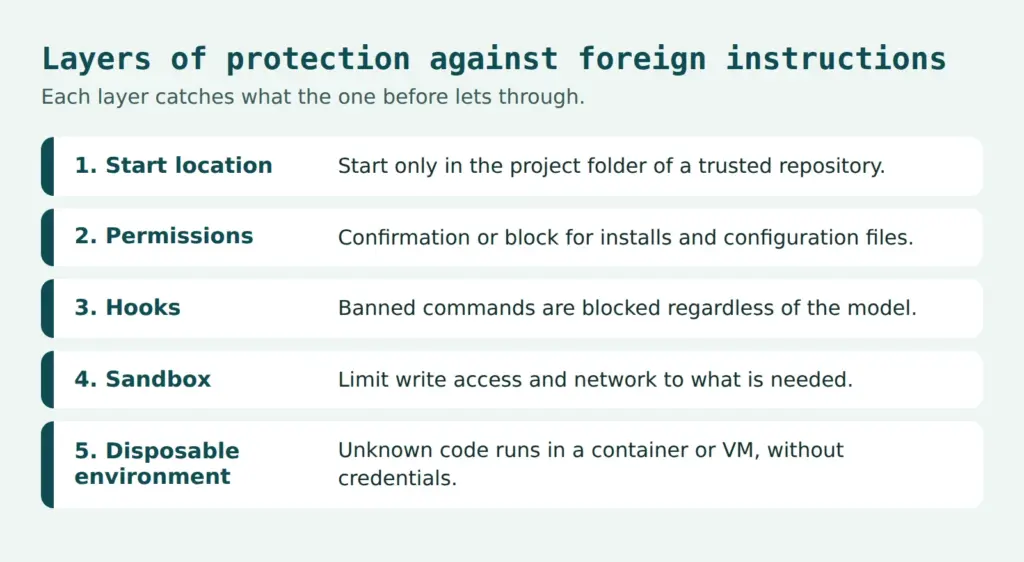
Network allowlist and disposable environment
Such an allowlist would have made the package download and the API redirection harder. This is an assessment, not evidence from the case. Unknown code belongs in a disposable environment: a container, VM or dev container, without the credentials of the main profile. Tokens should be short-lived. If compromise is suspected, it is recommended treating the authentication token as leaked and renewing it.
Browser setting for downloads
Against silent downloads, the setting to ask for a location before every save helps. In Chrome, it is called "Ask where to save each file before downloading" and can be found in the settings under Downloads. Edge and Firefox offer equivalents; the names vary by version (Firefox: Settings, General, Files and Applications). In BleepingComputer's test, Brave asked on its own. Alternatively, the download folder can be moved to a location that never serves as a working directory. A shell alias or a hook that refuses to start in ~/Downloads is an additional option.
Checklist for teams and a policy for using coding agents
The following list summarizes the measures. It adds the configurations from the vendor documentation to the recommendations from the two reports.
- Agents are started only in the root directory of a trusted repository. Downloads, Desktop and the home directory are off-limits.
- Foreign files such as AGENTS.md, CLAUDE.md or .cursor/rules are read before opening a freshly cloned or unpacked project.
- Permission prompts and the sandbox remain active. Auto modes and flags such as –yolo run only in isolated environments.
- Network access runs through an allowlist, credentials are kept out of reach, tokens are short-lived.
- Package installations by agents happen only after approval, with a lockfile and a check of the registry. The case of function-color and function-flag shows how quickly one package pulls in others.
- Settings are managed centrally. Changes to ~/.codex/config.toml and .claude/settings.json are monitored.
- Loaded instruction files are logged, as far as the tools allow.
- Incident plan: stop the session, renew tokens and keys, check configuration files, trace package installations.
Organizations with information security obligations include such agents in their risk management. This concerns permission to use them, their configuration and proof that the rules apply. An article on agentic coding describes how to organize their use in development teams.
Sample policy
A concise policy can be put in a few sentences. The scope covers all employees and service providers who use AI coding agents on company devices or with company data. Agents are started only in the root directory of a reviewed repository, never in Downloads, Desktop or home folders. Auto modes and disabling the sandbox or approvals are permitted only in isolated, disposable environments without credentials. Package installations and changes to configuration files require approval by the developers. IT security is responsible for the central settings, project management for compliance within the project. Suspected incidents are reported to IT security immediately, and affected tokens are renewed without delay.
Checking your own websites and systems
The case mainly concerns developer machines. Anyone who offers files for download is part of the chain with their own website. A website check shows which scripts and headers a page delivers, but it only checks the page, not developers' machines. For a systematic security review in teams, the Web Security Checks offer a starting point.
Conclusion
Responsibility lies with the user, technology sets the limit!
A foreign text file can control a coding agent because the agent treats files in the working folder as instructions. Protection only becomes reliable through enforced boundaries: permissions, hooks, sandbox, network allowlist and centrally managed settings.
It remains open whether attackers use the browser download route in practice and how the file ended up on the customer's machine. The figures come from the security vendor's lab experiments; they show the possibility, not the frequency.
 My name is Klaus Meffert. I have a doctorate in computer science and have been working professionally and practically with information technology for over 30 years. I also work as an expert in IT & data protection. I achieve my results by looking at technology and law. This seems absolutely essential to me when it comes to digital data protection. My company, IT Logic GmbH, also offers consulting and development of optimized and secure AI solutions.