



Cookies are small snippets of information stored by your browser. How do cookies actually come into being and what happens to them? Why are so-called cookie blockers doomed to fail?
Introduction
Anyone looking for knowledge articles about cookies often finds questionable explanations. That is at least my assessment, and I can partly back it up. Here is one proof: take a look at the privacy policies of many so-called experts. They explain that cookies are text files. That is objectively wrong and always has been. You can find the proof in my Bullshit Basics article or in the fact check on Google Tag Manager. It does not become any more correct by arguing that the GDPR demands plain language.
Not long ago, politicians presented a plan to eliminate so-called cookie popups. The plan can only be supported. However, the chosen route of achieving this through browser default settings cannot work. That does not become any more correct when the privacy organization noyb, which I hold in high regard, demands the same with a concept called ADPC.
At the latest with the CJEU ruling on Planet49, the cookie hype began. The ePrivacy Directive added fuel to the fire because it also targets cookies. According to the German Federal Court of Justice (BGH) ruling on Planet49, the German Telemedia Act in § 15 (3) TMG must be interpreted in conformity with the ePrivacy Directive.
When cookies require consent is covered in the overview of cookies and consent on websites.
What are cookies?
Cookies are data records. To put it more nicely, you can also call them small snippets of information. A cookie is stored on the user's end device, by the user's browser. Every browser can store cookies in a different way. There is no standard for how they are stored. That is why the claim that cookies are text files has always been wrong. It is true that many browsers used to store a cookie in the form of a text file. But surely nobody will claim to have known all browsers and their storage mechanisms worldwide. Besides, there were other ways than text files to store cookies even back then.
Today, Firefox or Chrome store cookies in databases and not in text files. Anyone who claims otherwise should change their doctor or take different pills.
My following descriptions of cookies only scratch the surface, so that they are, first, generally understandable and, second, readable in a finite amount of time.
How are cookies created?
A cookie is created when data is retrieved. Specifically, this means: when a user opens a website and the website loads files, loading a file can create a cookie.
Files are, for example, fonts, images, JavaScript libraries, videos or other services. A service is often called a tool. Examples of services are Google Maps, SoundCloud audio player, Vimeo videos or reCAPTCHAs.
In addition, a first-party cookie can be created by JavaScript logic. You will find more on this further below.
Cookies are created by loaded tools and files and do not exist out of nowhere
the website you are currently visiting can also set its own cookies
So cookies are created and managed by loaded tools and files. Cookies do not simply fall from the sky. The website you are currently visiting can also create and manage cookies.
Scope of cookies
A cookie has a lifetime. In the CJEU ruling on Planet49, this was called the duration of operation. The CJEU ruling caused a stir because it found that Art. 13 GDPR must be interpreted to mean that the purposes and durations of operation must be explained for cookies.
A cookie lives within a so-called domain. Why some people in Germany use the English word domain rather than the German term remains a mystery to me forever. The GDPR demands clear, easily understandable language (Art. 12 (1) GDPR). Why the English term, with just as many letters but less clarity than the German one, is used is unclear to me.
A domain is, in short, an internet address. An example of such an address is dr-dsgvo.de.
If a file is retrieved from the domain dr-dsgvo.de in the browser when a website is opened, this file can send back a cookie, and only with the scope of the domain dr-dsgvo.de.
Sending it back works as follows:
- A cookie is created on the server from which the file is retrieved. This is done by logic running on the server, for example in the PHP programming language
- When the requested file is sent back, the cookie is automatically sent back to the caller, as specified by the internet protocol
- The cookie is automatically stored by the browser on the user's end device
An end device is a smartphone, a tablet, a desktop PC or the like. By including a file, the website therefore ensures that cookies can be created. Cookies can also be sent along the same route.
Sending cookies
Suppose you have already visited several websites on the internet. In the process, a number of cookies have accumulated on your end device, that is, on your computer's hard drive. Now you open one of the websites you have already visited again. A file is retrieved from the domain abcdwxyz.de. Because of your journey through the internet, there is already a cookie on your end device whose scope is the domain abcdwxyz.de. Now the following happens:
- You open a website X
- The website includes a file from the domain abcdwxyz.de
- The browser checks the cookie database on your computer, created by your browser, to see whether it contains cookies for the domain abcdwxyz.de
- If the browser finds such cookies, it automatically sends them along with its request to retrieve the file from abcdwxyz.de! So the file has not been retrieved yet, only requested. This request therefore contains the cookies stored on your device that match the address (domain) to which the file request is made
Point 4 therefore means: if cookies are already on your computer, they are automatically sent along when files are retrieved, because of the internet protocol TCP! The server that is to send back the requested file therefore automatically receives the cookie from your end device. When sending back the requested file, the third-party server can now change the value of the cookie, delete it or add new cookies.
Cookies stored on your end device are automatically sent by your browser to the called server with every request for a file
Specification of the internet protocol
Technically, a distinction is made between first-party cookies and third-party cookies. First-party means the original provider and third-party means an external provider or simply a third party.
First-party cookies
When a website is visited, files are logically also transferred in order to display the website at all. This means a website can also create cookies itself. This type of cookie is referred to as a (technical) first-party cookie.
Such cookies can be managed by the website currently being visited. Managing means:
- Creating
- Changing the value
- Changing other properties (lifetime etc.)
- Deleting
Third-party cookies
If a website retrieves a file from a third-party server and a cookie is created in the process, it is a third-party cookie.
A (technical) third-party cookie can only be managed by the third party that created the cookie. The visited website that includes the third-party service has no knowledge of the cookie created by this service and therefore cannot manage or read it.
Conversion from first-party to third-party
When you open the Google search engine, Google cookies are created. These are obviously first-party cookies, because the website you are currently visiting creates and manages the cookies itself. In this example, the cookies exist for the domain google.de or google.com (as the case may be). Here is an example of which Google cookies these can be:
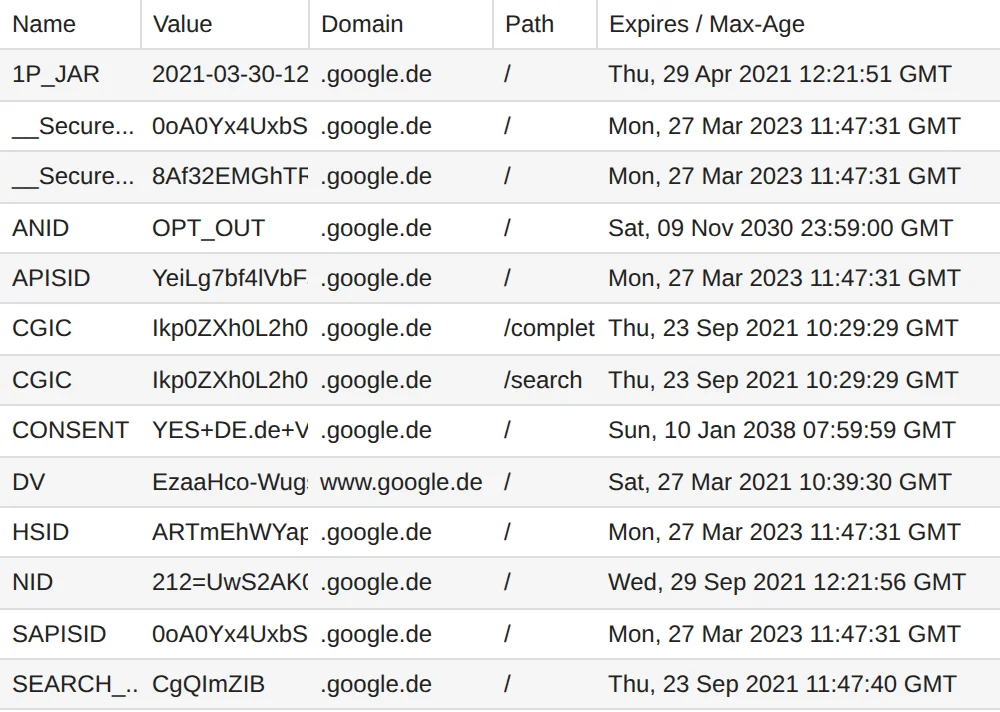
If you now visit a website that includes Google reCAPTCHA, roughly the following happens:
- Because you used the Google search engine, there is a cookie called NID in the domain google.com on your computer
- You now visit a website X
- The visited website X includes Google reCAPTCHA
- In the process, a file is retrieved from the domain google.com to provide Google reCAPTCHA
- When this file is retrieved, your browser automatically sends the cookie called NID, already present on your end device, to google.com
Obviously, the cookie called NID is no longer a first-party cookie, as it was when visiting the Google search engine. Rather, the former first-party cookie has now become a third-party cookie!
Definitions from a technical and a data protection perspective
Ultimately, the data protection view of cookies is more decisive for answering data protection questions, and the technical view is subordinate.
Technical definition of first-party and third-party cookies
From a technical perspective, a cookie is called first-party if its scope is a domain that matches the domain of the website currently being visited. Example:
- Website currently visited: dr-dsgvo.de
- If a cookie exists in the same domain, namely dr-dsgvo.de, it is a first-party cookie
I leave out details such as subdomains here, because they are irrelevant for explaining the basic principle.
A cookie that is not a first-party cookie is called a third-party cookie. A third-party cookie therefore has a scope that is a domain different from the domain of the website currently being visited. Second-party cookies are not considered, because they are not relevant from a data protection perspective. There is only the first and the third party. Processors are attributed to the first party.
That is how simple it is from a technical perspective.
Data protection definition of first-party and third-party cookies
From a data protection perspective, a first-party cookie is one that is processed only by the controller itself. The controller may use processors or the like.
A third-party cookie exists under data protection law when a cookie is processed by a third party. What a third party is, is explained by Art. 4 No. 10 GDPR:
'third party' means a natural or legal person, public authority, agency or body other than the data subject, controller, processor and persons who, under the direct authority of the controller or processor, are authorised to process personal data
Article 4 No. 10 GDPR
Special case of cookie use: Google Analytics
A prominent example of technical first-party cookies that are third-party cookies under data protection law is Google Analytics. If you visit a website that uses Google (Universal) Analytics (in the default configuration), the following happens:
- You visit website X
- The website includes Google (Universal) Analytics, the currently common version of this tool
- To do so, the website loads a JavaScript file from a Google server
- The JavaScript file now lives on the website, as if the Google JavaScript code were embedded directly in the website
- The Google JavaScript code creates several Google Analytics cookies
- These cookies are technical first-party cookies, because they are valid in the domain that matches that of the website currently being visited
- The Google JavaScript code also reads these cookies and sends their values to a Google server. From a data protection perspective, they are therefore third-party cookies from then on.
Why are cookies important?
Functional necessity
Functionally, cookies are important for storing user settings on websites, for example that a user is logged in. Cookies are also used to recognize a visitor who returns to a website a few days or weeks later.
If this recognition of visitors is done solely by the website operator, without involving third parties, it can be called audience measurement.
If the controller of the visited website uses a third party to track visitors, this is called tracking or web tracking. However, tracking can also exist when a website operator itself analyzes the behavior of its users in greater depth than could be justified by a legitimate interest.
Legal relevance
The ePrivacy Directive requires in Art. 5 (3) that consent must be obtained before information stored on the user's end device is accessed, if this process is not technically necessary. According to my investigation, currently only cookies fall into this category when visiting websites (at least from a PC).
However, § 15 (3) TMG provides something different, because the legislator failed to meet its obligation to transpose the ePrivacy Directive into German law. The TMG requires an option to object (so-called opt-out) for data collection for marketing purposes and for creating user profiles.
The BGH decided on 28 May 2020 – I ZR 7/16 that the TMG must be interpreted in line with the ePrivacy Directive. Thus, technically unnecessary cookies also require consent in Germany.
What is the problem with cookie banners?
So-called consent tools or cookie popups or cookie tools, or whatever you wish to call them, cannot work reliably in practice and do not. I have investigated this extensively. Just this much in brief here:
- The TMG also prescribes an option to object for processes other than cookies. Example: an embedded YouTube video without cookies that also loads DoubleClick.
- For data transfers to insecure third countries such as the USA, consent must be demonstrated under Art. 44 GDPR. Examples: Vimeo videos, SoundCloud audio player and probably all Google tools.
- For avoidable data transfers, consent must be obtained under Art. 5 (1) (c) GDPR. Example: external Google Fonts.
- For many tools, several of these conditions for consent apply at the same time.
- The purposes of cookies are initially known only to the publisher of services that create and use cookies. If the publisher does not reveal any details about the purposes of the cookies used, the purpose is unknown to third parties and thus cannot be explained in a legally compliant way. Example of a lack of transparency: Google tools such as Google reCAPTCHA.
- Cookie scanners cannot possibly detect all cookies that come into play on a website. Cookies are stored on the user's end device. Each user has different cookies, depending on which other websites the user visited before visiting the current website. The problem becomes particularly clear here: you can create cookies on your own computer using freely available means, and these are then picked up when a website is retrieved. Obviously, nobody but you can know that these cookies exist. This example is purely theoretical and is only meant to show the basic problem.
- The texts and explanations delivered with cookie tools are, in my experience and assessment, on the whole a big pile of bullshit. Unfortunately, this does not seem to bother millions of website operators, because they uncritically embed this mountain of bullshit, for which they are responsible, on their websites.
- Blocking data transfers that would otherwise take place through a so-called consent script does not work reliably. Anyone who tries this deserves the Bullshit Award of the year.
- Providers of cookie tools like to conceal the problems with their so-called solutions.
Further information on consent tools
- Large practical test of consent tools
- Five reasons why cookie popups cannot work
- Checklist for consent requests
- Excursion: Google Tag Manager is not a cookie-free domain
What is the solution?
Do not use cookie tools from popular providers. They are apparently unsuitable for obtaining legally compliant websites (see my investigations mentioned above and the practical test). I consider all the better-known cookie tools to be failures and can prove this with concrete cases.
Remove all services you no longer need and that are only there because someone else talked you into believing you need them. Examples: Google Maps, Google Analytics.
Replace services that are hostile to privacy with privacy-friendly versions. Examples: Matomo instead of Google Analytics, my interactive map instead of Google Maps.
Use your own consent tool or the open source solution Klaro! Use a checklist to design the requirements for a consent request as well as possible.
Run a quick test of your website to get a first idea of where you stand on data protection.
My assumption: 90% of all German websites do not need an annoying cookie popup, because data processing that requires consent can be avoided entirely.
Key takeaways of this article
Cookies are data records that websites store on your computer when you visit a page.
Websites can store cookies on your computer to save information about your visits and reuse it on your next visit.
Cookies can be set by different websites, and when you visit a website that uses services from other websites, a cookie originally set by another website can suddenly be managed by a different website.
Technically, cookies placed on the same website as the visited page are first-party cookies. From a data protection perspective, however, they are third-party cookies if they are processed by another company such as Google.
Cookies are important for websites to function, but they can also be used to track users. That is why website operators must ask users before using cookies that are not strictly necessary for the site to function.
Most websites do not need cookie popups, because you can avoid data processing that actually requires consent.
 My name is Klaus Meffert. I have a doctorate in computer science and have been working professionally and practically with information technology for over 30 years. I also work as an expert in IT & data protection. I achieve my results by looking at technology and law. This seems absolutely essential to me when it comes to digital data protection. My company, IT Logic GmbH, also offers consulting and development of optimized and secure AI solutions.
