


Which information is stored in a user's terminal equipment, and which is not? This question matters when you assess whether consent is required for services such as Google (Universal) Analytics, Google Maps or Google reCAPTCHA. In Germany, the ePrivacy Directive was implemented by the TTDSG.

The term GDPRmageddon is derived from GDPR and Armageddon.
The ePrivacy Directive focuses in particular on information stored in the user's terminal equipment. See Art. 5 of the directive, which first appeared under the number 2002/58/EC and was later updated under the number 2009/136/EC.
Article 5(3) of the directive states:
Member States shall ensure that the storage of information, or the gaining of access to information already stored, in the terminal equipment of a subscriber or user is only allowed on condition that the subscriber or user concerned has given his or her consent, having been provided with clear and comprehensive information, in accordance with Directive 95/46/EC, inter alia, about the purposes of the processing. This shall not prevent any technical storage or access for the sole purpose of carrying out the transmission of a communication over an electronic communications network, or as strictly necessary in order to provide an information society service explicitly requested by the subscriber or user.
Source: Art. 5(3) Directive 2009/136/EC
Directive 95/46/EC, referred to there, was replaced by the GDPR on 25 May 2018. The German Federal Court of Justice (BGH) found that Art. 5(3) of the directive applies to Germany and required that § 15(3) TMG be interpreted in conformity with the directive. § 25 TTDSG explicitly introduced the provision in Germany in December 2021. In 2024, the TTDSG was renamed TDDDG.
The ePrivacy Directive is often called the Cookie Directive. This is misleading, to say the least.
In the original version of the ePrivacy Directive, 2002/58/EC, the term cookie appears five times, and only within recital 25. This applies to both the English and the German text of the directive.
In the updated version of the directive, 2009/136/EC, the term cookie appears only once, in a parenthetical insertion. Again, this applies to both the English and the German text of the directive.
As will be shown later, the directive applies in essential parts to any data, regardless of whether it is personal data or not.
Cookie basics
Cookies are a kind of data container. If you want to know more, you will find background information on cookies in my Bullshit Basics post. The key point: cookies are not text files, but data records.
Cookies are bound to a domain. A domain is, for example, my-website-abc.com.
Cookies can be created in the domain of the website currently being visited, either by the website itself or by any JavaScript file loaded by the website (often just called a script)! This type of cookie is called a first-party cookie.
Files from a third-party server – these can be any kind of data, not necessarily JavaScript files – can additionally (!) create cookies in the third-party domain. This type of cookie is called a third-party cookie.
Being able to create a cookie automatically means being able to read it, change its value or delete it.
The following figure illustrates the data transfers that inevitably take place when a user visits a website that embeds a tool such as Google Maps or Google Analytics, or an image from Wikipedia:
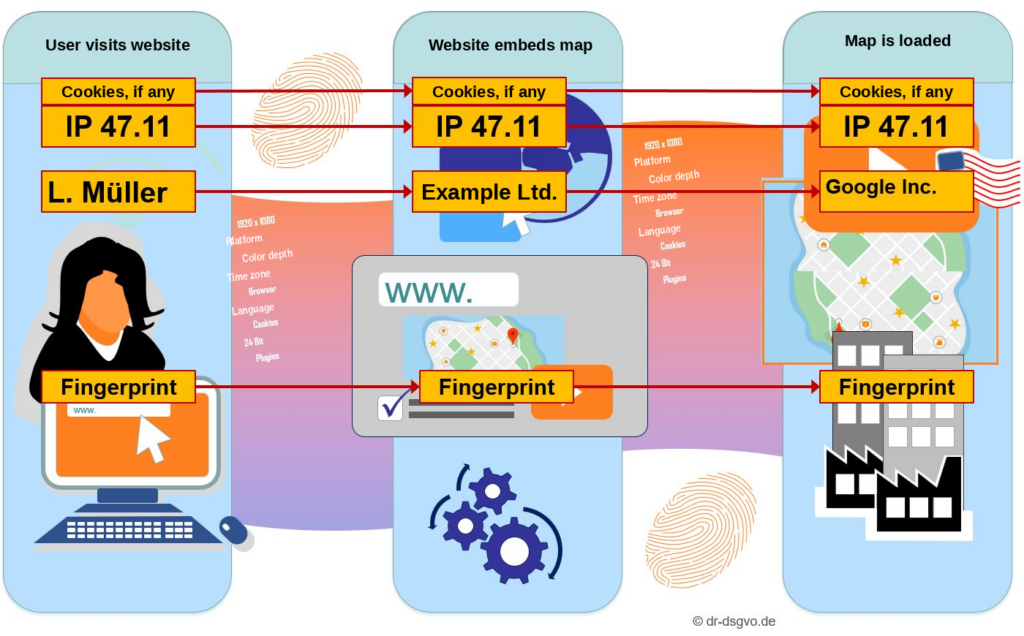
The data exchange shown here is dictated by the Internet Protocol (IP) as part of TCP/IP. So the following happens:
- The user's IP address and browser fingerprint are transmitted to the website being visited.
- The user's IP address and browser fingerprint are transmitted to the server from which the visited website loads Google Maps.
- All cookies that already exist (even before the loading process!) in the domain from which the map is loaded (for example google.com) are transmitted to the server from which the map is loaded.
- The cookies are sent back to the user's browser. Changes made to the cookies by the embedded map are applied.
From the point of view of the person responsible for a website, cookies can get out of control. Here is a prominent example with two scenarios. It concerns the cookie named NID, which some Google services use to identify and track a user. The following example refers to Google reCAPTCHA – it applies equally to Google Maps!
Scenario 1: The NID cookie does not exist yet
- A website loads Google reCAPTCHA from the domain google.com (among other domains).
- The NID cookie does not exist, so it is not transmitted to Google reCAPTCHA and is not created by Google reCAPTCHA either.
- There is no problem with the NID cookie, because it does not exist.
Scenario 2: The NID cookie exists because the user visiting a website previously logged in to their Google account on google.com (or google.de):
- The website loads Google reCAPTCHA from the domain google.com
- The NID cookie already exists (before Google reCAPTCHA is loaded) and is therefore necessarily transmitted to Google reCAPTCHA because of the Internet Protocol
- This creates a data protection problem because of the third-party cookie named NID
What is interesting here:
Google reCAPTCHA and Google Maps do not even have to create a cookie themselves to produce a data protection problem! It is enough for these tools to load files from a domain that is used by another tool (worldwide, on at least one website) that creates a cookie in the domain in question.
As of: 15 January 2021.
Of course, the person responsible for a website does not know whether a visitor was logged in to their Google account before visiting the site. But because it is possible (and, by the way, happens often), the website operator must assume that the NID cookie is relevant. Scenario 2 must inevitably be accepted as a given.
If two different websites use the same tool, such as Google Analytics, and this tool uses third-party cookies, data can be exchanged between these two different websites. However, only the embedded tool has access to this cookie data, not the two websites themselves. This was just a purely illustrative example.
Since 2020, Google (Universal) Analytics has used first-party cookies. First party is a term that can only be meant in a technical sense here. From a data protection perspective, Google Analytics creates the first-party cookie on the first visit and reads it on subsequent visits in order to send the value read from the cookie to a Google server. This can easily be proven.
Configurations of Google Analytics without cookies must be assessed differently. However it is configured, the tool can only be used lawfully with consent.
How does the browser manage cookies?
In almost every privacy policy you read that a cookie is a text file. This is bullshit.
Here is the proof, showing how the popular Mozilla Firefox browser manages cookies.
Firefox stores cookies in a database. You can find the location of the cookie database like this:
- Start Firefox
- Enter the following text in Firefox's address bar:
about:support - Open the profile folder shown on the screen
- In this folder there is a file called cookies.sqlite, which contains all the cookies stored on the user's terminal equipment for the browser. This file is called the cookie database. The file extension sqlite shows that the database uses SQLite. It is a lightweight file-based database.
The contents of this cookie database can be viewed with the free tool DB Browser for SQLite:
Start the tool and open the file cookies.sqlite described above by clicking "Open database" and then selecting the file. You should make a copy of the file beforehand. Click the "Browse Data" tab to see all the cookies and their values managed by the browser.
As you can see, a cookie does not consist of a text file. Instead, there is a single file in which all cookies are stored together. I examined this in more detail in a Bullshit Basics article.
Web Storage
Web Storage is also called a super cookie, because it can store much more data per record than ordinary cookies. Compared to cookies, Web Storage acts exclusively like a first-party cookie.
Firefox stores information about this in the database file webappsstore.sqlite. See also https://en.wikipedia.org/wiki/Web_storage for details.
Here is one of the 24 records currently stored in this database on my terminal equipment:

I changed only the value entries for the screenshot, for data protection reasons. The value column contains my own IP address. It is 22.33.44.55.
In this case, the IP address was stored. In other records, no IP address was stored, but other data. Funnily enough, the columns originalKey and scope contain the actual values in reverse order. So moc.sysofni.www.:https stands for https:.www.infosys.com.
In Firefox, you can see these Web Storage values as follows:
- Open a website that stores the user's IP address in Web Storage (such as https://www.infosys.com)
- If necessary, wait a few seconds
- Press F12 to open the developer tools in Firefox
- Click the Storage tab
- Click the Local Storage node. There you will see:
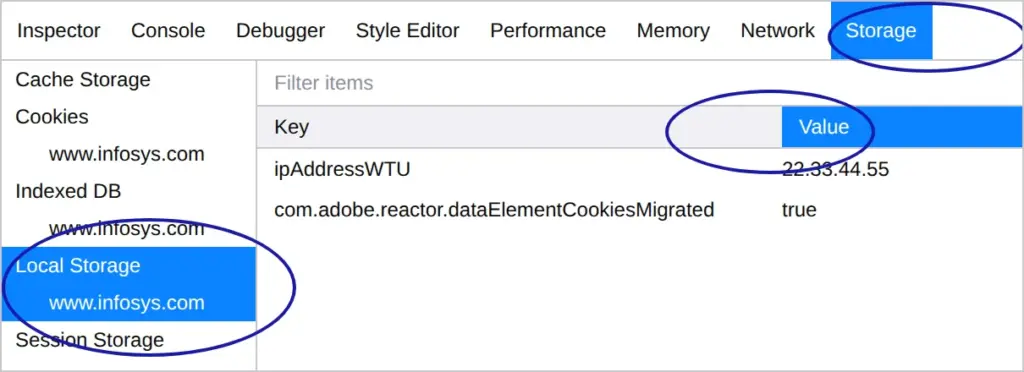
As before, I replaced the real value with a dummy value. The value 22.33.44.55 represents my IP address!
The wow effect of the ePrivacy Directive
The ePrivacy Directive refers in particular to data stored in the user's terminal equipment. See Article 5(3) of the directive.
The passage states that consent is required if all of the following points apply together:
- Data is stored in the user's terminal equipment
- This data is accessed
- The data is used for purposes that are not strictly necessary to provide the website
Take the example of Google (Universal) Analytics in its current default configuration. Google Analytics uses first-party cookies. From this we can establish the following – and prove it (which I am not doing here, but can do at any time):
- Google Analytics creates cookies on the first visit: data is stored in the user's terminal equipment. It would also be sufficient if another service created these cookies.
- On subsequent visits, Google Analytics reads these cookies: this data is accessed.
- Google Analytics can also be configured to run without cookies: so the cookie data is not strictly necessary.
Legal conclusion:
Obviously, it makes no difference whether first-party or third-party cookies are used. See the explanations in Art. 5 of the ePrivacy Directive.
It also makes no difference whether personal or other data is collected. See the ECJ judgment of 1 October 2019 (case C-673/17, "Planet49"), e.g. para. 82.
Obviously, the ePrivacy Directive applies to Germany. See, for example, letter b on the first page of the BGH judgment of 28 May 2020 – I ZR 7/16. From December 2021, § 25 TTDSG applies.
Conclusion: Consent is required for Google Analytics if cookies are used.
For the same reasons, a consent requirement applies to
- Google Maps
- Google reCAPTCHA
- Embedded YouTube videos with cookies (without cookies too, but for other reasons)
For Google Analytics without cookies, consent is likewise required for other reasons. Please note that Google itself has admitted that all Analytics data is always processed in the USA.
What about fingerprints?
A fingerprint is a digital fingerprint of a user's terminal equipment. With such a fingerprint, users can be recognized even without cookies and without using the user's IP address. People often speak of a device fingerprint or browser fingerprint.
Fingerprinting reads out metrics of the browser and terminal equipment the user is using. These include characteristics of the screen, such as resolution or color depth, but also the time zone, the operating system or the browser in use.
To create a digital fingerprint, the metrics mentioned are read out of the user's terminal equipment. However, these metrics are not stored in the user's terminal equipment (within the meaning of the ePrivacy Directive). Rather, they are data that can be queried at any time and are anchored in the hardware or software, depending on the attribute. No access to a fixed storage in the terminal equipment takes place here.
The network address of a terminal device is not stored in the terminal device.
This refers to storage within the meaning of the ePrivacy Directive or of § 25 TTDSG.
The same applies to the IP address, which is not stored in the user's terminal equipment but is managed by the access point to the internet (usually a router, a FRITZ!Box or similar). A monitor does not have a fixed number of colors either, because this can be set at the operating system level.
To that extent, fingerprinting does not fall under the protection of the ePrivacy Directive, but possibly under that of § 15(3) TMG.
According to some available studies, fingerprinting can uniquely identify users with a probability of over 90%.
Key takeaways of this post
Without consent, information in a user's terminal equipment may not be stored or accessed, unless it is necessary for communication or the user has explicitly requested it.
Cookies are files that websites store on your computer. They can be created by the visited site itself or by external servers such as Google.
Google reCAPTCHA sets a cookie when a website is visited, which stores data about the user. If that site uses other Google tools (such as Google Analytics), the information collected can be shared between different websites, even if the user is not logged in.
 My name is Klaus Meffert. I have a doctorate in computer science and have been working professionally and practically with information technology for over 30 years. I also work as an expert in IT & data protection. I achieve my results by looking at technology and law. This seems absolutely essential to me when it comes to digital data protection. My company, IT Logic GmbH, also offers consulting and development of optimized and secure AI solutions.
