



WordPress makes it easy to build websites. To end up with a GDPR compliant WordPress website, however, a few points need attention.
This article shows what to look out for with WordPress sites. The most important points are:
- Basic configuration: Must definitely be adjusted
- Design theme: Affects the look and the basic functions of the website
- Privacy policy
- Link to the privacy policy
- Forms and newsletters
- Plugins: Not everything that is useful should be used
Choosing a GDPR compliant WordPress theme
A WordPress theme controls the general look and the basic functions of the website.
You should definitely choose a theme (design theme) that either does not load any third-party libraries or fonts from Google servers, or lets you switch off such embedding in its configuration.
I recommend running a website check. Many swear by Webkoll. I do not think much of this tool, because it delivers cluttered, highly technical results and is not driven by subject-matter expertise. In my initial assessment, the tool does not perform a complete analysis of websites but only provides partial results. On request, I am happy to name other free options.
With the so-called developer console of Firefox or other browsers, you can see directly whether files are loaded from third parties. To do this, start Firefox and press F12. The developer console opens. Go to the Network tab. Then open the website. I recommend sorting by host name. To do so, click on the column of the same name. A typical result looks like this:
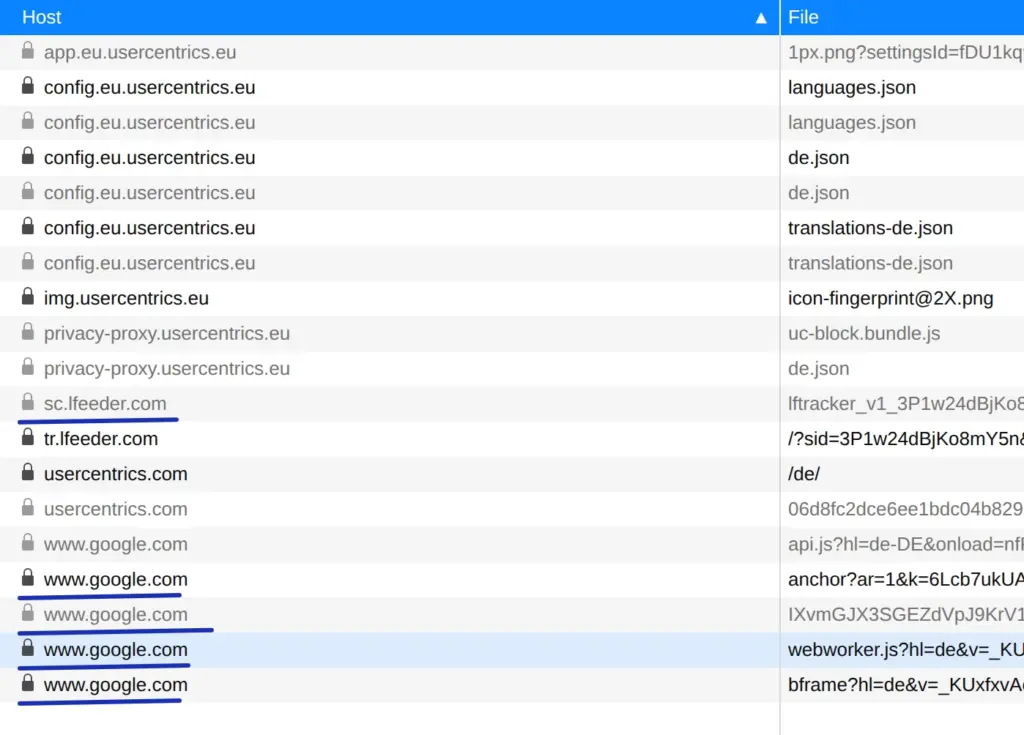
All entries marked in blue are critical. In my clear opinion, the site operator is not complying with data protection rules here, because the file api.js is retrieved from google.com without consent and numerous non-functional cookies are transmitted when the file is retrieved.
Anyone with some knowledge of WordPress programming and a little time to spare can deactivate critical loading operations in the theme themselves. To do this, go to the Theme Editor and search for the loaded tools:
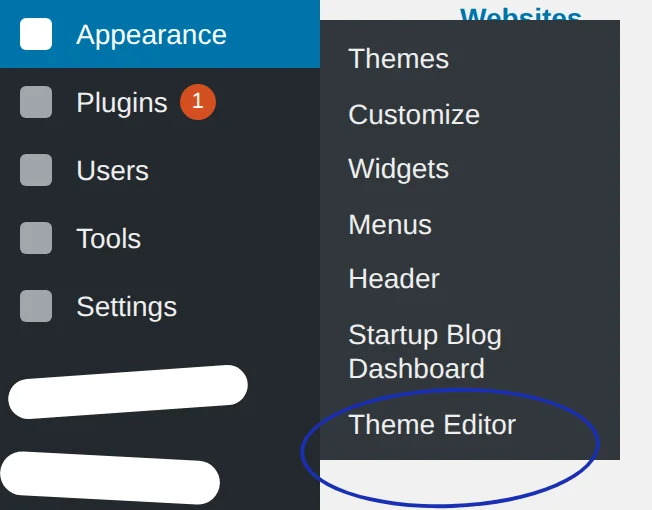
You can then view every file of the theme. Only the tech-savvy privacy advocate will succeed here.
Creating a privacy policy
Of course, a privacy policy must be created or adapted. If you do everything right, hardly anything needs to be explained for WordPress.
WordPress usually only uses session cookies, unless a user logs in. These probably do not need to be declared. If you want to do so anyway, feel free to take a look at my privacy policy.
Linking the privacy policy
In the Settings -> Discussion menu, link the page containing the privacy policy:
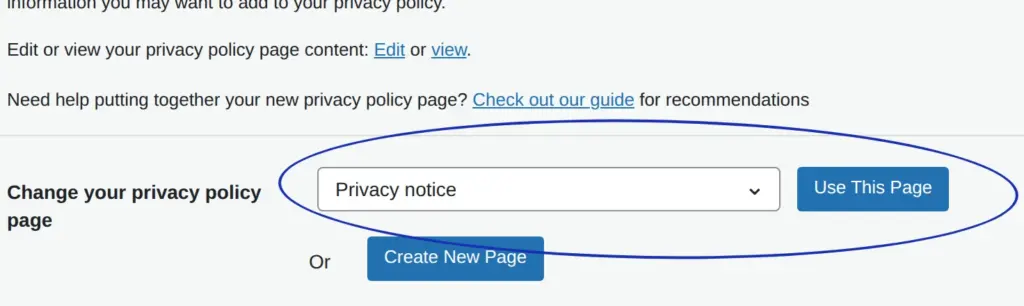
The effect is that the link to the privacy notice is automatically added to the WordPress login page for administrators and editors. Only the link to the legal notice (imprint) is then still missing there. The talented programmer or webmaster has to take care of that themselves …
Insert the following code into the functions.php file of the active theme to get the important links on the WordPress login page.
add_action('login_footer', 'dr_dsgvo_addition_to_login_footer');
 function dr_dsgvo_addition_to_login_footer() {
   echo '<a href="/impressum/">Impressum</a> | <a href="/datenschutz/">Datenschutzerklärung</a>';
 }
The links must of course be adjusted! You should definitely check them after installing the code. If you decide to go the code route, you should not set up the link to the privacy policy page mentioned above.
Linking the privacy policy and legal notice
These important links must be present on every single page of the website.
The links must be reachable with no more than two clicks on every page and on every device. This also applies if a so-called hamburger menu (three horizontal lines) is used on smartphones.
In addition, the links must not be covered by pop-ups.
Disabling avatars
In the Settings -> Discussion menu, be sure to disable avatars:
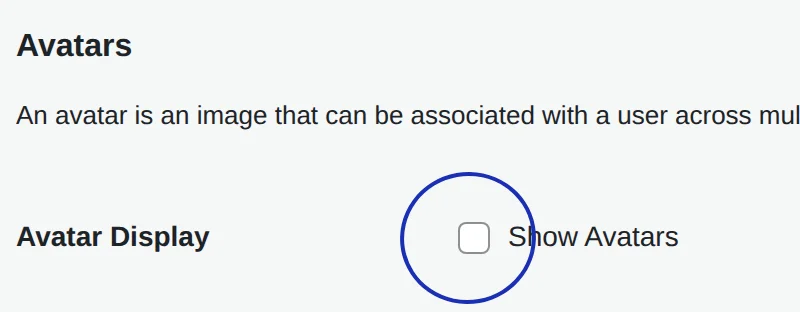
If avatars are enabled, the Gravatar tracker is loaded, which would require consent that cannot be requested at all. An article in Der Spiegel described data protection problems in connection with Gravatar .
Configuring comments
In the WordPress dashboard, under Settings -> Discussion, disable the other comment settings as follows:
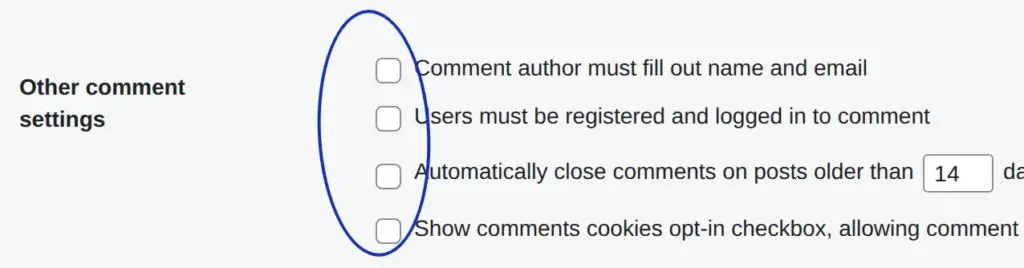
The third box does not have to be unchecked. For the screenshot, there was no other way.
WP Ajaxify Comments
By default, WordPress displays a new page when form input is incorrect. The link to the privacy policy is missing on this page. Usability also leaves a lot to be desired. I therefore strongly recommend using the plugin WP Ajaxify Comments.
The plugin shows error messages directly on the page, as WordPress should actually do by default.
SSL certificate
This is not a WordPress topic, but it always matters if there is a contact form, a newsletter or a comment field. In that case, an SSL certificate should be used so that the website can be reached via a secure https connection. You can order such a certificate from your hosting provider. Good providers offer these certificates free of charge, for example ALL-INKL.
Also make sure that a redirect from http to https is set up. Likewise, the redirect from https://xyz.de to https://www.xyz.de should work (or the other way round, depending on which is the main domain of the website).
Protecting the admin page
Not strictly necessary, but advisable because of Section 25 TTDSG, is protecting the WordPress login page against unauthorised access. The background is that calling up the page some-website4711.de/wp-admin sets a cookie named wordpress_test_cookie.
I therefore recommend protecting access to this page with a server-side password. This can be done either by creating a .htaccess file in the wp-admin directory of your WordPress installation via FTP access. Or you use the WordPress plugin called htaccess protect. After activating it, create a new user in the plugin settings and enable the following options:
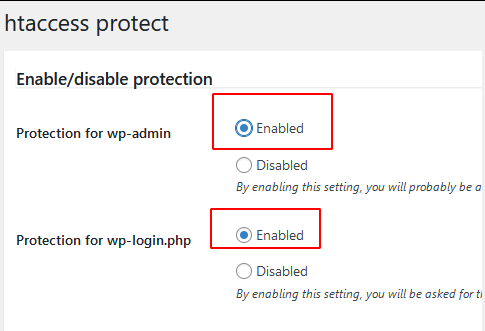
From now on, whenever you open your login page, a pop-up will ask you for a user name and password. Only after entering the correct credentials will the WordPress login screen appear.
Newsletter
Here are the key points in brief; more on GDPR compliant newsletters in a separate article.
- Sign-up form: Ask only for the data that is strictly necessary and make further data optional. Mention and link the privacy notice. Confirming the privacy policy is not strictly required, especially since it can be included in the opt-in email.
- Double opt-in: Have the email address confirmed. In the confirmation email or beforehand, point out the right to withdraw, i.e. that subscribers can unsubscribe from the newsletter again and how. As proof of confirmation, store the subscriber's IP address and use it only if someone claims not to have signed up. In the confirmation email, mention the privacy notice and state that it is accepted with the registration.
- Opt-out: Unsubscribe link in every newsletter email; alternatively: everyone has to subscribe by ordinary email and can unsubscribe the same way.
- Privacy policy: Briefly explain the process
- Newsletter emails: Include the legal notice and a link to the privacy policy
- Special pages: If the newsletter has special pages, such as a confirmation of unsubscription, make sure that the links to the legal notice and privacy policy are present on those pages.
Legal notice (imprint)
The general mandatory information and the information specific to the legal form must be present, as on any other website. Because of editorial content, the obligation to provide a legal notice also applies to most non-commercial websites.
Further information on the mandatory information and on emails and newsletters is summarised in a separate article.
Disabling notification emails for pingbacks
A pingback is a link from another website to your own WordPress site, or a ping via the so-called XML-RPC interface. However, WordPress also sends a notification email for internal links. So the long-suffering admin always gets an email whenever they link from one post to one of their own posts that has already been published.
These emails are not only annoying, they apparently cannot be switched off with standard means. With the following code, which needs to be inserted into functions.php of the WordPress theme in use, those annoying emails stop:
function drdsgvo_no_self_ping( &$links ) {
     $home = get_option( 'home' );
     foreach ( $links as $l => $link )
         if ( 0 === strpos( $link, $home ) )
             unset($links[$l]);
 }
 add_action( 'pre_ping', 'drdsgvo_no_self_ping' );
I took this code from an article by Jonas. He now has the chance to get a pingback from my site as well …
Tools & plugins
Individually used tools and WordPress plugins must of course be considered separately. The following points are particularly important:
- Is consent required?
- If consent is required: Good luck trying to get a legally compliant consent prompt. It does not work with the common tools (see Cookiegeddon). The consent checklist helps to take the important points into account. Nevertheless, there are five reasons why cookie blockers cannot work reliably. Among these reasons are some irrefutable facts
- Adapt the privacy policy
Key takeaways of this article
To make a WordPress website GDPR compliant, you should choose a theme that does not load any data from Google, and create a privacy policy.
To make the WordPress website compliant with data protection law, important links to the privacy notice and legal notice must be easily accessible on all pages.
 My name is Klaus Meffert. I have a doctorate in computer science and have been working professionally and practically with information technology for over 30 years. I also work as an expert in IT & data protection. I achieve my results by looking at technology and law. This seems absolutely essential to me when it comes to digital data protection. My company, IT Logic GmbH, also offers consulting and development of optimized and secure AI solutions.
