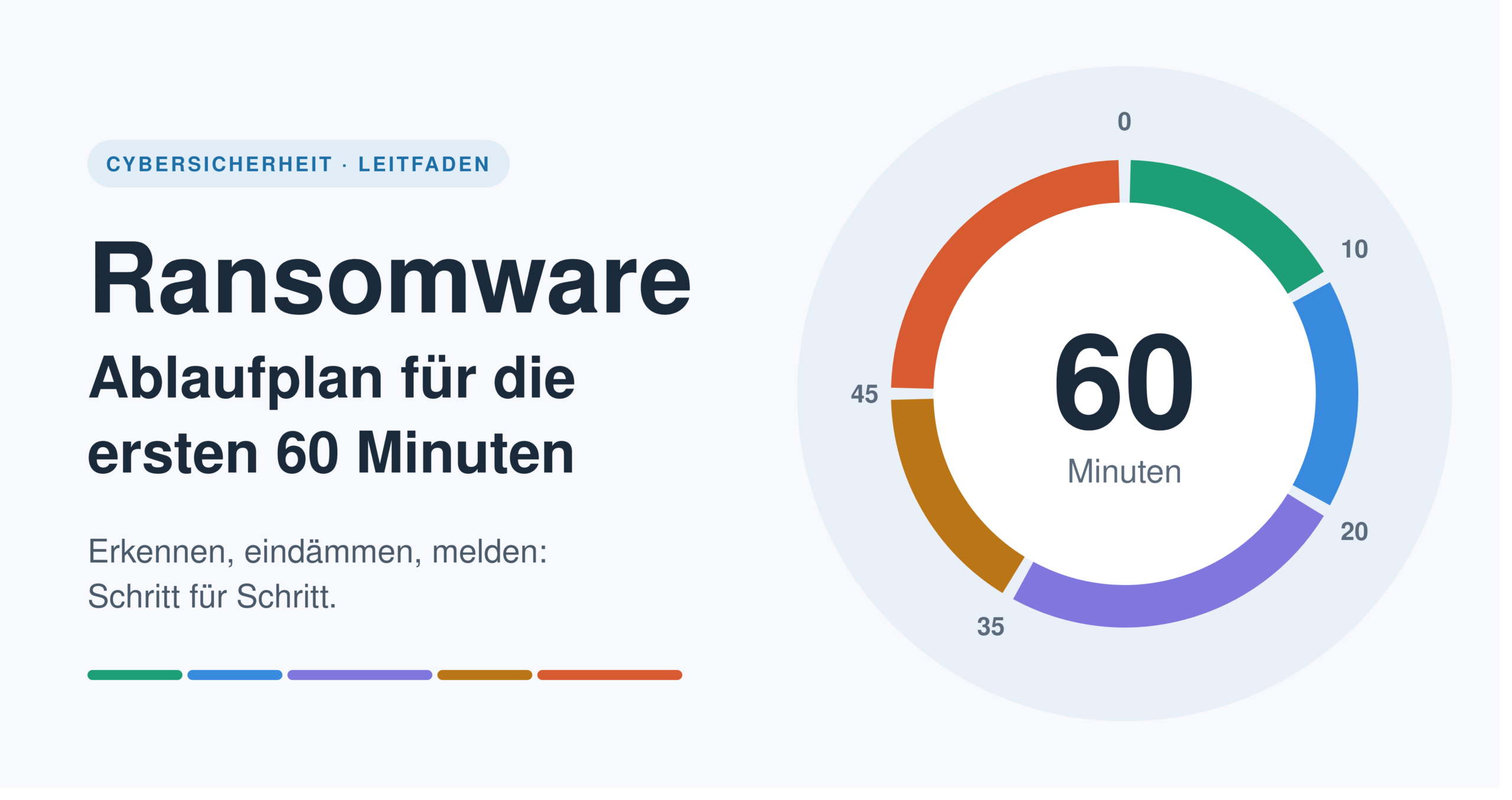


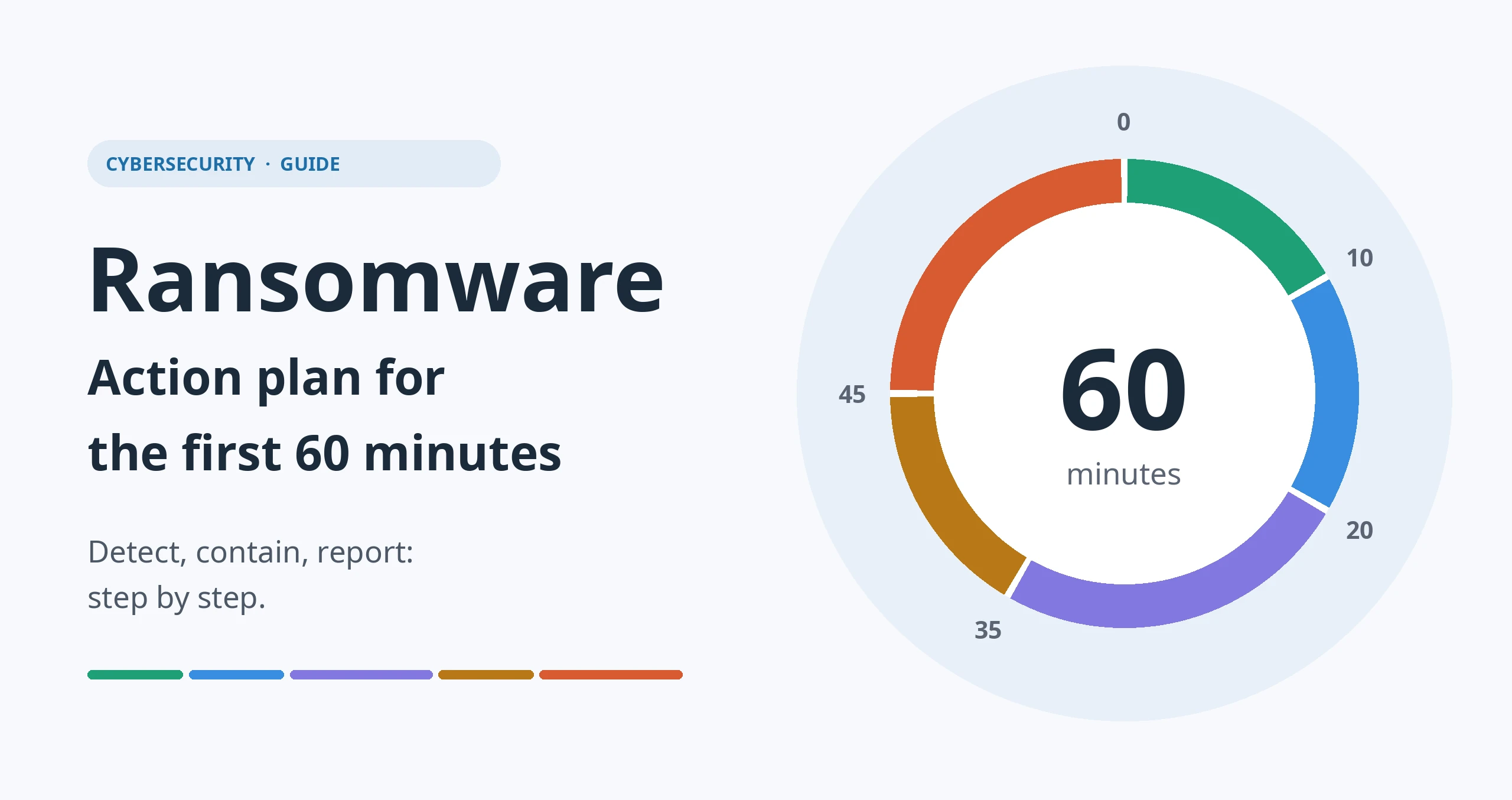
A hacker attack with extortion demands structured, well-thought-out and, above all, fast action. A guide to emergency measures that helps avoid mistakes and sets the course for a successful recovery in the first hour.
Key points at a glance
In a ransomware attack every minute counts, but speed alone is not enough. What matters is that the right steps happen in the right order: detect, contain, secure evidence, involve those responsible and only then recover. Those who act calmly and in a structured way during the first hour limit the damage considerably, protect important traces for the root cause analysis and can more easily meet later reporting and documentation obligations.
This article describes the first 60 minutes step by step. It can serve as a guide for an emergency. A checklist supports a structured approach.
What is ransomware?
Ransomware is malware that encrypts data and systems or blocks access to them. Websites can also be affected. The attackers then demand a ransom, usually in cryptocurrency, and promise a decryption key in return.
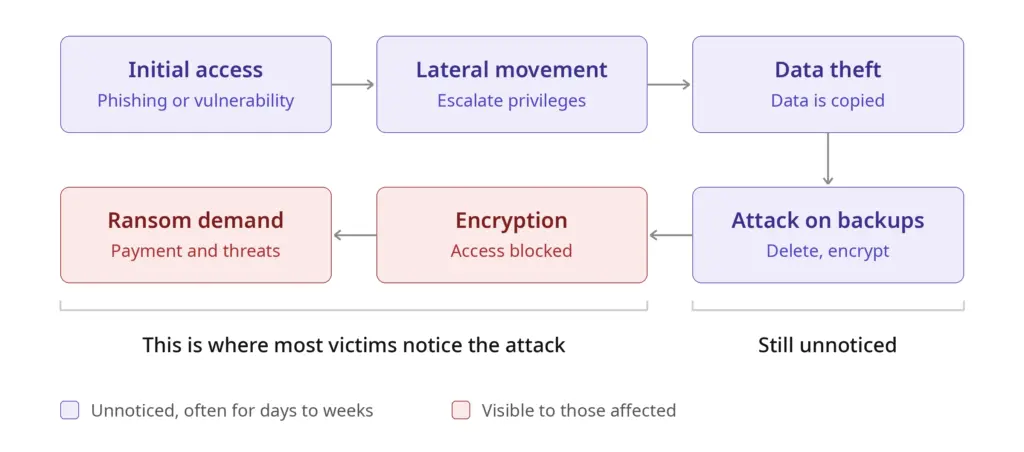
Modern attacks often go far beyond pure encryption:
- Double extortion: Data is copied before encryption. The perpetrators additionally threaten to publish or sell this data.
- Attacks on backups: Perpetrators specifically search for backups and delete or encrypt them so that recovery without payment becomes impossible.
- Long lead time: The attackers are often active in the network for days or weeks before the encryption becomes visible. They explore systems, extend their privileges and prepare for the moment of greatest damage.
This leads to an important insight: once the ransom demand becomes visible, the attack is usually already well advanced. Cleaning up a single computer is therefore not enough. It must be assumed that the entire network may be compromised.
The ground rules for an emergency
Before the actual schedule, four principles apply that hold across all phases:
- Stay calm, but act quickly. Hectic individual actions often cause more damage than the attack itself.
- Contain before cleaning up. First the spread must be stopped, then the clean-up follows.
- Preserve traces. Without evidence it is impossible to determine how the perpetrators got in. Then there is a risk that they will strike again immediately after the recovery.
- Document everything. Every measure goes into the log with the time and the person responsible. This supports the team, authorities, insurers and the later review.
Preparation: what should be ready before an attack
The best action plan loses its value if it is unclear in an emergency whom to contact. The following points should be clarified in advance, ideally printed out and available offline:
- Emergency contacts: Phone numbers of IT management, executive management, the data protection officer, the IT service provider, the incident response provider, the cyber insurer, legal counsel and the police.
- Emergency credentials: A secured location independent of the production network where important accounts and instructions are stored.
- Network diagram: An up-to-date overview of sites, segments, servers, firewalls and remote access points.
- System list with priorities: A definition of which systems are business-critical and in which order they should be brought back online.
- Alternative communication channels: If email and the phone system are affected, a fallback is needed, for example private mobile phones with a messenger group agreed in advance.
- Backup concept: At least one backup should be stored offline or immutable. It is crucial that recovery is tested regularly.
Roles in a crisis
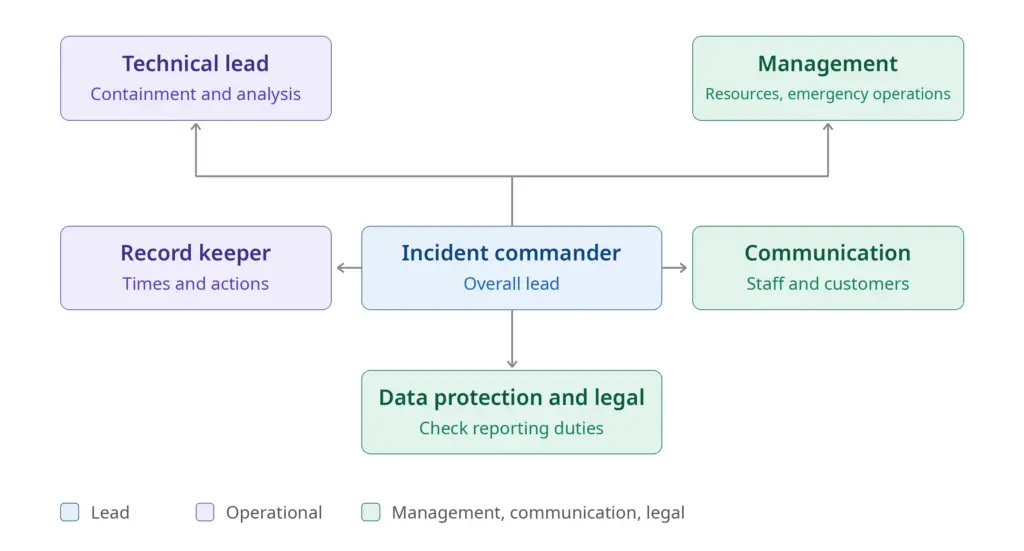
Even in small organisations it must be clear who makes which decisions. One person can take on several roles, but the roles themselves must be filled.
| Role | Task |
|---|---|
| Incident commander | Keeps the overview, makes decisions, assigns tasks |
| Technical lead | Coordinates containment, analysis and recovery |
| Record keeper | Documents times, observations and measures |
| Communication | Informs staff, customers, the press and partners |
| Data protection and legal | Checks reporting obligations and legal consequences |
| Executive management | Decides on resources, emergency operations and external help |
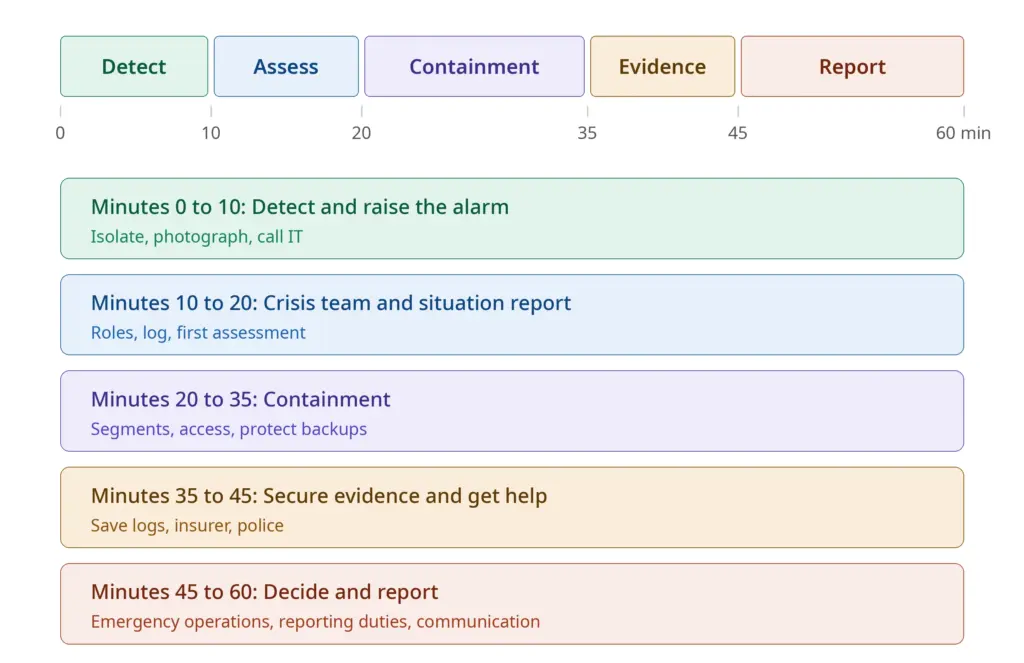
The ransomware action plan: the first 60 minutes
Minutes 0 to 10: detect and raise the alarm
Typical signs of an attack:
- A message on the screen demanding a ransom payment
- Files that can no longer be opened or have unusual extensions
- Servers or shares that are suddenly unreachable
- Simultaneous fault reports from several employees
- Mass alerts from the antivirus software or its deactivation
Immediate measures:
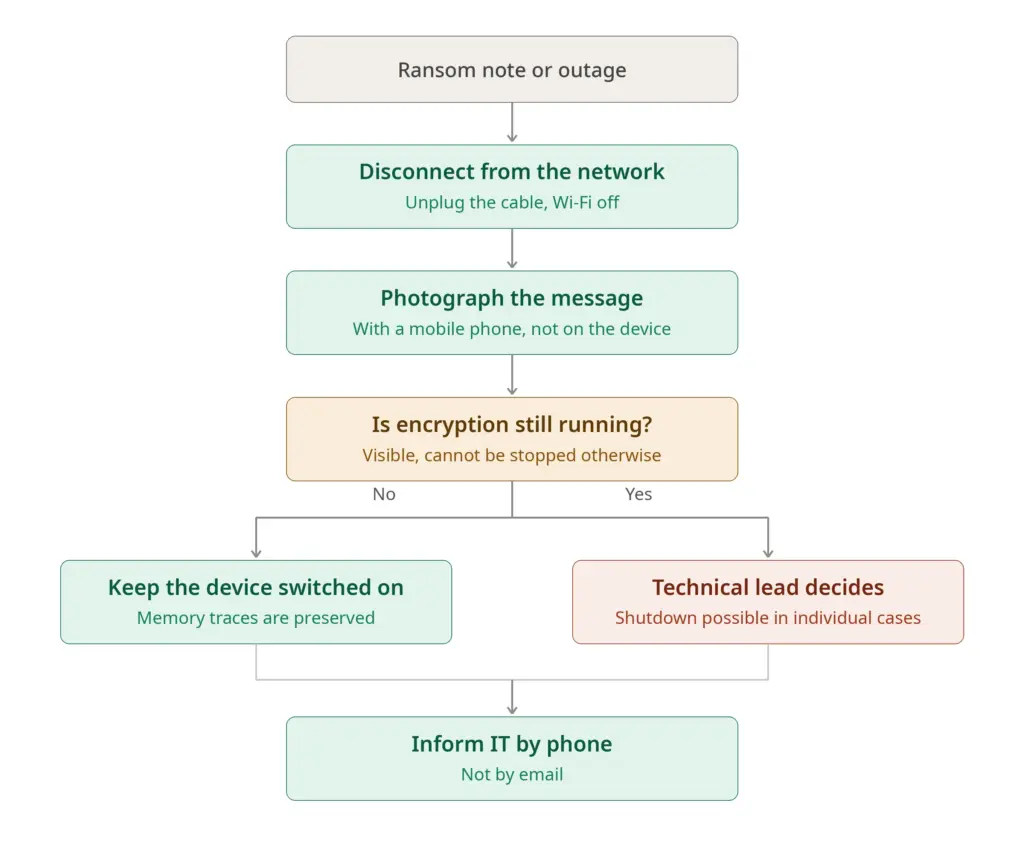
- Disconnect the affected device from the network. Unplug the network cable and switch off Wi-Fi and Bluetooth. This prevents the malware from spreading further.
- Do not shut down immediately. The memory often contains valuable traces, such as key material or clues about the perpetrators. The device stays switched on, but isolated. If the encryption is visibly still running and the device cannot be stopped in any other way, switching it off may make sense in individual cases. This decision is made by the technical lead, ideally after consulting experts.
- Photograph the ransom note. Use a mobile phone for this, not the affected computer. The note often contains clues about the malware family.
- Inform IT or the emergency number immediately. Do this by phone, not by email, because the mail system may be affected or monitored.
- Delete nothing, reinstall nothing.
By the end of this phase the incident commander should be appointed and the log should have been started.
Minutes 10 to 20: form the crisis team and assess the situation
In this phase a disruption turns into a structured response.
- Convene the crisis team. This is done by phone or via an independent channel agreed in advance.
- Keep a log. Record who observed what and when, which systems are affected and which measures have already been taken.
- Create an initial situation report. The key questions are:
- Which systems, sites and users are affected?
- Is the encryption still running?
- Are servers, backups or cloud services affected?
- Are there signs of data exfiltration?
- Make an assumption: Assume the worst at first. If one device is affected, the entire network may be compromised.
- Set a communication rule. Staff are briefly informed: do not use affected devices, do not switch them off, delete nothing, make no repair attempts of your own and send reports to one central point.
Minutes 20 to 35: containment
Now the goal is to take away the attackers' room for manoeuvre.
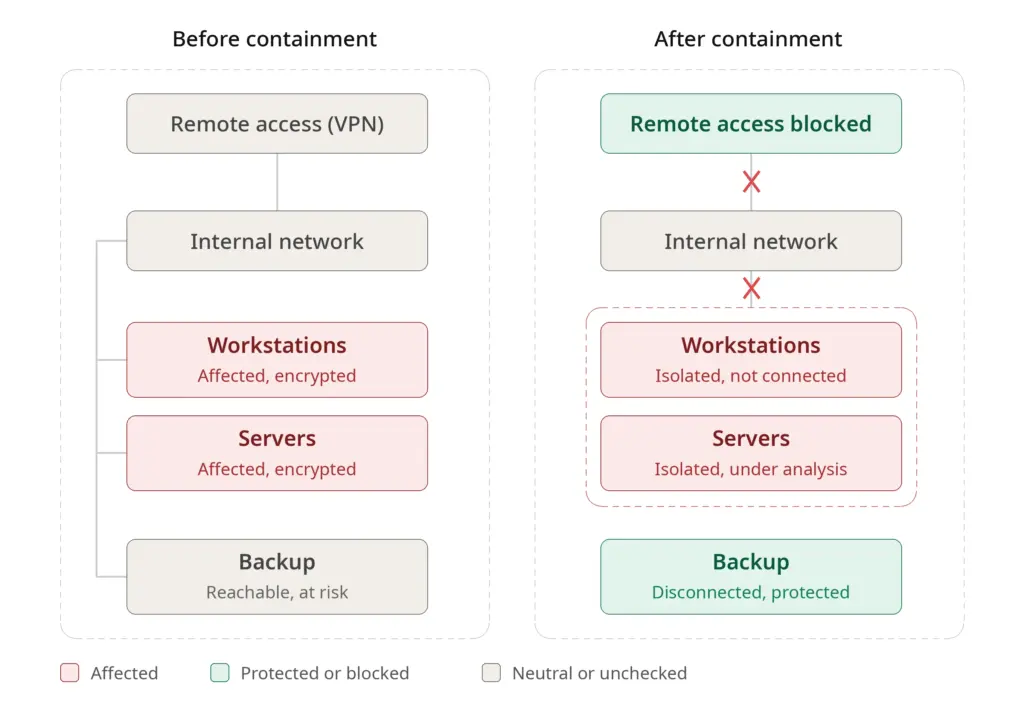
Network and access:
- Affected network segments are separated, for example by disabling switch ports or with firewall rules.
- Remote access such as VPN, remote desktop and service provider access is blocked.
- Connections between sites are cut if necessary.
- Internet access for critical systems is temporarily interrupted so that no more data flows out and no commands from the perpetrators get in.
Accounts and passwords:
- Compromised or suspicious user accounts are deactivated.
- Privileged accounts (domain administrators, service accounts) are secured and their passwords changed. This is done exclusively from a clean device that is verifiably not affected, because passwords could be intercepted on infected systems.
- Multi-factor authentication is checked and enforced wherever possible.
Protect backups:
- Backup systems are immediately disconnected from the network or access to them is blocked.
- Offline media are only connected once the environment is considered clean.
- Cloud synchronisation (such as OneDrive, Dropbox or network drives) is paused so that encrypted files do not overwrite the good versions.
Email:
- Check whether the attack started with a phishing email. Suspicious senders and attachments are blocked at the mail gateway.
It is important that each of these measures is logged. Some interventions, such as shutting down servers, have consequences for operations. Such decisions should be made deliberately by the incident commander and not left to chance.
Minutes 35 to 45: secure evidence and get outside help
Secure evidence:
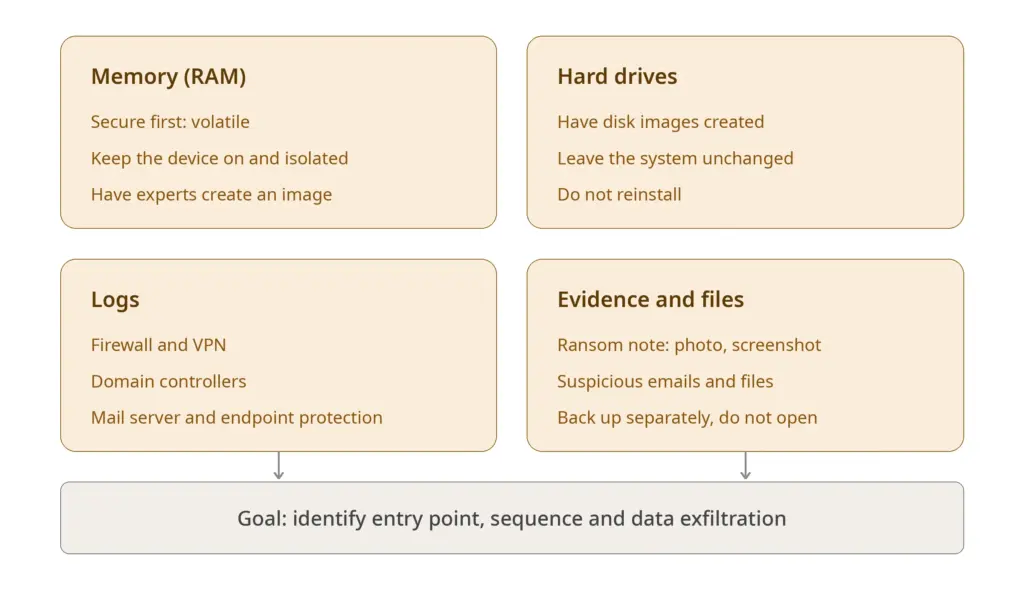
- Affected systems are left as unchanged as possible.
- If necessary, experts create images of hard drives and memory.
- Relevant log data is secured, for example from the firewall, VPN, domain controllers, mail server and endpoint protection.
- Screenshots and photos of messages are filed.
- Suspicious files, emails and ransom demands are saved separately.
This data is indispensable for the forensic analysis. It clarifies how the perpetrators got in, what they did and whether data was exfiltrated.
Bring in external support:
- Cyber insurance: Many policies include an emergency hotline and make benefits conditional on prompt notification. The terms should be checked early.
- Incident response provider: Specialised teams help with analysis, containment and recovery. They are often arranged through the insurer.
- IT service provider: The provider is informed, but its access is coordinated so that no traces are altered.
Involve the police:
Ransomware extortion is a criminal offence. In Germany, the Central Contact Points for Cybercrime (ZAC) of the State Criminal Police Offices are responsible for companies. A criminal complaint is not only important for prosecution, it is also frequently required by insurers.
Minutes 45 to 60: decide, report, communicate
In the last phase of the first hour the next steps are prepared.
Plan emergency operations:
- Which business processes must continue immediately?
- Are there manual alternatives, such as paper processes, telephone or mobile hotspots?
- Who informs customers and suppliers whose orders are affected?
Check reporting obligations:
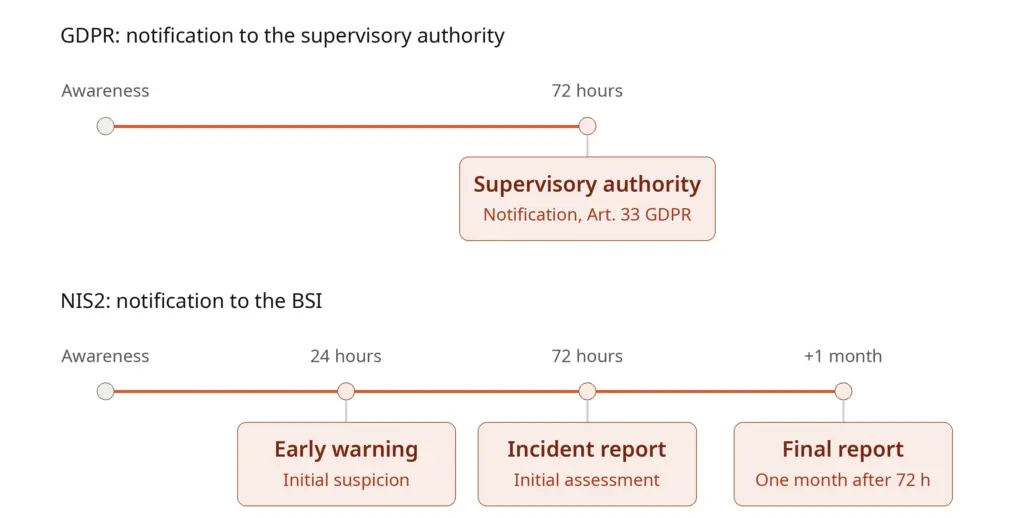
- Data protection (GDPR): If a personal data breach has occurred, it must generally be reported to the competent data protection supervisory authority within 72 hours of becoming aware of it, in accordance with Article 33 GDPR. If there is a high risk to the data subjects, they must also be informed in accordance with Article 34 GDPR. The 72 hours start from the moment the incident becomes known. The data protection officer should therefore be involved early.
- NIS2 and sector-specific requirements: If a company is one of the entities covered by the NIS2 rules, staggered reporting deadlines apply towards the BSI (the German Federal Office for Information Security). These comprise an early warning within 24 hours, a notification with an initial assessment within 72 hours and a final report after one month at the latest. Whether and to what extent these obligations apply should be checked in good time.
- Contracts: Customer and supplier contracts may contain their own notification obligations.
Internal and external communication:
- Staff are informed factually and concisely: what is known, what is not, and how employees should behave.
- It is decided who speaks to the outside world. Speculation should be avoided.
- A simple text for customers and partners is prepared so that a quick response is possible if needed.
Plan the next 24 hours:
- Who takes on which tasks in which shift?
- When is the next situation briefing?
- Which resources and decisions does executive management need?
What to avoid in the first hour
The following mistakes are particularly common in the heat of the moment:
- Paying the ransom immediately. There is no guarantee that the perpetrators will deliver or will not publish the data anyway. Payments finance further attacks. A decision on this does not belong in the first hour and should only be made with experts, legal advice and the authorities.
- Contacting the perpetrators. Communication should, if at all, only be handled by experienced negotiators.
- Rebuilding systems on your own initiative. This destroys evidence, and there is a risk that the perpetrators still have access.
- Restoring backups without thinking. They could already be infected or let the attackers back in.
- Using administrator accounts on infected devices. Credentials can be stolen.
- Deleting or overwriting logs. They are the key to the investigation.
- Giving the all-clear too early. As long as the cause has not been clarified, the risk remains.
- Concealing the incident. Both legally and for the trust of customers and employees, openness within the right framework is the better strategy.
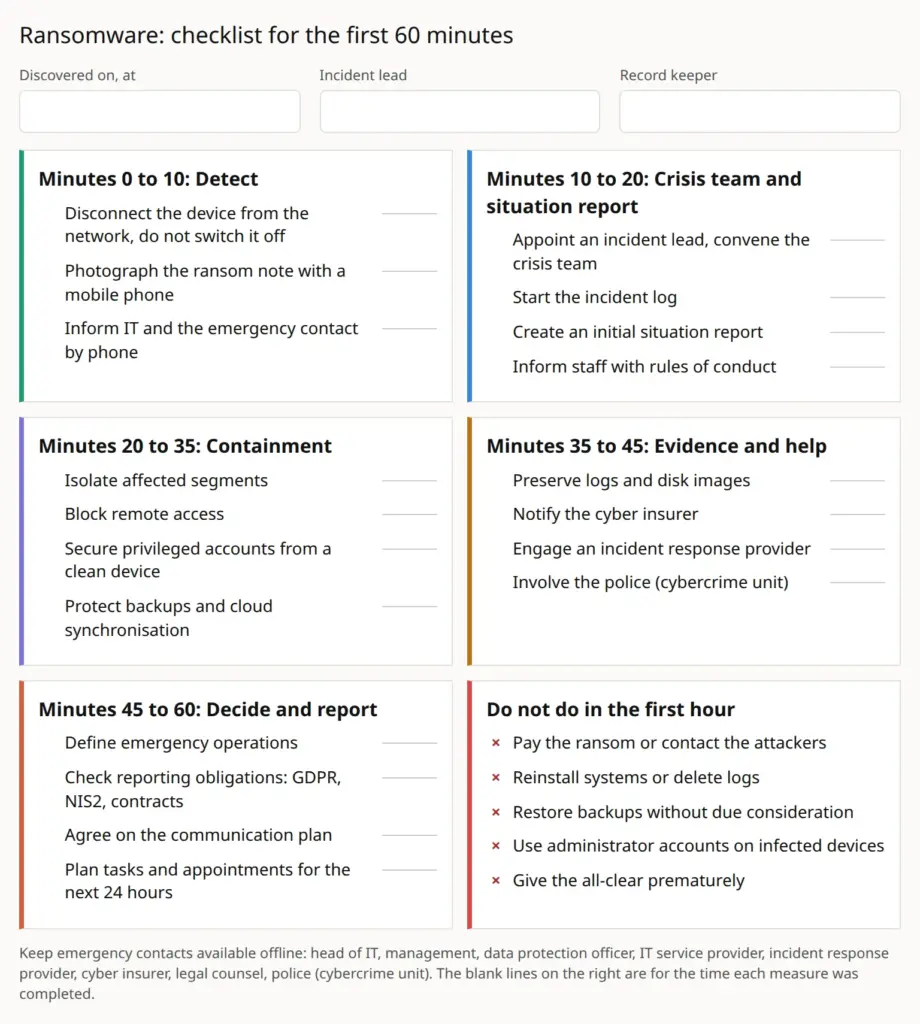
Checklist for the first 60 minutes
At the end of this article you will find a printable checklist.
Minutes 0 to 10
- Disconnect the device from the network, do not switch it off
- Photograph the ransom note
- Inform IT and the emergency contact by phone
Minutes 10 to 20
- Appoint the incident commander and convene the crisis team
- Start the log
- Create an initial situation report
- Inform staff about rules of conduct
Minutes 20 to 35
- Isolate affected segments
- Block remote access
- Secure privileged accounts
- Protect backups and cloud synchronisation
Minutes 35 to 45
- Secure logs and images
- Inform the cyber insurer
- Engage an incident response provider
- Involve the police (ZAC)
Minutes 45 to 60
- Define emergency operations
- Check reporting obligations (GDPR, NIS2, contracts)
- Agree on the communication plan
- Plan tasks and appointments for the next 24 hours
After the first hour: what comes next
The first 60 minutes are the starting signal, not the end. In the following hours and days these tasks are due:
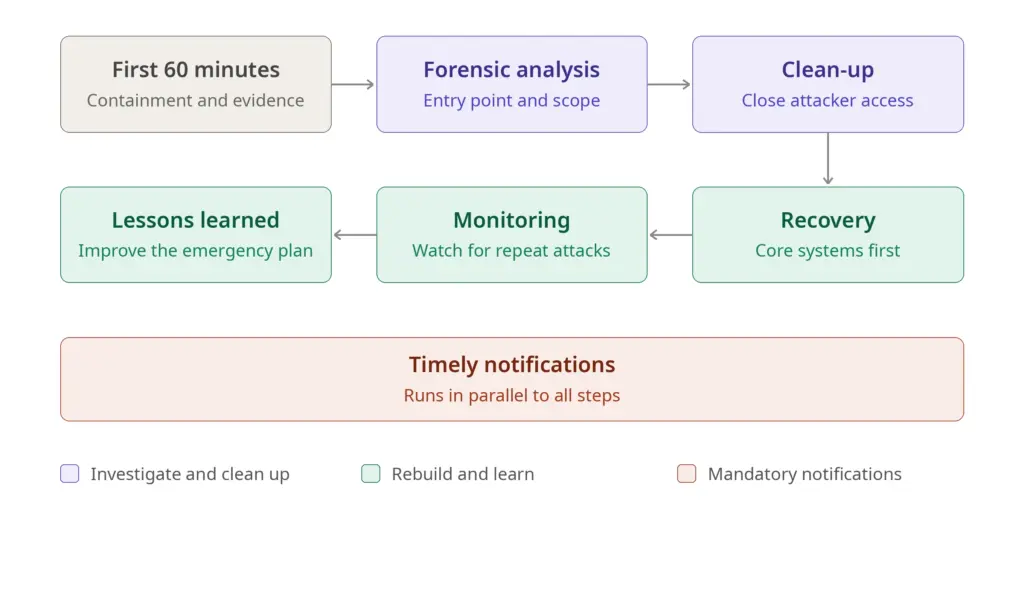
- Forensic analysis: The entry point, the spread and the extent of data exfiltration are clarified.
- Complete clean-up: All of the perpetrators' access paths are closed, compromised accounts and credentials are renewed and vulnerabilities are eliminated.
- Prioritised recovery: Core systems first, then the other services, each from verifiably clean backups and in a tested environment.
- Monitoring: After the recovery the systems are watched particularly closely, as repeat attacks are not uncommon.
- Timely notifications: Authorities, data subjects and contractual partners are informed in accordance with the legal requirements.
- Review: After the incident, what worked well and what needs to be improved is evaluated calmly. The emergency plan, training and technical safeguards are adjusted.
Prevention: how to reduce the risk
No protection is absolute, but some measures significantly reduce the likelihood and the consequences of an attack:
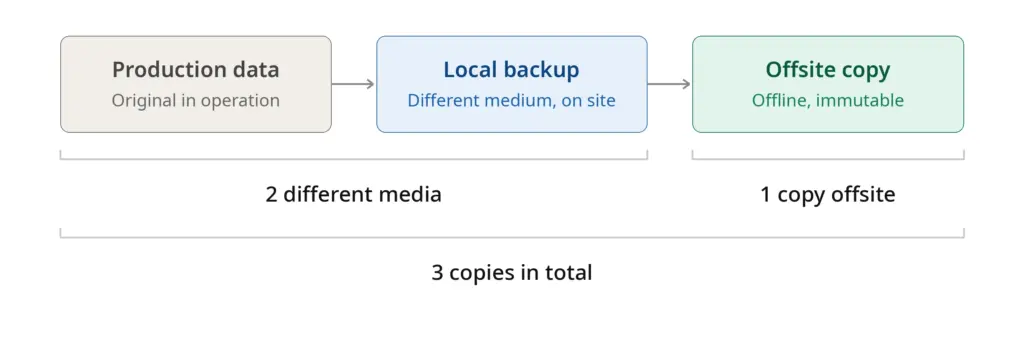
- Regular, tested backups following the 3-2-1 rule: three copies, on two different media, one of them offsite or offline
- Timely updates for operating systems, applications, firewalls and VPN gateways
- Multi-factor authentication for remote access, email and administrator accounts
- Least privilege: users only receive the access they actually need
- Network segmentation, so that an attack cannot spread unhindered
- Modern endpoint protection with detection of suspicious behaviour and central monitoring
- Employee training, especially on recognising phishing
- Emergency drills in which the procedure is rehearsed realistically
- A written emergency plan that is available offline and updated regularly
- Access control: Be be automated with AI
Frequently asked questions
Should the computer be switched off immediately? First, disconnect it from the network. Whether and when a device is switched off is decided by the technical lead. If in doubt, the device stays switched on and isolated so that volatile traces in memory are preserved.
Should the ransom be paid? This question does not belong in the first hour. Authorities generally advise against payments. If a payment is considered at all, it should only be made after careful consideration with experts, legal advice and, where applicable, the insurer. Even after a payment there is no guarantee that the data will be fully usable again.
Does the incident have to be reported? If personal data is affected, this is generally the case, namely within 72 hours to the data protection supervisory authority. Depending on the sector and company size, further obligations may apply, for example under NIS2. This should be clarified early with data protection and legal advisers.
Can the data be recovered without paying? This is often possible if clean and unaltered backups are available. Freely available decryption tools also exist for some malware. One place to start is the No More Ransom project. Expert advice is recommended.
How can you tell whether data was also stolen? This can usually only be determined by analysing logs and network traffic. Until proven otherwise, possible data exfiltration should be assumed.
Conclusion
A ransomware attack is a serious situation, but not a matter of fate. Preparation is decisive: those who know the roles, contacts and procedures can act prudently in the first 60 minutes instead of improvising. Isolate, do not switch off hastily, secure evidence, involve those responsible and experts, keep reporting obligations in mind and document everything: these principles form the foundation.
This guide is suitable as a template for an organisation's own emergency plan. It should be adapted to the specific circumstances, printed out and practised with the team before an emergency occurs.
 My name is Klaus Meffert. I have a doctorate in computer science and have been working professionally and practically with information technology for over 30 years. I also work as an expert in IT & data protection. I achieve my results by looking at technology and law. This seems absolutely essential to me when it comes to digital data protection. My company, IT Logic GmbH, also offers consulting and development of optimized and secure AI solutions.