


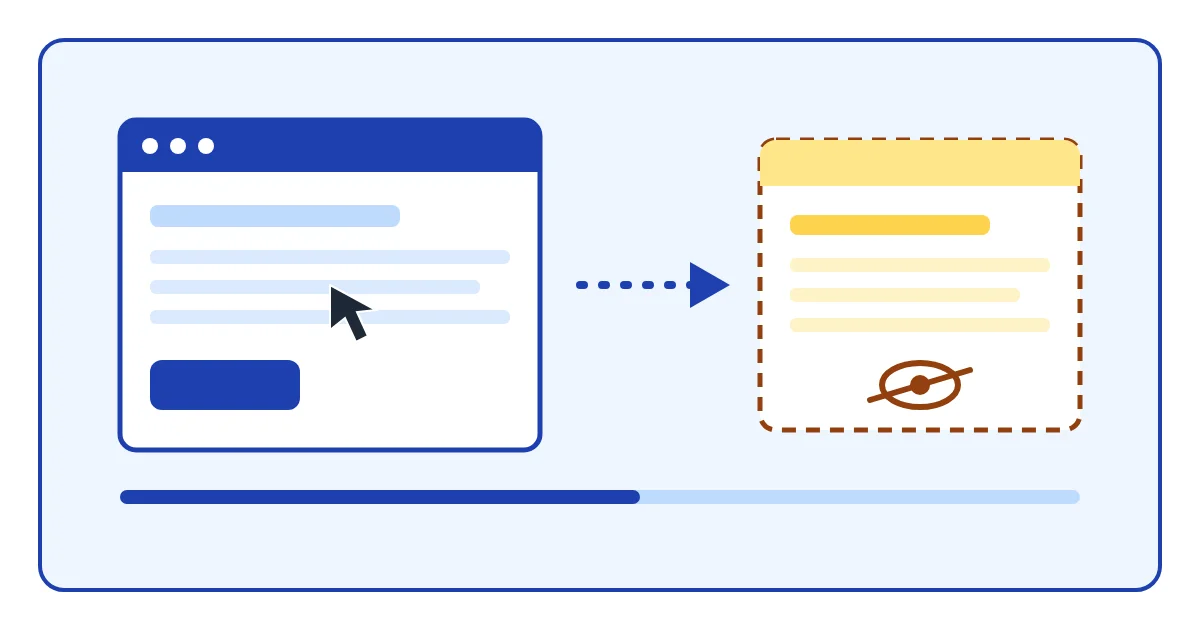
Browsers such as Google Chrome can load pages in advance, before anyone clicks the link. With a plain prefetch only the HTML document is fetched; with a prerender the page runs invisibly in the background, scripts included. This article separates what is technically documented from what is still legally open, and shows how site operators can check their own site.
Browsers get faster by guessing which page will be needed next. With Speculation Rules, websites can even tell the browser explicitly which follow-up pages it may load in advance. For load time that is a gain. For privacy and visitor statistics it raises new questions, because a page is requested that the visitor never saw.
The article first explains the technology, relying on documentation from Chrome, MDN and the draft specification of the Web Incubator Community Group. Then it turns to tracking and statistics, and only last to the legal questions. This order is deliberate. The technology can be documented and tested. The legal assessment of the invisible request, by contrast, is unsettled as things stand (October 2026). The article looks at Chromium-based browsers and is not legal advice.
Loaded in advance, not yet visited: What Speculation Rules are
Speculation Rules are a web platform interface shipped by Chrome. Site operators place a list of rules in JSON format in a page's source. It states which follow-up pages the browser may load in advance, either as a prefetch or as a prerender. The rules usually sit in a script element of type speculationrules. Alternatively, an HTTP header points to a rules file. Visitors see none of this. The browser decides for itself whether and when to use the hints.
The technique became widespread through WordPress. According to the developer note on WordPress 6.8, speculative loading is active by default on the frontend of all sites there. Logged-in users and sites without pretty permalinks are excluded. The default is prefetch with the eagerness level conservative. The request therefore only starts when someone clicks a link. That is the most cautious setting. Anyone who uses a plugin or has changed the setting, however, may be running considerably more aggressive rules.
On availability, MDN lists the interface as experimental and only partly available. It is not Baseline because it does not work in some widely used browsers. In practice the topic therefore concerns mainly Chrome and other Chromium browsers. Whether and how other browsers follow should be checked in MDN's current compatibility table before making any statement. Browsers without support simply ignore the rules, and nothing happens.
Prefetch and prerender: What the browser really does in the background
The two methods sound alike but differ considerably. According to the description at MDN, a prefetch loads only the response body of the target page, that is, the HTML document, and no subresources such as images, scripts or stylesheets. A prerender, by contrast, fetches the page completely, renders it and executes the JavaScript, including the requests that scripts trigger. The page behaves as if it were open in an invisible tab. When the visitor clicks, that tab is brought to the foreground. The specification calls this activation.
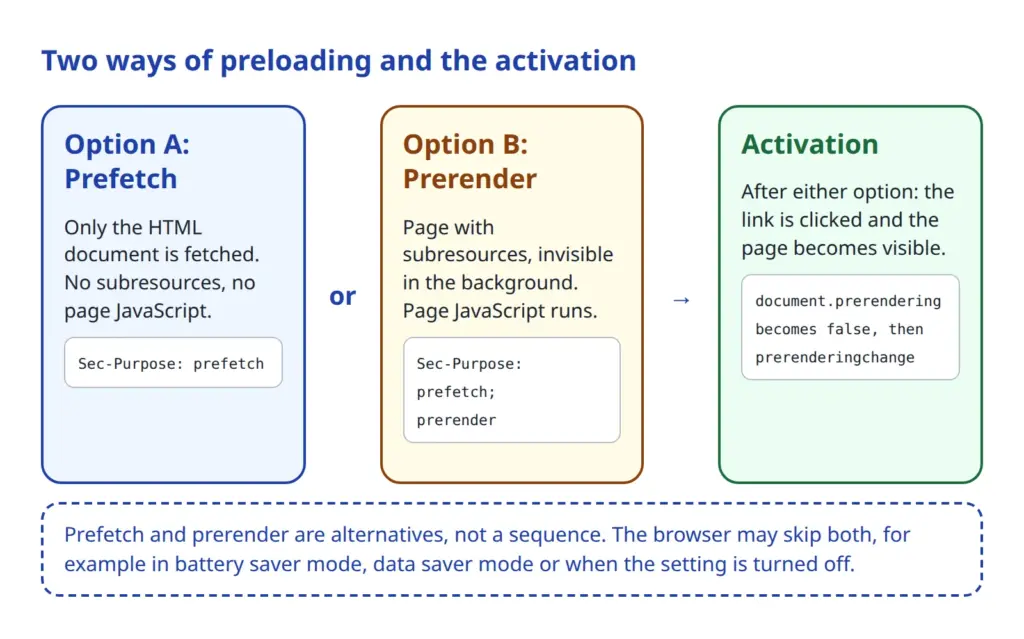
The server recognizes the requests by the Sec-Purpose header. For a prefetch the value is prefetch, for a prerender prefetch;prerender. A prerender therefore fetches the document first like a prefetch. Responses outside the 2xx range prevent both. According to MDN, the status codes 204 and 205 prevent prerendering but not the prefetch.
The eagerness level controls when the browser gets going. According to Chrome's documentation on Speculation Rules for more complex sites, conservative has the lowest risk but also the lowest benefit. The level moderate reacts to the mouse pointer over a link, while eager and immediate start earlier and bring more speed, but also more unnecessary loads. According to the "Chrome limits" section of the prerendering documentation, Chrome allows up to 50 prefetches and 10 prerenders for immediate. For eager, moderate and conservative it is two prefetches and two prerenders each. When the limit is reached, the oldest speculation is canceled.
The browser does not have to follow the hints. Chrome suppresses preloading when the user has turned off the "Preload pages" setting, in battery saver mode, in data saver mode and when memory is low. Extensions such as ad blockers can also switch it off. The documentation explicitly describes prerendering as a hint and as a progressive enhancement. For the privacy assessment this means: whether a preload takes place for a particular visitor depends on their browser and settings. Operators cannot predict it reliably.
What already runs during prerendering and what waits until activation
An invisible tab may not do everything a visible one may. The Chrome documentation on prerendering and MDN describe that intrusive interfaces do not become active in the hidden state but are deferred until activation. The calls first return a promise that stays pending and are only executed once the visitor actually sees the page.
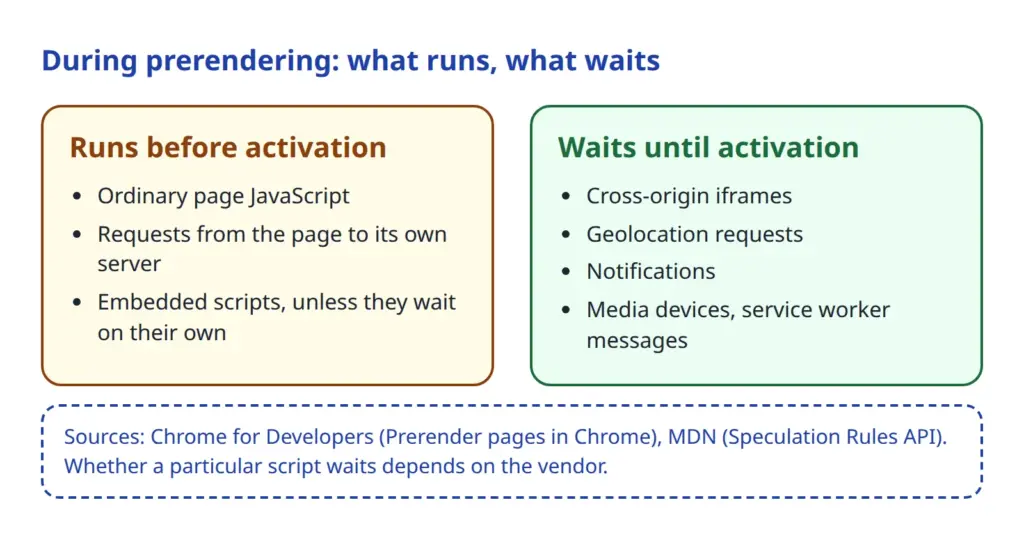
According to MDN, the following are among the things deferred:
- geolocation requests,
- notifications,
- access to camera, microphone and other media devices,
- registrations and messages of service workers,
- interfaces to Bluetooth, USB and similar hardware.
Dialogs are not shown at all: alert() returns immediately, confirm() returns false. Cross-origin iframes, that is, embedded content from foreign domains, are rendered by Chrome only after activation, according to the documentation. For sessionStorage, the prerendered page receives a copy that is replaced by the tab's storage on activation.
What matters is what is not on the list. Ordinary page JavaScript runs. It can send requests to its own server and to other servers. A script embedded by a tag manager or a tracking provider is not an iframe. It is subject to deferral only if it takes care of that itself or uses one of the interfaces named above. The statement "third-party content loads only after the click" is therefore true only for embedded frames and not across the board for third-party scripts.
In its list of unsafe pages for prerender, MDN explicitly names two cases: pages that modify localStorage or IndexedDB on load, and pages that send analytics data or record ad impressions on load. According to MDN, both are critical because they happen in the background. Whether cookies from a prerender response are already set before activation, and whether a stored consent status can be read in the background, is not explicitly stated by the Chrome documentation or MDN (as of October 2026). It is therefore a point to check on your own site (see below) and not a statement of fact.
How pages detect prerendering: document.prerendering, prerenderingchange and Sec-Purpose
So that operators can react cleanly, there are two ways: one in the browser and one on the server.
In the browser, the property document.prerendering returns true while the page is being prerendered and false otherwise. As soon as the visitor activates the page, the browser fires the event prerenderingchange on the document. A third hint is in the navigation data: a value of activationStart greater than zero in PerformanceNavigationTiming shows that the page was prerendered and has since been activated. The pattern is also shown at MDN and looks roughly like this:
if (document.prerendering) {
  document.addEventListener("prerenderingchange", startMeasurement, { once: true });
} else {
  startMeasurement();
}
The code starts the measurement only when the page becomes visible. The same switch applies to any other script that should run only on a real page view. The name of the function does not matter; the order does: check first, then start.
On the server, the Sec-Purpose header serves as the identifying feature. It allows two things. First, the server or a CDN can treat speculative requests differently, for example refuse prerenders or serve only content that is already cached. The Chrome documentation gives an example. Second, requests with this header can be found in log files and removed from evaluations. For server-side counters and log analysis this is the only reliable hint, because no JavaScript runs there.
Tracking and visitor statistics: When page views occur without visitors
For web analytics, prerendering is first of all a quality problem. A script that reports a page view on load counts a view in the prerender that nobody ever saw. Visitor numbers rise, the bounce rate falls, and evaluations become blurred. The Chrome documentation states that a preloaded page should as a rule be counted only on activation.
According to the Chrome documentation, Google Analytics, the Google Publisher Tag and AdSense delay their execution until activation by default. Other providers do not necessarily do so, and additional code may be needed there. The Chrome documentation speaks generally of "Google Analytics" without distinguishing product variants. Statements about individual variants such as GA4 or Google Tag Manager cannot be derived from it. Corresponding statements in blog posts are not a primary source. Anyone who wants to know the behavior must read the vendor documentation and test it.
The situation is similar for privacy-friendly alternatives. For Matomo, a community post in the Matomo forum from April 2024 suggests wrapping the page view in a prerenderingchange listener. The post names no native solution, and no statement from the vendor can be found there. That says nothing about the quality of the tool, but it shows that each analytics tool has to be checked individually. For self-hosted solutions there is the added point that your own server also sees requests with Sec-Purpose. If these are not filtered, log analyses count the speculative requests too.
Prefetch fetches only the document, prerender runs the page including its scripts. For tracking and consent, exactly this difference is decisive.
The consequences go beyond cosmetic numbers. If a script in the prerender triggers not just a page view but also loads further services, requests to third parties arise before the visitor has ever seen the page. Server-side conversion tracking, counters for quotas or actions with side effects can also be triggered. MDN's list of unsafe URLs explicitly names such cases, for example logout addresses, shopping cart actions and counters. The same applies to prefetch, because merely requesting the address can have a server-side effect.
The central question can be answered as follows on the current state of the documentation:
Does a preloaded page already trigger tracking before anyone clicks?
Speculation Rules and data protection: Which questions arise around consent
Legally there is one secure starting point. Section 25 TDDDG permits storing information on the end device and accessing information stored there in principle only if the end user has consented on the basis of clear and comprehensive information. Exceptions apply if the operation is strictly necessary for a provider to deliver a service expressly requested by the user, or if it serves solely to transmit a message. How far this exception reaches is explained in the article on cookies and the TTDSG. How reading device characteristics is to be classified is covered in the article on browser fingerprinting and in the explanation of the browser fingerprint.
Whether and how this rule fits the invisible request of a page is a different question. The author is not aware of a statement by a supervisory authority or a court ruling on it (as of October 2026). That does not prove that none exists. It merely means there is no documented position on which this article could rely. What remains are open questions. The following assessment is reasoned but not secured.
Is access in the background already access within the meaning of the provision?
If a script runs in the prerender and reads or writes cookies or local storage, the wording suggests that this is an access to the end device. The fact that the visitor does not yet see the page does not automatically remove the character of the operation. Against this, it can be argued that the prerendered page runs in a sealed-off state and is discarded if never activated. How to weigh this has so far not been decided in a binding way.
Does consent from the originating page apply?
Prerendering is restricted to the same origin by default. A visitor who agreed to a banner on the home page may already have made the decision when the follow-up page loads in the background. The consent could then be read as already given. If they have not yet answered the banner, the follow-up page may load with scripts that should have waited for consent. Whether the page reads the consent status correctly in the prerender is a question of implementation and has to be tested.
Requests to third parties before the click
Every request to a third party transmits at least the visitor's IP address. Even when embedding fonts from Google, caution is therefore needed without consent, as the article on Google Fonts explains. With a prerender, the request is triggered before the visitor has seen the target page or its privacy notice. Cross-origin iframes are deferred, but third-party scripts are not automatically. The transmission of the IP address to third parties falls rather under the GDPR than under Section 25 TDDDG, because it is not storage on or access to the end device but a data transfer.
The banner in the prerender
The consent platform is also part of the page and is loaded along with it. Is the banner even displayed in the invisible tab? When do consent callbacks report a status, and who reacts to it? A consent platform vendor describes on its own test page that callbacks can fire too early during prerendering, and offers an option to delay them until activation. That is a vendor claim, but it is a hint that the interplay does not work as a matter of course. An overview of the tools is given in the article on consent tools.
The cautious conclusion: anyone who uses prerendering cannot assume that the invisible request is legally irrelevant. In practice the risk can be kept small by allowing only what would be permissible without consent to happen in the prerender, and letting everything else wait until activation. How a legally sound consent request is built is shown in the checklist for consent requests. The German Data Protection Conference has also published guidance for providers of digital services. Version 1.2 of November 2024 contains no statement on prefetch or prerender. The current version of the guidance should be checked in the original before any assessment.
What Chrome protects by itself and where the limit lies
Chrome builds in several protection mechanisms. According to the documentation, cross-site prefetches only take effect if the user has no cookies stored for the target site. If they have visited the other site before, the browser discards the speculation. According to MDN, a cross-site prerender is currently not possible at all, and a prerender to a different origin of the same site requires explicit consent from the target page via a header. Navigating to a different site discards the prerendered document immediately. In addition, users can switch the feature off, and that setting takes precedence.
These rules protect the transition between pages and the user's state on foreign domains. They do not replace a review of your own scripts, though. On your own domain, a page in the prerender may in principle do what a page view may do, except for the deferred interfaces. A tracking script on the target page therefore runs unless it holds itself back. Regarding the browser's role in privacy, note also that the draft specification Prerendering Revamped still lists its privacy sections on prerendering as incomplete in October 2026. For detailed statements, the current state should be checked against the original.
Checking it yourself: Steps for site operators
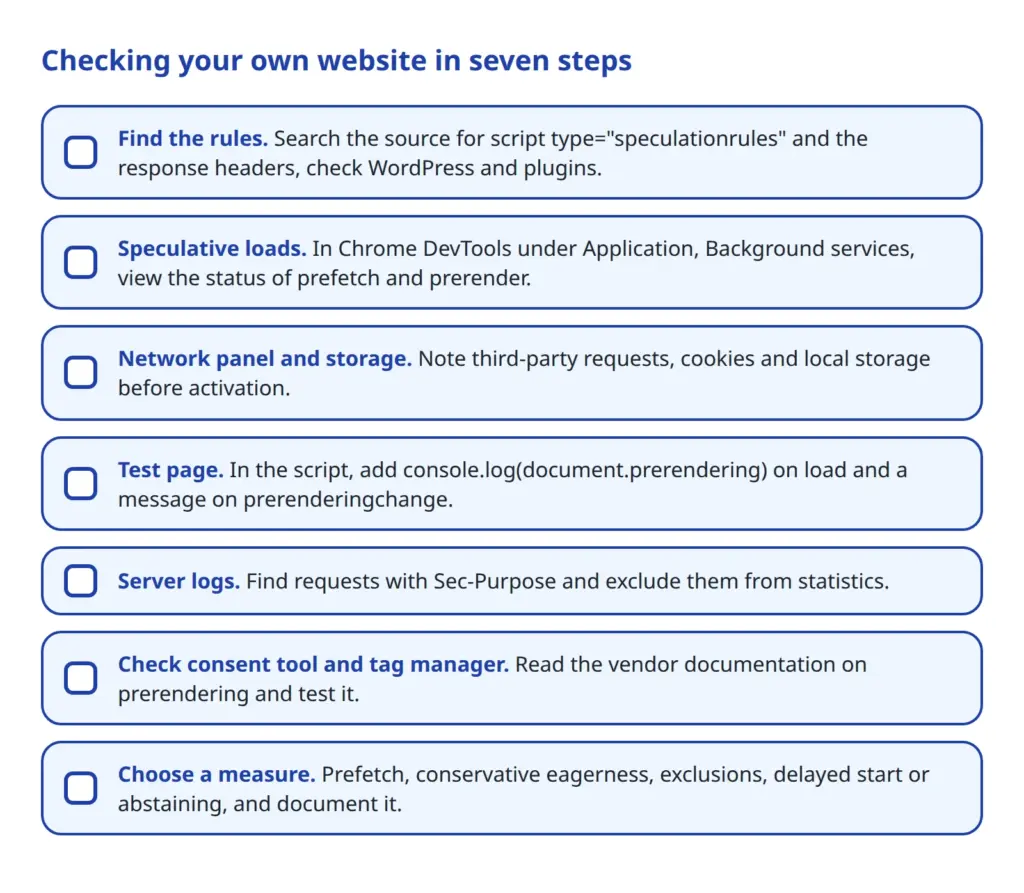
Whether Speculation Rules are active on your own site and what they trigger can be found out without much prior knowledge. The following steps use Chrome and its built-in developer tools.
- Find the rules. Search the page source for
speculationrules. Response headers can also point to a rules file. On WordPress, the core from version 6.8, performance plugins and themes are possible sources. - View speculative loads. In Chrome DevTools (key F12), open the Application panel and select "Speculative loads" under Background services. It shows which rules were detected and whether the preloads started, succeeded or failed. If the page was loaded before the tabs were opened, reload it.
- Watch the network panel and storage. While a prerender is running, filter the network panel for domains that do not belong to your own site. Requests with the
Sec-Purposeheader can be seen in the request details. In the Application panel you can also observe whether cookies or local storage are changed before activation. That answers the open question about your own site's behavior directly. - Test page with console output. Typing
document.prerenderinginto the console later always showsfalseafter activation and proves nothing. Instead, put aconsole.log(document.prerendering)directly on load into the script of a test page, plus a listener that prints another message onprerenderingchange. Iftrueappears in the console on load, the page ran in the background. - Search the server logs. Search the access logs for
Sec-Purpose, provided the header is logged. If necessary, extend the log format. - Check consent tool and tag manager. Read the vendors' documentation to see whether prerendering is supported, and confirm with a test.
- Choose a measure. Depending on the findings, decide on prefetch instead of prerender, conservative eagerness, exclusions, delayed script start or abstaining, and document it (see next section).
If you do not want to check the site by hand, or are looking for an overview of embedded services in addition, you can also use the website check. It does not replace the check of prerender behavior described above, but it shows which services the site contacts at all.
Measures: Operating prerendering safely or abstaining
The review yields options that can be ordered by effort and effect.
- Prefetch only instead of prerender. This is the safer entry. No page JavaScript runs, and the Chrome documentation recommends starting with prefetch when confidence is low.
- Conservative eagerness. Preloading starts only when navigation is very likely, which reduces the number of invisible requests.
- Exclude pages. Logout addresses, shopping cart actions, checkout processes and pages with side effects do not belong in the rules. In WordPress, the filter
wp_speculation_rules_href_exclude_pathsand the CSS classesno-prefetchandno-prerenderserve this purpose. - Start scripts only after activation. Analytics, tag managers, pixels and the consent platform should wait for
prerenderingchange, unless they do so themselves. - Clean up log analysis. Remove requests with
Sec-Purposefrom counts. - Abstain entirely. Where the review is too costly, preloading can be switched off. In WordPress this is possible through the filter
wp_speculation_rules_configurationwith the valuenull.
After weighing the pros and cons, not much remains. The gain in load speed is real, but small for many sites. Against it stand the review and documentation effort as long as the legal situation is open. Anyone who uses prerendering should record which rules apply, which scripts wait and when this was last tested. For traffic peaks, such as promotions, the rules should also be possible to switch off at short notice.
Conclusion: Know the technology, name the open legal questions
Prefetch fetches only the document. Prerender runs the page including its scripts and is therefore the more critical case for tracking and consent.
Intrusive interfaces and cross-origin iframes are deferred. Normal scripts run unless they wait on their own.
Google states that Analytics, Publisher Tag and AdSense wait for activation. For all other services this needs to be checked.
For the legal assessment of the invisible request, there is currently apparently no statement from an authority or a court. The questions on access to the end device, consent and requests to third parties are open.
Operators can check the behavior of their own site themselves with developer tools, a test page and server logs, and keep the risk small with conservative settings and delayed script start.
 My name is Klaus Meffert. I have a doctorate in computer science and have been working professionally and practically with information technology for over 30 years. I also work as an expert in IT & data protection. I achieve my results by looking at technology and law. This seems absolutely essential to me when it comes to digital data protection. My company, IT Logic GmbH, also offers consulting and development of optimized and secure AI solutions.