


A TV in the meeting room shows confidential slides, a welcome screen runs in reception. Content recognition is switched off in the menu, so the matter is settled. A new study shows otherwise: with Samsung and Vizio, traffic consistent with ACR continued even after opting out. Private individuals in their living rooms are affected too.
Smart TVs in the office: why opting out is not enough
Smart TV ACR, automatic content recognition, is hardly known in offices, because smart TVs are seen as accessories. They hang on the wall, are procured by facility management and are often only noticed by IT when the Wi-Fi password is missing. Yet they are fully fledged computers with a network connection, their own software and a manufacturer that wants to analyse data about how they are used.
The occasion is a report from 21 October 2026. Researchers at Northeastern University examined twelve TVs and checked whether switching off content recognition actually stops the traffic. This also has consequences for private households.
What smart TV ACR is and what manufacturers use content recognition for
ACR stands for Automatic Content Recognition. The feature recognises what is playing on the screen. To do this, the device captures short snippets of picture or sound at regular intervals and calculates a so-called fingerprint from them. This is a compact identifier from which the original cannot easily be recovered. The fingerprint is sent to a server and matched there against a reference database. The result might be: a particular programme or a particular commercial was on the screen.
Manufacturers and their partners use this information for audience measurement and targeted advertising. It can be used to determine who watches which programme and for how long, even when no streaming service is involved. Recognition works independently of the image source. Antenna, cable, apps and external devices can all be captured.
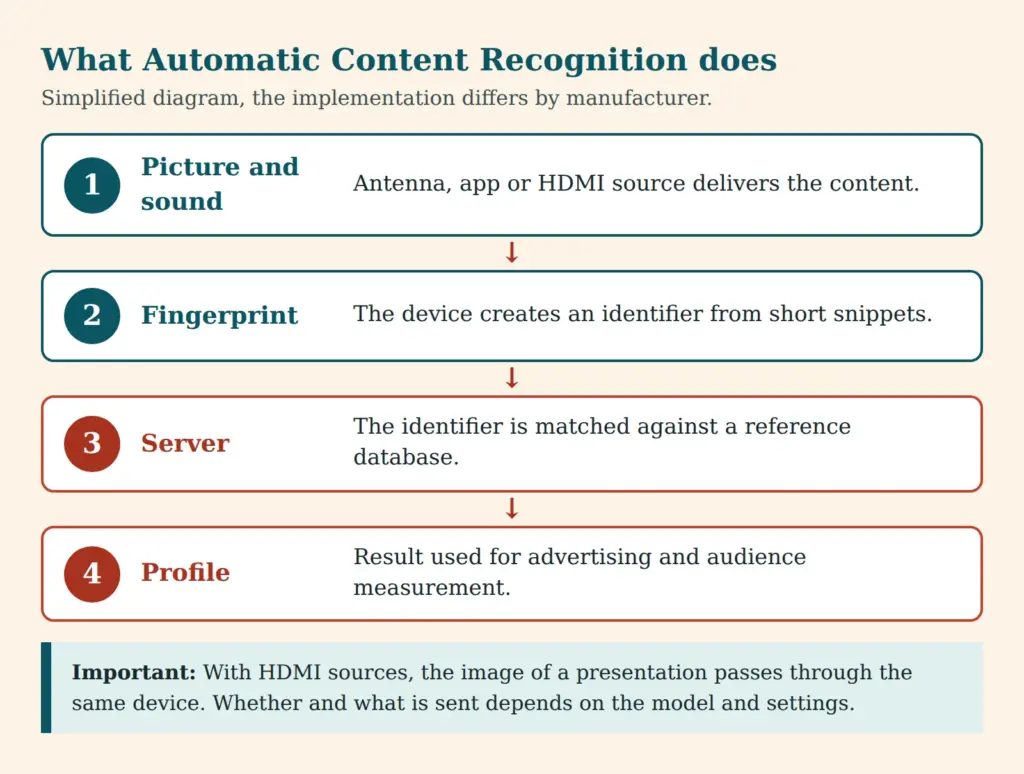
The last point in particular matters for offices. If a presentation runs from a laptop to the TV via an HDMI cable, this is an input signal like any other for the device. Whether the device includes this signal in content recognition depends on the manufacturer, the operating system and the settings. Earlier research has shown that this also applies to HDMI sources for some manufacturers. However, the 2024 study concluded at the time that the opt-out worked for Samsung and LG in testing.
There is a menu item for switching it off, which is named differently by each manufacturer and located in different places. Typical names contain words such as content recognition, viewing information services, interactive advertising or live feature. Specific paths change with the model and software version and are not fixed here. The manufacturer's instructions for the specific device are authoritative.
Switching it off is an opt-out in the literal sense: the manufacturer receives a setting that the device evaluates. Whether the device then actually stays quiet can only be judged from the outside by looking at the network traffic. That is exactly what the new study set out to do.
Smart TV and ACR: what the Northeastern University study shows and what it does not
Method
The study is titled “Watching the Watchers” and is described on its own project page.
According to the report, twelve TVs from ten manufacturers were examined, namely Amazon, Hisense, LG, Roku, Samsung, Sony, Supersonic, TCL, Vizio and Westinghouse. They ran eight different operating systems. In total there were 5,943 controlled experiments. The devices were controlled by script and the network traffic was recorded. From this, the researchers identified the servers belonging to content recognition for each operating system. Tests were carried out with the opt-out switched on and off, including with streaming apps, antenna signal, HDMI sources and screen mirroring.
Findings
With Samsung running the Tizen operating system, traffic consistent with ACR continued after the opt-out. According to Ars Technica, this was the case in all 30 measurements with the first streaming app, in 41 of 60 measurements with antenna signal and in 18 of 30 measurements with HDMI input.
With Vizio, traffic to a destination that most closely matches ACR behaviour continued in all opt-out scenarios. No measurable effect of the opt-out was found. The devices also sent data when idle. With third-party apps and screen mirroring, however, the traffic stopped. According to the report, this matches a statement Vizio made to the US Securities and Exchange Commission in 2021 that it does not collect ACR data from these sources.
With Roku, ACR-like behaviour only occurred in its own app, The Roku Channel. According to the study, this behaviour is disclosed in the terms of use.
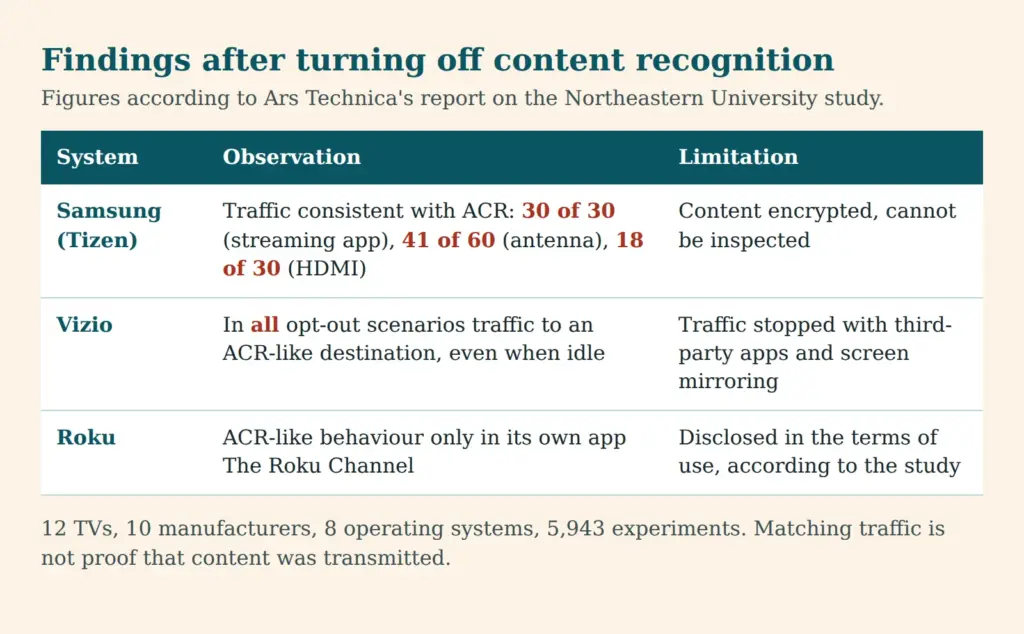
The authors themselves describe the traffic after the opt-out as suspicious. Possible explanations are a bug or a transmission followed by discarding the data. They consider the latter unlikely. According to the report, the lead author points out that a bug would make no difference to the outcome for those affected.
The opt-out is a menu item, not proof.
Limits of the findings
What is reported is an observation. What it means is less clear. Five caveats apply:
- The traffic is encrypted. Which data is transmitted is unknown. Traffic consistent with ACR is not proof that screen content was sent.
- Smart TVs are locked down. The researchers could not open the devices or break the encryption. All conclusions are indirect.
- Only twelve devices were examined. According to the report, the results cannot be transferred to other ACR providers, because each manufacturer and each operating system implements ACR differently.
- The devices come from the US market. Whether European models from the same manufacturer behave in the same way has not been demonstrated.
- At the time of the report, there were no statements from Samsung or Vizio. The situation may have changed since then. In addition, according to the project page, the paper is intended for an academic conference and has therefore not yet been fully peer-reviewed.
Is it enough to switch off content recognition (ACR) in a smart TV's menu?
According to the report, the authors' advice to users is clear: disconnect smart TVs from the network or use an external streaming device without ACR. According to the report, they also provide a list of domains and addresses that can be blocked without affecting playback quality. According to the report, manufacturers should name all inputs used for content recognition in their privacy policies and protect the traffic.
Why offices and meeting rooms carry their own risk
In the living room, it is about viewing habits. In the office, the situation is different, even if the technology is the same. Several points speak for taking data protection for smart TVs in the office seriously.
First, the meeting room displays material that is not intended for third parties: quarterly figures, quotes, drafts, HR matters. It appears on the TV via HDMI cable or screen mirroring. Whether any of it leaves the room has not been demonstrated. The study provides no evidence of this, but it cannot rule it out either, because the content of the traffic is encrypted. So this is about minimising risk, not about known damage.
Second, reception areas often show visitor lists, welcome messages with names or schedules. These are personal data displayed on screen while a device with internet access shows them.
Third, TVs are often connected to the same Wi-Fi as other devices. A smart TV on the company network is a device with manufacturer software that nobody in the company controls. It can establish outbound connections, and it can see other devices on the network. This is a classic network security problem, regardless of ACR.
Fourth, the TV often does not really belong to any department. Procurement, mounting and configuration are handled by facility management or reception. IT finds out late or not at all. There is then neither an inventory nor rules for updates, accounts and settings. Anyone who sets up a manufacturer account may store business data or private credentials on the device.
For these reasons, it pays to treat TVs in meeting rooms like any other networked device: record, classify, isolate.
Legal situation in the EU: consent, TDDDG and GDPR
The legal framework is deliberately kept brief here; it does not replace legal advice, and in individual cases the exact circumstances matter.
In Germany, reading information from a terminal device is governed by Section 25 TDDDG (German Telecommunications Digital Services Data Protection Act). Under it, access to information stored on the device or read from it generally requires consent. Exceptions only apply if access is strictly necessary, for example to provide a service expressly requested by the user. Advertising measurement is not usually one of them. The background and further practical examples can be found in the article on browser fingerprinting and the TDDDG. Similar questions arise with networked household appliances, as the article on smart home devices describes.
If the data obtained is personal data, the GDPR also applies. Processing then requires a legal basis under Article 6, which for advertising purposes is in practice usually informed consent. An opt-out that does not work would undermine this consent logic. However, it has not been demonstrated that this is the case in the study, and whether European devices are affected is open.
For companies as operators of the devices, a different question arises: who is responsible if a TV in the meeting room sends data? The answer depends on the individual case. What is certain is that the selection and configuration of the devices lie within the company's sphere of influence. The GDPR requires data protection by design and by default, as described in Article 25. Those who procure TVs can set requirements for manufacturers, include the devices in the record of processing activities and, where employee data may be affected, involve the works council.
In practice, this means: those who can demonstrate that they only use display devices without a network connection or in an isolated segment have far fewer of these questions to worry about.
Isolating a smart TV on the company network: measures by effectiveness
The following measures are ordered by effectiveness. The most effective ones start at the network, not the menu.
Level 1: operation without network and external players
Where a TV only needs to display a picture, it does not need network access. Without Wi-Fi and without a LAN cable, it cannot send anything that requires a network. An external player is a good option here, such as a media player or a conferencing system managed by IT. The TV then remains a monitor. It should be checked whether the device nevertheless searches for a network when switched on or forces setup wizards. Also note: the player is itself a device on the network and must be examined in its own right.
Level 2: separate network segment
If a TV needs network access, for example for mirroring or updates, it belongs in a separate segment. This can be a VLAN or a separate guest network. It is important that no access to the internal network is possible from this segment. The firewall limits outgoing traffic to what is really necessary.
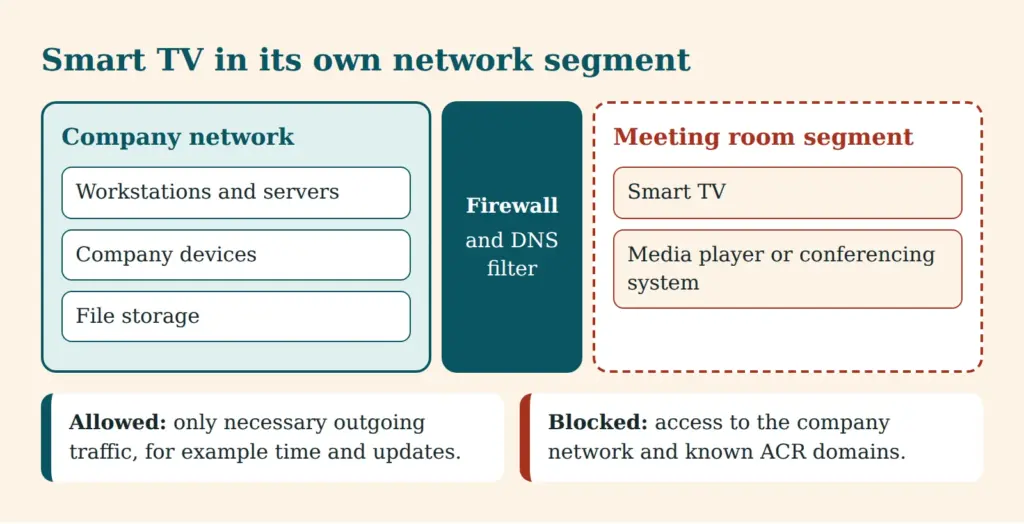
A segment does not prevent the TV from sending data to the outside. It prevents it from having access to company devices and file storage while doing so. This protects against lateral movement in the network, not against ACR traffic. The security checks for the network and open ports provide a starting point for checking your own protection.
Level 3: block ACR domains
For outgoing traffic, a DNS filter or a firewall rule that blocks known content recognition servers is an option. The authors of the study say they have compiled a list for this purpose. It should be taken from the project rather than copied from forums.
This approach has limits. Manufacturers' endpoints change, and the list needs to be maintained. If a device uses its own encrypted DNS queries, it can bypass a DNS filter. Then only a firewall rule that blocks all traffic to known destination addresses helps. And not every block is without consequences: if too much is blocked, apps or updates stop working. After changes, the device's traffic should be observed again.
Level 4: settings as a supplement
Finally, there are the settings on the device: switch off content recognition, turn off personalised advertising, turn off voice control and microphone, do not create a manufacturer account. Switching off content recognition makes sense and costs little. But it remains a supplement. For Samsung and Vizio, the study provides no basis for relying on it alone.
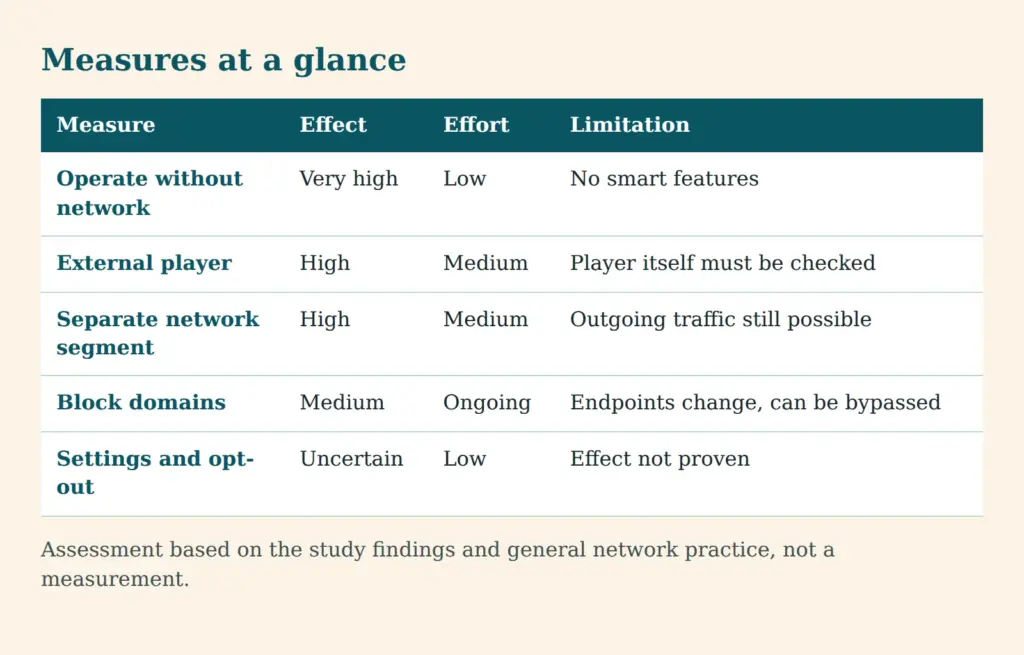
The table summarises the levels. The assessment is based on the findings and general network practice. It is not a measurement.
A short checklist helps with implementation:
- Record all TVs and displays in the building, including reception and canteen.
- Decide for each device: monitor without network or device with network access.
- Move devices with network access to a separate segment.
- Restrict outgoing traffic and block known ACR destinations.
- Check and document settings for content recognition, advertising and voice control.
- Spot-check the devices' traffic after the change.
Private individuals: switch off ACR and limit the data flow
The same considerations apply at home, with less effort. The first step is the menu item for content recognition. The names differ depending on the manufacturer and software version. Test reports mention terms such as “Viewing Information Services” on Samsung or “Live Plus” on LG. Whether they are called that on your own model is shown in the manufacturer's instructions. Menu paths in secondary sources should not be regarded as binding.
Additionally useful are:
- Disconnect the TV from the network if it only shows antenna programmes or external players. Without a network connection, there is no route to the outside.
- Use a streaming stick or box whose privacy settings are known, and keep the TV itself offline.
- Restrict the TV's access in the router or put the device on the guest network. Some routers offer filter lists for advertising and tracking domains.
- Switch off voice control and microphone if they are not needed.
Anyone who wants to prevent smart TV tracking does best with a combination of settings and network measures. Treating the opt-out alone as a guarantee would not be supported by the current study, at least for the models examined.
Assessment: verify instead of trust
The study shows that a switch in the menu and behaviour on the network can be two different things. With Samsung and Vizio, traffic consistent with ACR continued. What it contains is unknown. The manufacturers had not commented at the time of the report. And the devices come from the USA.
For offices, this is no cause for alarm, but it is a clear task. TVs belong in the inventory, they need a network rule, and confidential content is better played through players that the company manages itself. The menu item for content recognition remains a useful additional measure. It only becomes reliable when the network ensures what the menu promises.
Anyone who wants to make their own data traffic visible is best off starting with the router or firewall. There you can see which destinations a device contacts when idle and in operation.
 My name is Klaus Meffert. I have a doctorate in computer science and have been working professionally and practically with information technology for over 30 years. I also work as an expert in IT & data protection. I achieve my results by looking at technology and law. This seems absolutely essential to me when it comes to digital data protection. My company, IT Logic GmbH, also offers consulting and development of optimized and secure AI solutions.