

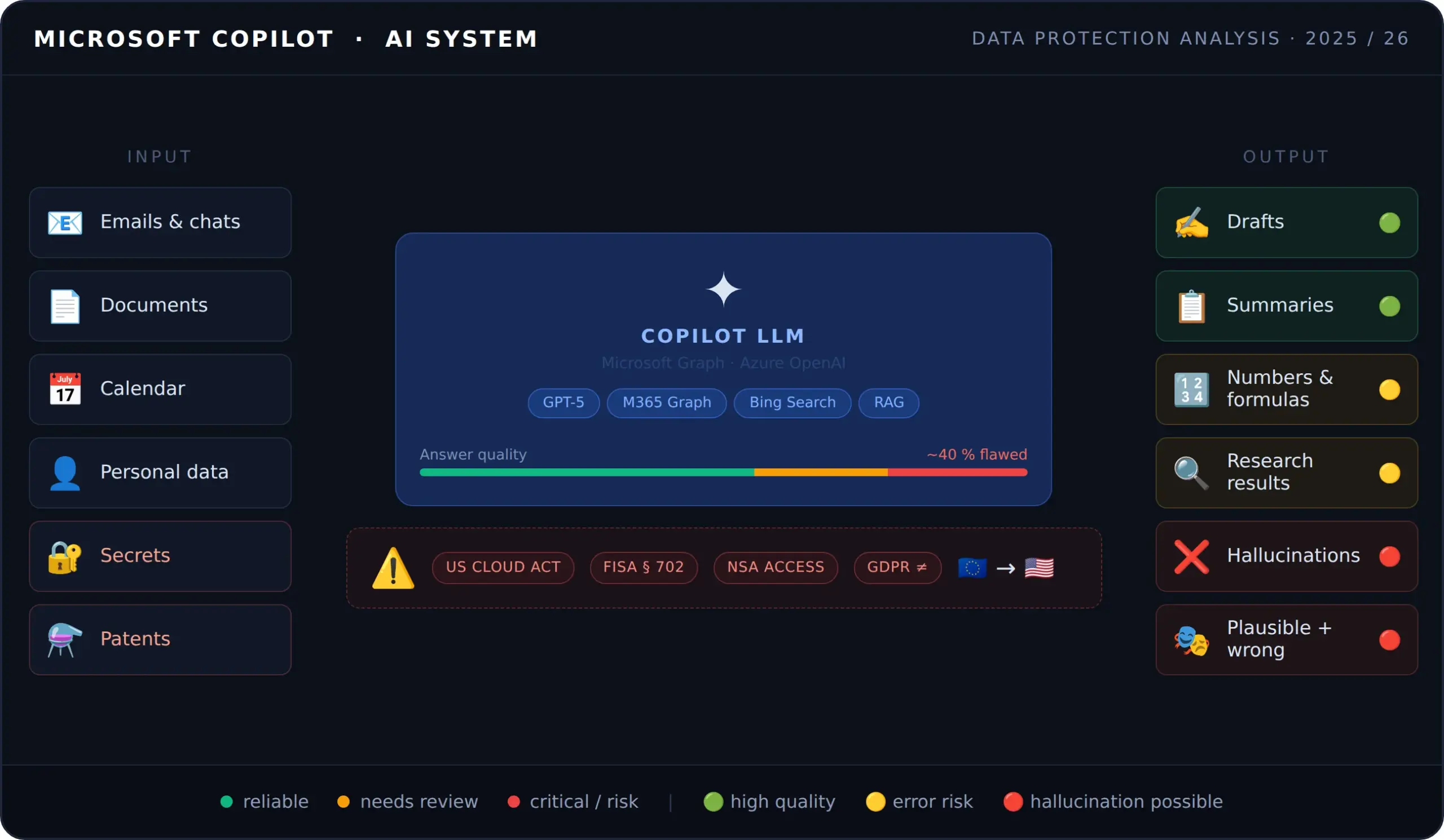
Microsoft Copilot is on everyone's lips right now. The AI assistant from the software giant in Redmond promises to revolutionize daily work, right inside the familiar Microsoft 365 applications that are standard in millions of European companies. Yet behind the glossy product promise lurk data protection pitfalls, considerable security risks, questions about reliability and a cost structure that quickly becomes opaque. This article takes a critical look at Microsoft Copilot and shows why local, sovereign and open-source AI systems can be the far better alternative for many companies.
What exactly is Microsoft Copilot?
Microsoft Copilot is not a single product but a family of AI-powered assistants that Microsoft has integrated into almost all of its platforms. At its core it is an interface to large language models (LLMs), originally GPT-4 from OpenAI and, since late 2025, GPT-5 as the default in the business edition, connected to company data via the so-called Microsoft Graph.
The product may now be somewhat more mature than it was not so long ago: a simple test (text application) produced shockingly poor AI results.
The most important Copilot variants at a glance:
Microsoft 365 Copilot is the business variant and accesses the user's emails, documents, chats and calendar entries. It is deeply integrated into Word, Excel, PowerPoint, Outlook, Teams, OneNote and SharePoint.
Copilot Chat (formerly Microsoft 365 Chat) is a stripped-down basic version, free for many M365 subscribers, without deep app context.
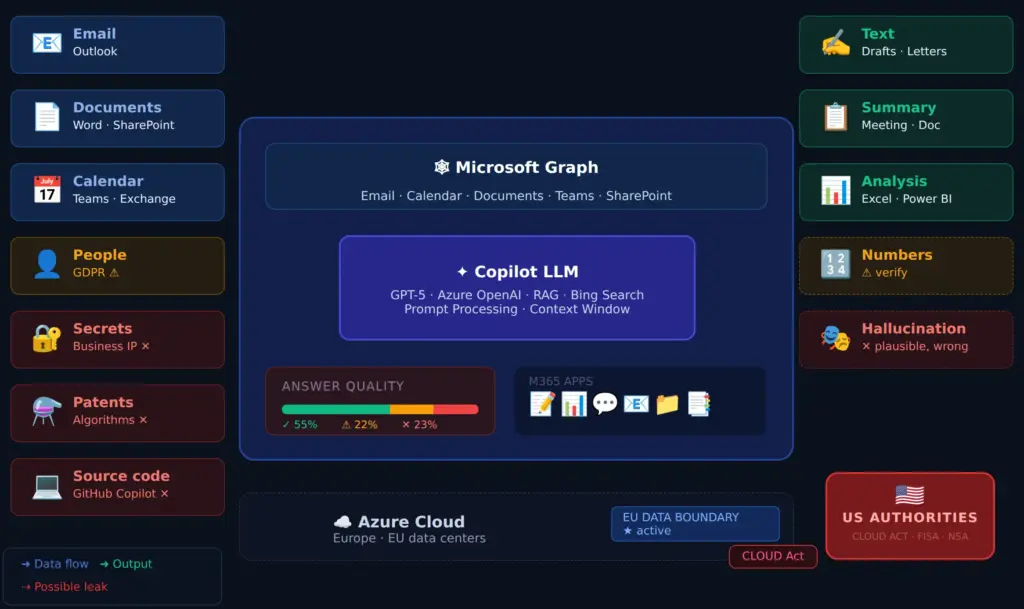
GitHub Copilot is aimed at software developers and helps with writing, reviewing and explaining code.
Copilot Studio makes it possible to build your own AI agents without programming skills.
Copilot for Bing / Consumer Copilot is the free web version for private users without access to company data.
Capabilities: what Copilot can really do
The technical possibilities of Microsoft 365 Copilot are impressive, provided they are used correctly.
In Word, Copilot can create texts from short prompts, summarize, rewrite and translate existing documents, and incorporate content from other sources such as SharePoint documents.
In Excel, Copilot suggests formulas, completes them automatically when you type the "=" character, analyzes datasets for patterns and anomalies, creates charts and, since late 2025, performs multi-step analyses with transparent intermediate steps in agent mode.
In Outlook, Copilot searches the entire inbox, calendar and meeting history, prioritizes emails, summarizes threads and drafts replies. AI-assisted meeting planning with automatic agenda suggestions and preparation tips is also part of the feature set.
In Teams, Copilot records meetings, creates meeting summaries in different styles (Executive, Newscast, Casual), identifies open tasks and can prepare sessions afterwards as an audio summary.
In PowerPoint, Copilot generates presentations from text descriptions or existing documents, creates speaker notes and translates slides directly in the editor.
Copilot Researcher and Analyst (available from late 2025) are advanced agents that autonomously carry out complex, multi-step research tasks across multiple sources and processing steps.
On paper, this sounds like an enormous productivity gain. But between the advertising promise and reality there is often a considerable gap.
Shortcomings and limits: what Copilot cannot do reliably
The problem of AI hallucinations
A fundamental problem of all large language models, and thus of Microsoft Copilot as well, is so-called hallucinations: the AI invents false information and presents it with the persuasiveness of true statements. Hallucinations arise when training data is incomplete or outdated, when the AI assigns contexts incorrectly, or simply when it fills gaps with learned patterns.
Automation bias is particularly dangerous here: people tend to treat machine-generated results as trustworthy and to ignore contradictory information. Faulty AI outputs that appear professionally worded are questioned less often than obvious errors.
Microsoft itself admits in its terms of use that Copilot can produce hallucinations, generate offensive content and reproduce real people or facts inaccurately. The remarkable wording that the service is ultimately designed for "entertainment purposes" stands in stark contrast to its aggressive marketing as a business productivity tool.
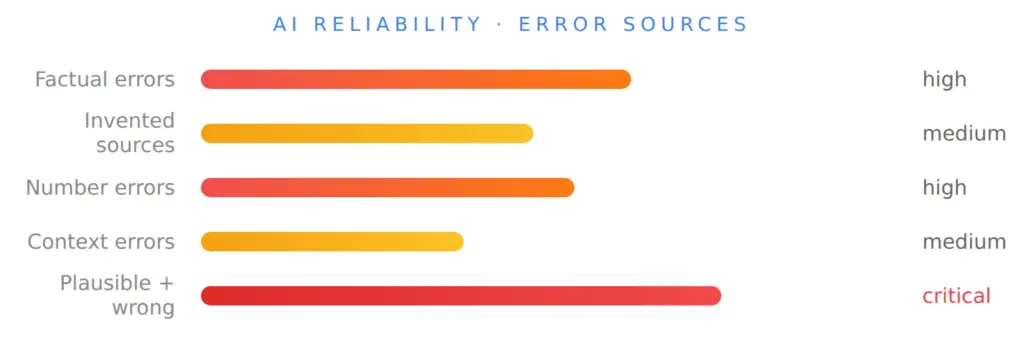
Microsoft did report considerable progress in 2025, and the current GPT-5-based Copilot version is said to have reduced hallucinations by more than 50 %, but freedom from errors is not guaranteed and cannot be achieved. Anyone who adopts Copilot outputs uncritically takes considerable risks.
Access permissions as a silent danger
Copilot uses the access permissions of the respective user within the Microsoft 365 tenant. This means: if an employee has access to documents that they do not use every day or had forgotten about, Copilot can automatically include this content in its answers. Without a clean permission structure and consistent data hygiene in the company, this can lead to the unintended consolidation of sensitive information.
Limits of contextualization
Copilot works on the basis of prompts: vague, contradictory or incomplete input leads to poor or wrong results. Technical nuances, industry-specific knowledge and internal company context are only taken into account as well as they are available in the company data. The AI is not an expert; it is a language model.
Data security: a critical look at Microsoft
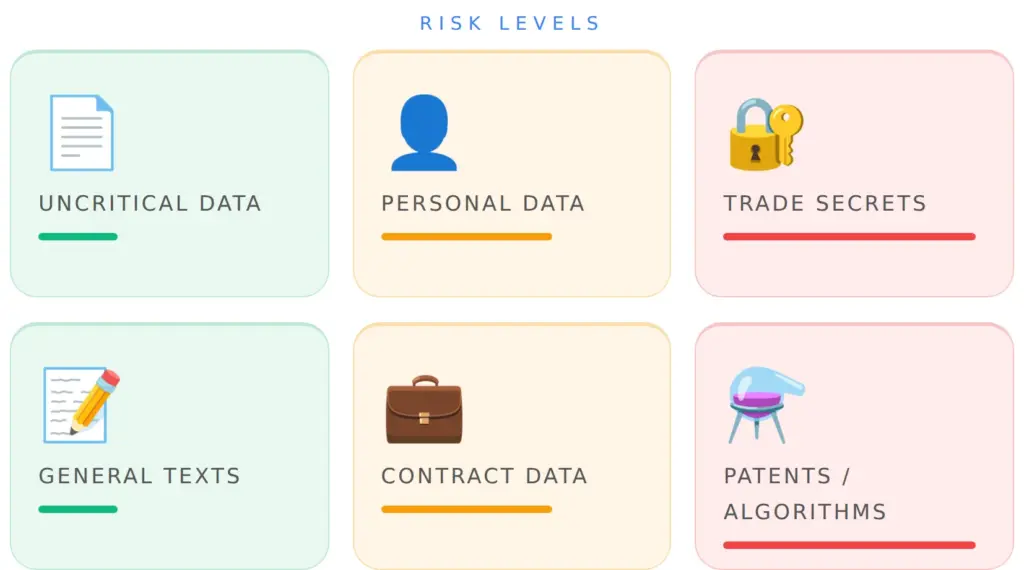
Data protection and data security are two terms that are often used synonymously. Data protection, however, refers "only" to personal data, while data security concerns all types of data. For many companies, their assets, in other words their data treasures, are probably even more important than personal data. These include not only patents and trade secrets, but also sales databases, contracts or collected information.
Personal data and the GDPR
In business operation, Microsoft 365 Copilot inevitably processes personal data within the meaning of the GDPR: names, email addresses, communication content, work behavior and more. Microsoft acts as a processor under Art. 28 GDPR. A corresponding data processing agreement (DPA) is mandatory.
With the full implementation of the EU Data Boundary by Microsoft in February 2025, the company took important steps to keep customer data within the EU and to meet the expectations of European data protection authorities. The Hessian Commissioner for Data Protection and Freedom of Information (HBDI) assessed in November 2025 that Microsoft 365 can in principle be operated in compliance with the GDPR, but on the condition that companies implement certain measures consistently.
These measures include: creating a record of processing activities, carrying out a data protection impact assessment (DPIA) under Art. 35 GDPR, implementing the need-to-know principle for data access, clear data classification, and regular training of employees on the responsible use of AI.
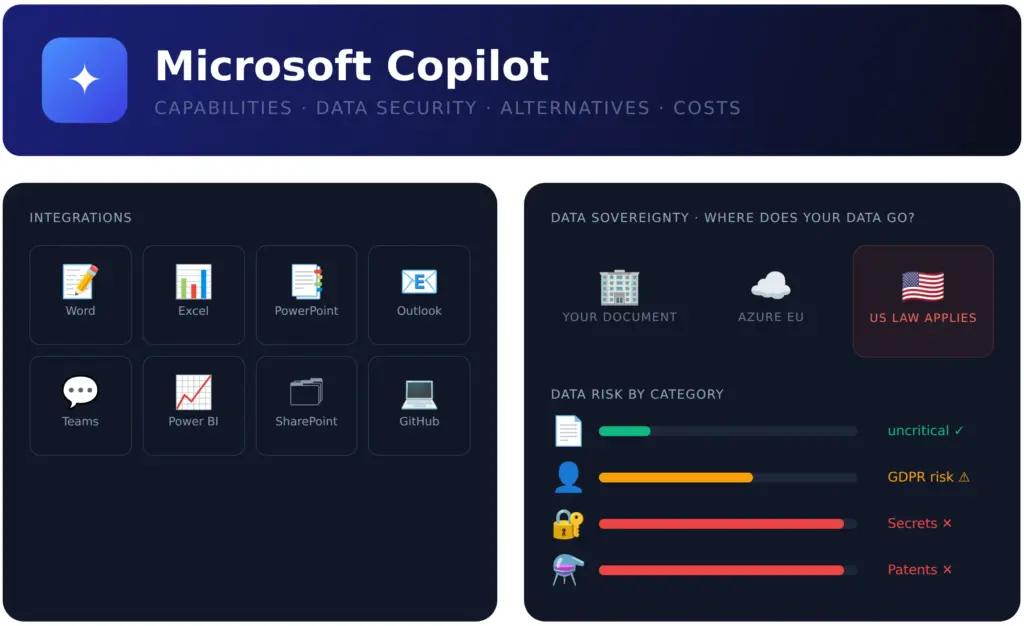
In the past, the German Data Protection Conference (DSK) classified a data-protection-compliant use of Microsoft 365 as hardly possible. Even though the situation has improved thanks to the EU Data Boundary, open questions remain, especially around the Bing search integration, where Microsoft processes data under its own data protection responsibility.
On top of that, Microsoft does not necessarily do much to make customers happy with regard to their data: see, for example, the sprawling collection of telemetry data in Windows. The concept Microsoft has come up with for Outlook sounds even more alarming: customers' passwords are used to retrieve customers' emails as a matter of routine, which are then used for the improvement of Microsoft AI – without the customer having allowed this or understanding which privacy settings apply.
Sensitive company data: an underestimated risk
Besides personal data there is a second, often underestimated category: sensitive company data that is not personal data in the GDPR sense but carries considerable economic weight. This includes trade secrets, confidential contract documents, strategic plans, patents and patent applications, proprietary algorithms, software source code, calculation bases and M&A transactions.
Anyone who enters this information into a cloud-based AI effectively hands it over to a US company for processing. Microsoft does state that it does not use customer data to train its own models, but the processing takes place nonetheless, and the legal framework does not offer complete security.
The US CLOUD Act: a barely solvable fundamental tension
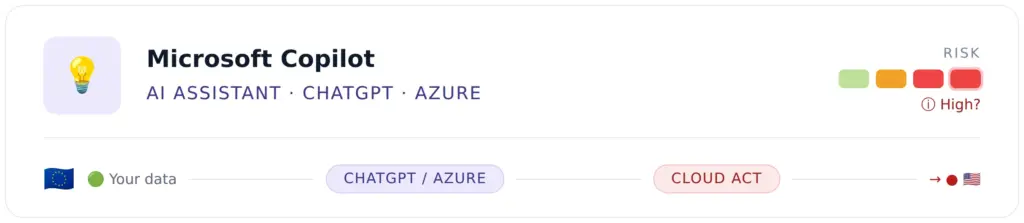
Here lies the actual structural problem: the US Clarifying Lawful Overseas Use of Data Act (CLOUD Act) of 2018 obliges US companies to hand over stored data on the order of US authorities, regardless of which country the data is physically stored in. A data center in Frankfurt does not protect European data if the operator is a US company.
Besides the CLOUD Act there are other US legal bases for data access: the Foreign Intelligence Surveillance Act (FISA, in particular Section 702) and the Stored Communications Act (SCA). A legal opinion commissioned by the German Federal Ministry of the Interior and published by the University of Cologne makes clear that these laws are in fundamental conflict with the GDPR. Microsoft itself has confirmed in court documents that the company can be compelled to hand over data from EU data centers to US authorities.
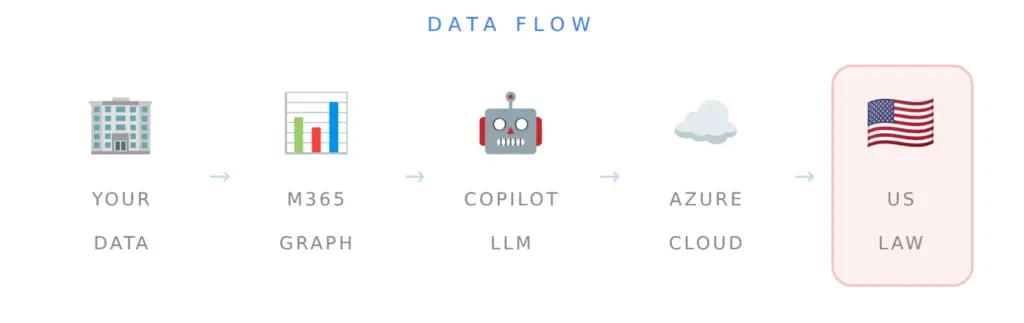
Article 48 GDPR expressly prohibits complying with data access demands from non-European authorities without an international agreement. The conflict is therefore systemic: US law demands disclosure, European data protection law forbids it. For companies this means that a compliance risk can never be fully eliminated as long as they use US cloud providers for sensitive data.
Microsoft as a favorite target for hackers
The popularity of Microsoft products has an undesirable side effect: Microsoft platforms are the preferred target of hackers worldwide. The enormous reach of Windows, Microsoft 365, Azure, SharePoint and Teams turns every successful exploit into a threat to millions of companies at the same time.
Particularly alarming was the 2024 attack by the Russian hacker group "Midnight Blizzard" (also known as Cozy Bear / APT29), in which attackers gained access to internal Microsoft systems and source code repositories, and with them to confidential email correspondence between Microsoft and its business customers. It was thus not only an attack on Microsoft itself, but potentially on the corporate data of its customers.
In addition, several critical security vulnerabilities in Microsoft 365 Copilot itself were discovered in 2025 and 2026. Particularly serious was the vulnerability known as EchoLeak (see the link above), which was rated with a CVE severity of 9.3 (out of a maximum of 10) and gave attackers access to sensitive company data. In addition, vulnerabilities (CVE-2026-25592 and CVE-2026-26030) were found in Semantic Kernel, Microsoft's open-source framework for AI agents, which enabled prompt injection attacks: a harmless chat request thus became a full-blown attack on internal systems.
There are also attack campaigns via Microsoft Teams in which hackers installed malware on company computers within less than 20 minutes of first contact. Between December 2025 and March 2026, 1,540 suspicious Teams interactions were recorded in 172 different organizations.
But in general, too, Microsoft applications and platforms are probably exposed to more attacks than those of other vendors. Microsoft often has great difficulty (or lacks the will?) to close security vulnerabilities quickly and transparently. Over the years, numerous cases have come to light that do not put Microsoft in a good light.
What Microsoft Copilot really costs
The license costs for Microsoft 365 Copilot are significantly underestimated by many companies. The pricing structure is complex and has changed several times recently.
For small and medium-sized businesses (up to 300 users), Microsoft 365 Copilot Business currently costs around €18.20 per user per month (as of June 2026), temporarily discounted to €15.60. On top of that comes the mandatory base license (e.g. Microsoft 365 Business Standard or Premium). The total cost thus amounts to roughly €30 to €50 per user per month.
For enterprise customers, Microsoft 365 Copilot costs around €26 per user per month, plus the enterprise base license (M365 E3 or E5). With M365 E3 as the base, the total cost is around €65 per user per month.
These figures sound manageable at first. On closer inspection it gets expensive: a company with 100 employees that equips everyone with Copilot quickly pays €3,000 to €5,000 per month in the SME variant, that is, up to €60,000 per year. With 500 users it would be up to €300,000 annually, for the AI function alone.
Then there are hidden costs that are often missing from the initial calculation: training effort for employees (without AI literacy training the licenses are effectively worthless), IT governance and implementation effort, external consulting costs for a data-protection-compliant rollout, and follow-up costs from faulty AI outputs that flowed undetected into documents or decisions.
Alternatives: the AI landscape beyond Microsoft
The market offers a wide range of alternatives to Microsoft Copilot, from commercial cloud services to fully self-hosted open-source solutions.
Commercial cloud alternatives such as Google Workspace with Gemini, Anthropic's Claude or OpenAI's ChatGPT Enterprise offer capabilities similar to Copilot, but are subject to comparable fundamental data protection problems, since Google and OpenAI are also US companies and therefore subject to the CLOUD Act.
European cloud providers such as Aleph Alpha (Germany), Mistral AI (France) or the various offerings under the Gaia-X umbrella provide European data sovereignty and are subject exclusively to European law. They are a serious alternative for sensitive use cases.
Local and sovereign AI: the most data-secure choice
The most convincing alternative for companies with high data protection or confidentiality requirements is to operate a local or privately hosted AI system. The language model and the entire infrastructure are run on your own servers, either on-premises in the company's data center or in a private cloud.
Why local AI is the better choice:
Data never leaves the company's own network. The CLOUD Act, FISA and any other foreign law simply do not apply, because no third-party provider is involved. Neither US authorities nor hackers attacking a cloud provider can access data that was never transferred to the cloud. This applies equally to personal data, trade secrets, patents, algorithms and all other sensitive information.
Local AI is practically feasible today for any company that has a suitable server. The open-source community has made remarkable progress in recent years:
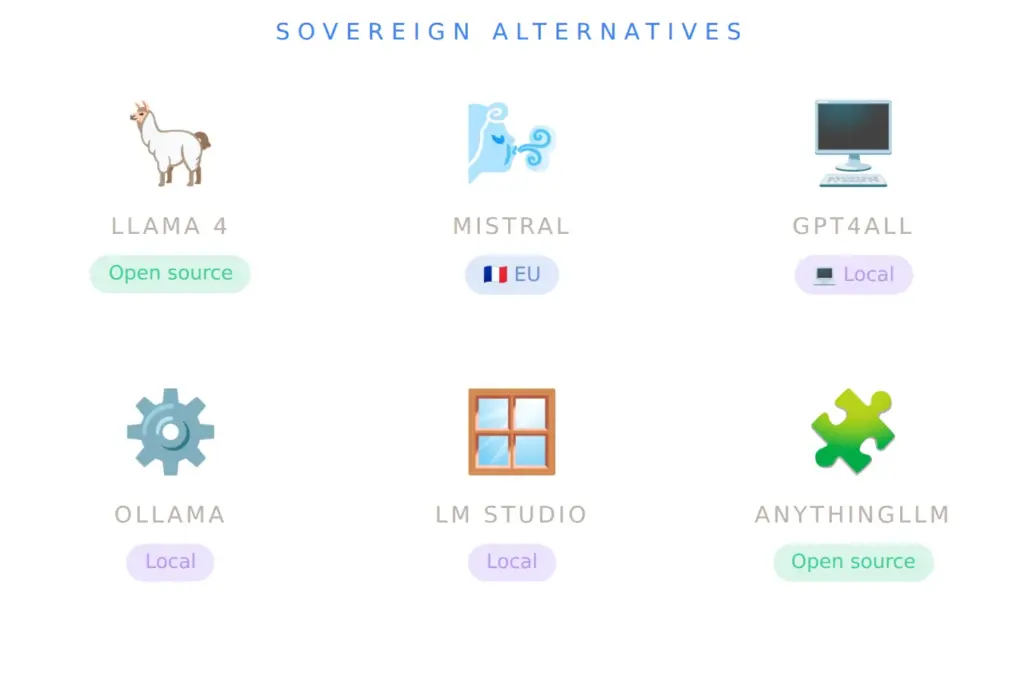
Ollama is the most widely used framework for running LLMs locally. It offers ready-made installation packages for Windows, macOS and Linux, downloads models automatically and provides a local interface compatible with the OpenAI API. Over 200 different models are available, including Llama 3.3, Mistral, Phi-3 and specialized variants for code or text analysis.
LM Studio offers a graphical user interface for local LLMs and is particularly suitable for getting started without command-line knowledge. GPT4All is also popular.
AnythingLLM makes it possible to build custom AI assistants with a local backend, document analysis and long-term conversation storage, a direct Copilot competitor for enterprise use.
Open WebUI (formerly Ollama WebUI) is a browser-based user interface for local LLMs with extensive administration functions and team features.
For developers, self-hosted solutions such as OpenCode or locally run coding assistants based on Ollama offer a data-protection-compliant alternative to GitHub Copilot, especially where source code needs protection as a trade secret or as the basis of a patent.
The installation of your own AI is quite simple, at least for private or semi-professional use. Without optimization or training, the results are good enough for private purposes. Companies have the option of feeding top open-source AI models into an AI system optimized for their use cases. The whole truth also includes this: with an AI model alone (without further surrounding programming) you do not win a war.
Open-source AI: transparency, control and future-proofing
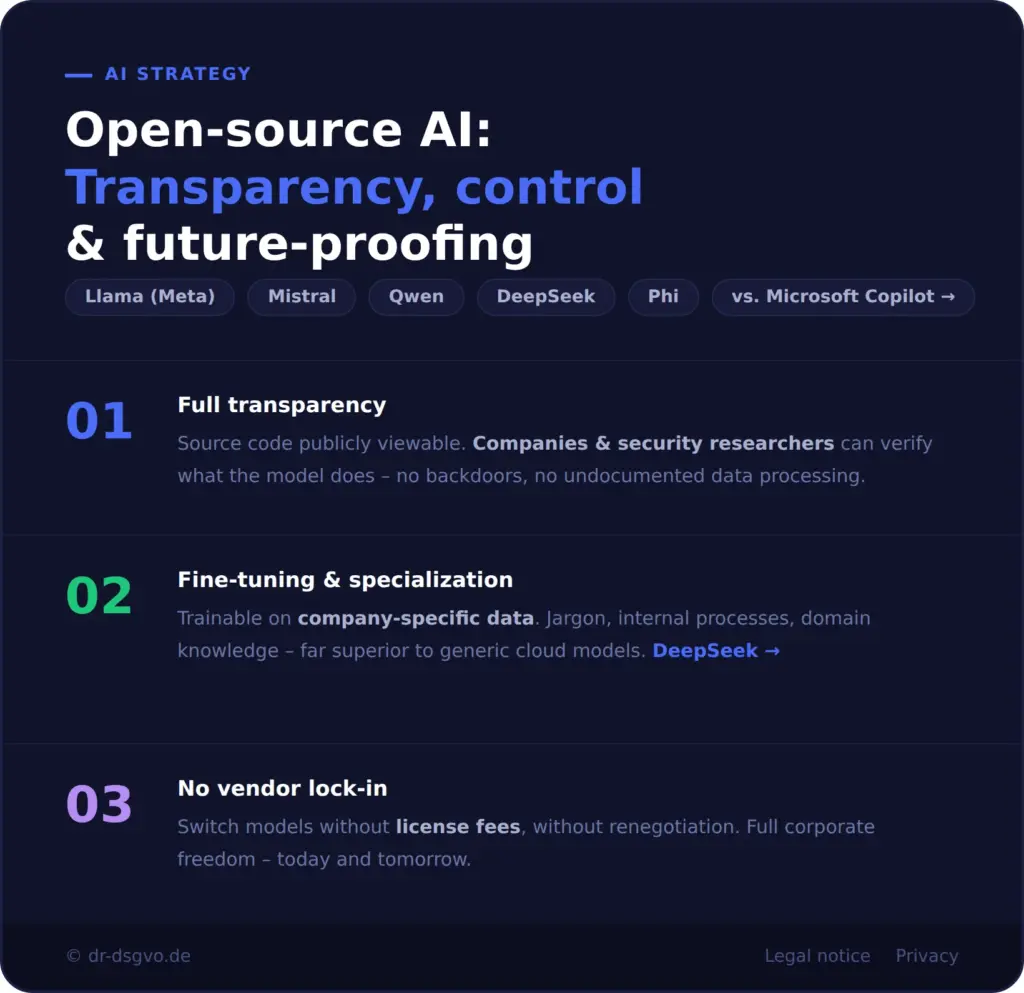
Open-source AI models such as Llama (Meta), Mistral, Qwen, DeepSeek or Phi offer structural advantages over proprietary systems such as Microsoft Copilot that go far beyond price.
Full transparency: the source code is publicly viewable. Companies and independent security researchers can verify what the model really does: no hidden backdoors, no undocumented data processing.
Fine-tuning and specialization: open-source models can be trained or fine-tuned on company-specific data and use cases. The result is an AI that masters technical jargon, internal processes and specific domain knowledge far better than a generic cloud model.
No vendor lock-in: switching to a more powerful model costs no additional license fees with open-source solutions and requires no renegotiation with a provider.
Cost model: instead of ongoing per-user fees, local AI involves either a one-time setup cost (hardware, setup, configuration) plus manageable maintenance costs, or a flat rental price from a specialized managed-service provider. For companies above a certain size, a self-installation usually pays for itself within one to two years compared with a Microsoft Copilot rollout.
Easier compliance with the AI Act: from August 2026, the EU AI Act applies in full. Self-operated open-source solutions offer a decisive advantage: the company knows the system completely, can create technical documentation, implement audit trails and reliably demonstrate human oversight (override mechanisms). With third-party cloud AI, by contrast, you depend on the provider's documentation and transparency, and have few options to prove your own compliance in a dispute. Note that open-source AI is not blanket-exempt from the AI Act; as soon as a high-risk application is involved, the full requirements of the law apply.
When Microsoft Copilot makes (perhaps) sense
A balanced assessment includes this: there are scenarios in which Microsoft Copilot justifies its use. Anyone who is already deeply rooted in the Microsoft 365 world, processes only uncritical and non-confidential data, does not want to operate their own IT infrastructure for local AI and is willing to invest the considerable effort for a data-protection-compliant introduction (DPIA, DPA, governance concept, training) can use Copilot as a productivity tool.
For everyone else, meaning companies with trade secrets, research institutions, law firms, doctors and healthcare facilities, public authorities and any company that values genuine data sovereignty, the structural risks of Microsoft Copilot are hard to justify.
Conclusion: productivity yes, but not at any price
Microsoft Copilot is technically impressive. The integration into the familiar M365 environment is deep and well thought out, the capabilities are real and are continuously being expanded. But the price is high: in euros and cents, in data protection risks, in dependence on a US corporation and its legal demands, and in the attack surface that Microsoft platforms offer hackers.
Companies should ask themselves: which data am I entering into this system? Would I be comfortable if this data could theoretically be viewed by US authorities or, in the event of a hack, by attackers? If the answer is no, and for trade secrets, patents, patient data or strategic plans it should always be no, then local, sovereign open-source AI is the ethically and legally more consistent choice.
The good news: the technological maturity of local AI solutions has reached a point where they are real alternatives for many use cases. The open-source community delivers powerful models, easy-to-use tools and a growing choice of integration options. Anyone who invests in local AI today invests in independence, transparency and future-proofing, and in the best possible protection of the data that forms the foundation of their business.
An example of a secure and optimized AI solution is the Personas AI for market research. Such a solution cannot be realized with cloud AI. Even if you used ChatGPT, Gemini or Claude via API, the costs would be so unpredictable and probably too high in the long run for cloud AI to be worthwhile. Data security aside.
How companies operate AI themselves in a data-protection-compliant way is summarized in the Local AI in the Enterprise overview.
 My name is Klaus Meffert. I have a doctorate in computer science and have been working professionally and practically with information technology for over 30 years. I also work as an expert in IT & data protection. I achieve my results by looking at technology and law. This seems absolutely essential to me when it comes to digital data protection. My company, IT Logic GmbH, also offers consulting and development of optimized and secure AI solutions.