

An AI writes an email in seconds, but sending it is another matter. Who presses “Send” in the end? There are three designs, and each answers the question differently.
Can AI send emails? More and more assistants promise to write, answer or even send emails “on the user's behalf”. Terms such as tool use, function calling, workflow and agent are often mixed up. Many people also assume on their own that an AI can send emails or call someone. The truth looks different.
This article explains what is behind these terms, who actually triggers the email in each design and where control and risk lie. A customer enquiry handled in three variants serves as the common thread: with tool use by the AI, with tools completely outside the AI loop and with tools before and after the model call.
Why a language model alone does not send an email
A language model is a text generator. Text goes in, text comes out. On its own, it cannot do more. It has no access to a mail server, knows no credentials and cannot reach a network. A picture for this: an author sits at a desk and writes excellent letters but owns neither stamps nor a postbox. The letter is finished, but it is lying on the table.
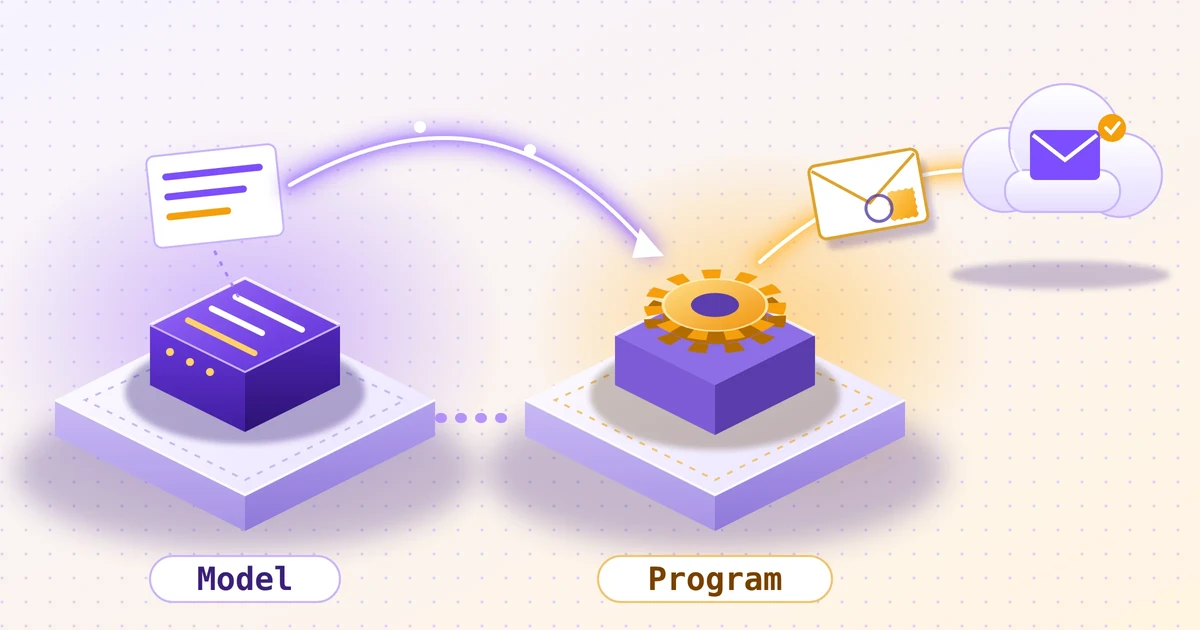
The vendors say so clearly themselves. The Anthropic documentation states, in essence, that the model does not execute anything itself. It outputs a structured request, such as “call the tool send_mail with these details”. The surrounding program executes it. OpenAI describes function calling the same way: tools are defined, the model requests a call, your own code executes it, and the result goes back to the model.
This is the basis for everything that follows. When a chatbot says “I have sent the email”, there is always a program behind it that actually did the sending. Whether this program acts at the model's request, on a fixed schedule or only after a human clicks is what distinguishes the three designs. Anyone who understands this sees through most marketing promises around AI assistants: the intelligence is in the text, the action is in the program.
A tool here is simply a program component with a clear task, for example “send email”, “read calendar” or “search customer file”. A tool is not automatically AI. A mail server is a tool that has existed for decades and works without any AI.
Can AI send emails? The short answer in context
Can an AI send emails by itself?
For everyday use, then: yes, an AI system can send emails, but never the model alone. It depends on the framework around it (the harness). Three variants are common, and they differ in two questions: who decides that an email goes out, and who carries out the sending?
- Variant 1, tool use: The model decides during the conversation that an email should be sent and requests the call. The application executes it.
- Variant 2, tools outside the AI loop: A program sends emails according to fixed rules. A model is not involved at all or supplied the text at some earlier point.
- Variant 3, tools before and after the model call: A fixed pipeline prepares data, asks the model once for a draft and then handles checking, approval and sending.
The model writes the letter, but someone else posts it.
Variant 1: tool use, the AI requests the sending
Tool use refers to a model's ability to request a tool call. A picture for this: an assistant calls out to the boss, “Please send this email”, and the boss, who has access to the mailbox, does it. The assistant can advise and draft. The hand on the send button belongs to someone else.
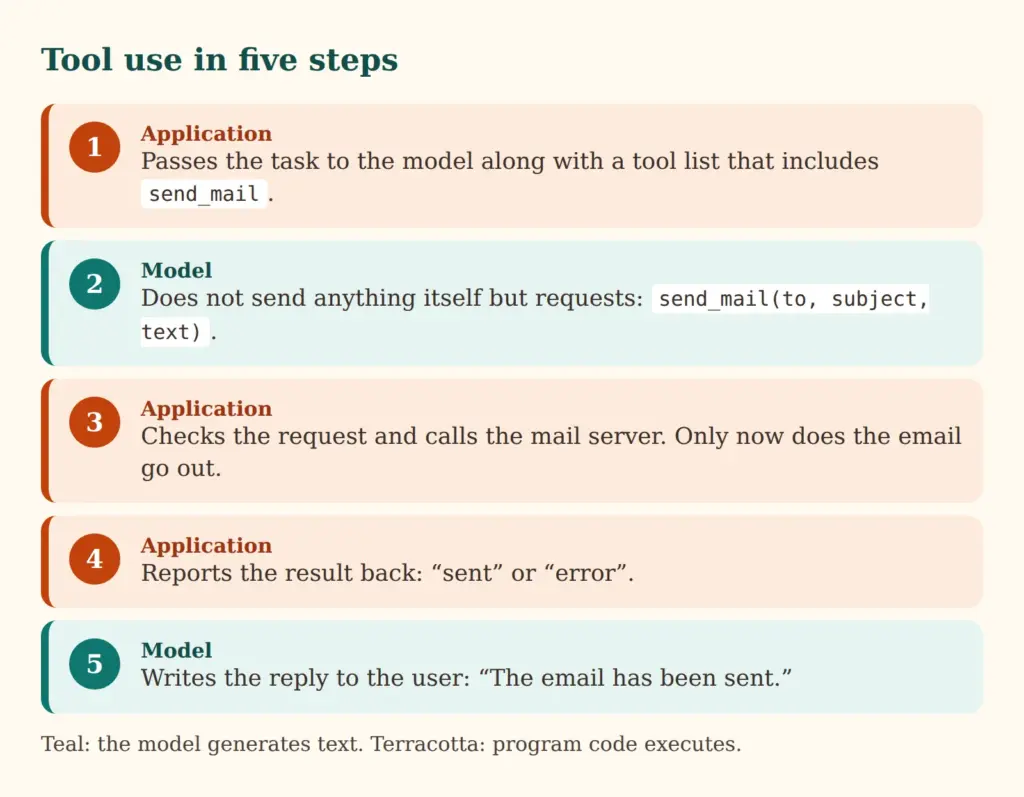
Technically this takes five steps, essentially the same at Anthropic and OpenAI. The technical term is function calling.
- The application gives the model the task together with a list of tools. Each tool has a name, a description and fields, for example “send_mail” with recipient, subject and text.
- The model decides whether a tool is needed. If so, it does not reply with prose but with a structured request.
- The application checks the request and executes it. Only now does the email go out via the mail server.
- The application reports the result back to the model, either “sent” or an error.
- The model writes the reply to the user.
What matters is where the code runs. With so-called client tools, the code runs in the operator's own program. Sending email usually belongs here, because it requires credentials for your own mail account. There are also server tools that the model provider executes itself, such as a web search. Email sending by the provider on its own is usually not offered. The Anthropic documentation explicitly names actions with side effects, such as sending an email, as a typical case for your own tools.
Connecting many tools is increasingly handled by the Model Context Protocol (MCP), an open standard that connects AI applications to external systems. The introduction compares it to a USB-C port: one plug, many devices. A mail tool built to the MCP standard can thus be connected to different AI applications without being rebuilt each time.
Examples of tool use for sending email
- Personal assistant: Asked to “suggest three appointments next week to Ms Meier”, the model reads the calendar via a tool, writes the email and requests sending. The program sends.
- Support agent: A customer reports a problem in the chat. The model creates a ticket via a tool and then requests a confirmation email to the customer.
 My name is Klaus Meffert. I have a doctorate in computer science and have been working professionally and practically with information technology for over 30 years. I also work as an expert in IT & data protection. I achieve my results by looking at technology and law. This seems absolutely essential to me when it comes to digital data protection. My company, IT Logic GmbH, also offers consulting and development of optimized and secure AI solutions.