

One experiment shows that MFA does not prevent stolen sessions: more than 200,000 failed sign-in attempts, 497 successful sign-ins, and emails about salaries and bonuses vanishing into hidden rules. The focus is on how to recognize this kind of Microsoft 365 token theft, why the platform's wide adoption makes the attack worthwhile and what to do first in an emergency.
What token spraying is about
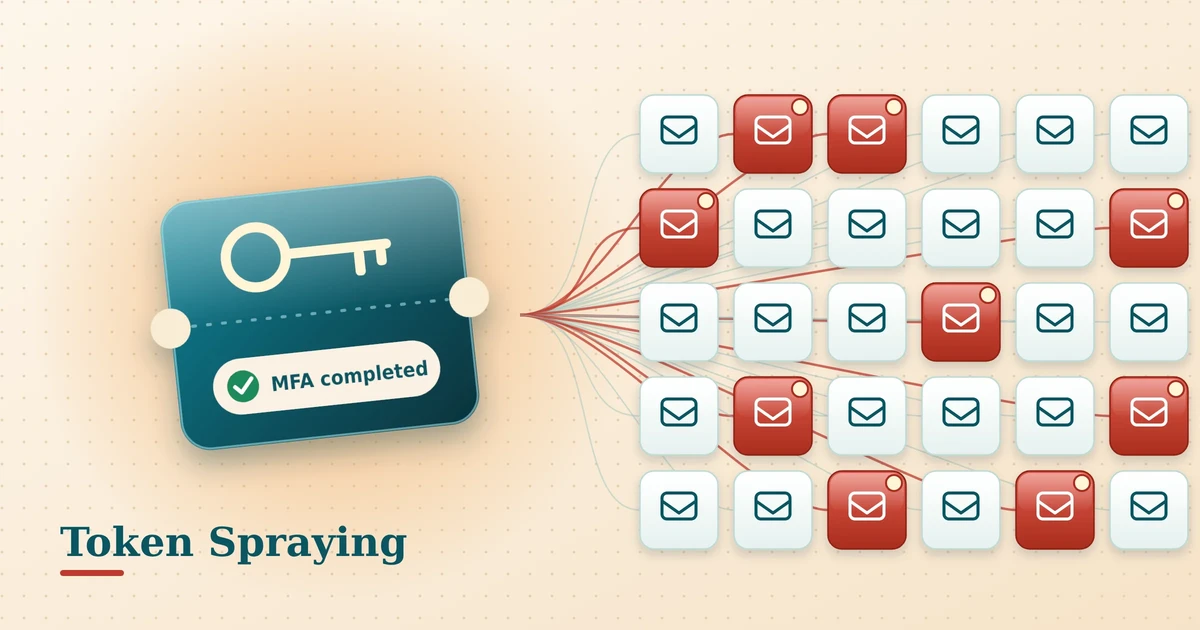
Token spraying in Microsoft 365 is the name for a technique that the security vendor Huntress observed in a campaign. The attackers do not guess passwords. They steal session tokens after an employee has properly signed in with a password and multi-factor authentication (MFA), and shortly afterwards replay these tokens from their own infrastructure. The name is a nod to password spraying, in which one password is tried against many accounts. Here, stolen sign-in credentials are spread widely and reused.
The information about the campaign comes from Huntress and from a report by The Hacker News. It is based on observations among customers of one security vendor and says nothing about all tenants.
Microsoft 365 token theft: what Huntress observed
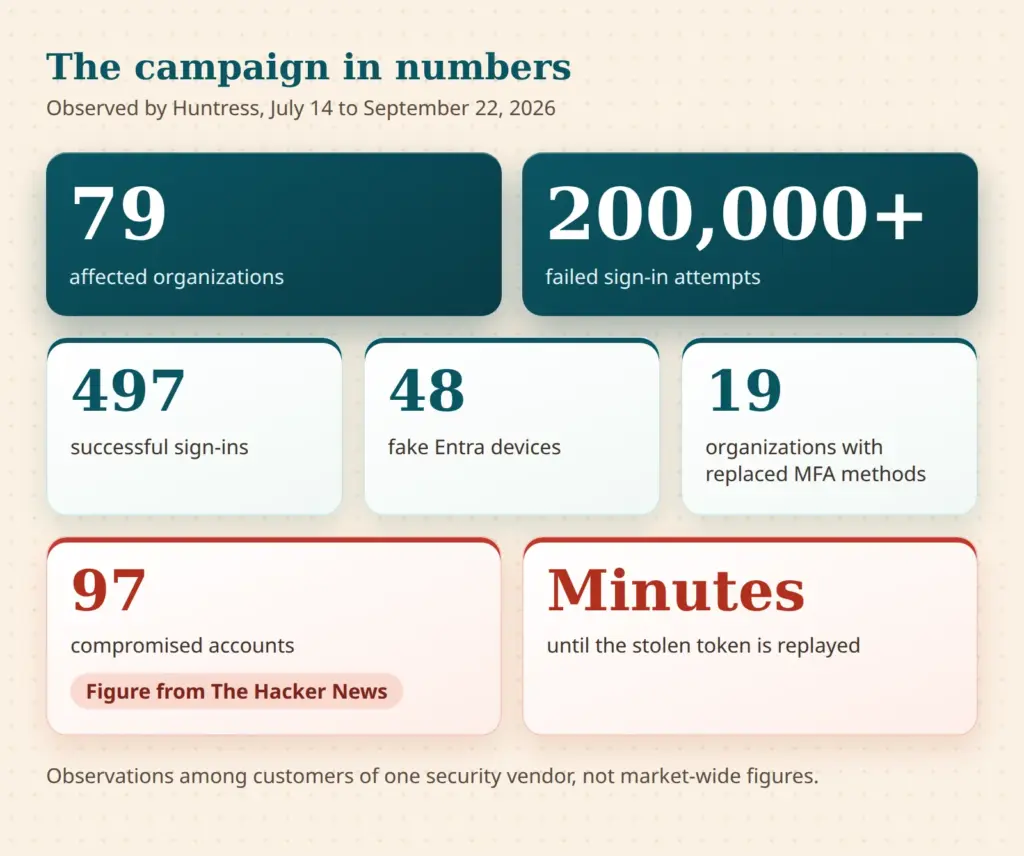
Huntress describes the campaign in the report Token Replay and Spray. The exact publication date of the report is not certain; what is documented is the observation period from July 14, 2026 to September 22, 2026. During this time, Huntress saw attacks on 79 organizations, more than 200,000 failed sign-in attempts and 497 successful sign-ins. At least 48 fake devices were created in Entra directories. In 19 organizations, existing MFA methods were removed and replaced with a new one.
As far as is known, the figure of 97 compromised accounts is reported only by The Hacker News. It could not be confirmed in the Huntress report and is therefore given here as a figure from that report. The numbers for the individual attack waves also differ slightly within the Huntress account. For context, the order of magnitude is enough: with 79 affected organizations, 497 successful sign-ins and several attack waves over roughly ten weeks, this was not an isolated case but a series.
How token spraying differs from password spraying
Password spraying produces many failed attempts, because most passwords are wrong. With token spraying, the sign-in credentials are valid. According to Huntress, the failed attempts in the campaign came from the attackers' networks, a large share of them from a hosting provider in Germany. That says nothing about other customers of this provider. Blocking individual addresses also helps little, because the attackers changed their addresses in waves, with one to two weeks of quiet between the waves.
How token replay undermines MFA
The technique is also called token replay, meaning a stolen token is played back again. The process can be described in four steps.
- Lure: An employee receives a phishing email or is directed to a third-party site through social engineering. How such emails gain trust is described in the article on the authenticity of electronic messages.
- Interception: An adversary-in-the-middle (AiTM) relay sits between the employee and the real Microsoft sign-in page. The password and MFA prompt pass through the relay, which then stores the token. In device code phishing, the victim is instead tricked into entering a code on the real Microsoft page, which the attacker uses to obtain a token.
- Replay: A few minutes to about an hour later, the attacker uses the token from their own servers. Neither a password nor a second MFA prompt is needed.
- Persistence: The attacker registers their own authenticator app, removes existing MFA methods or creates a fake device. Both survive a password change.
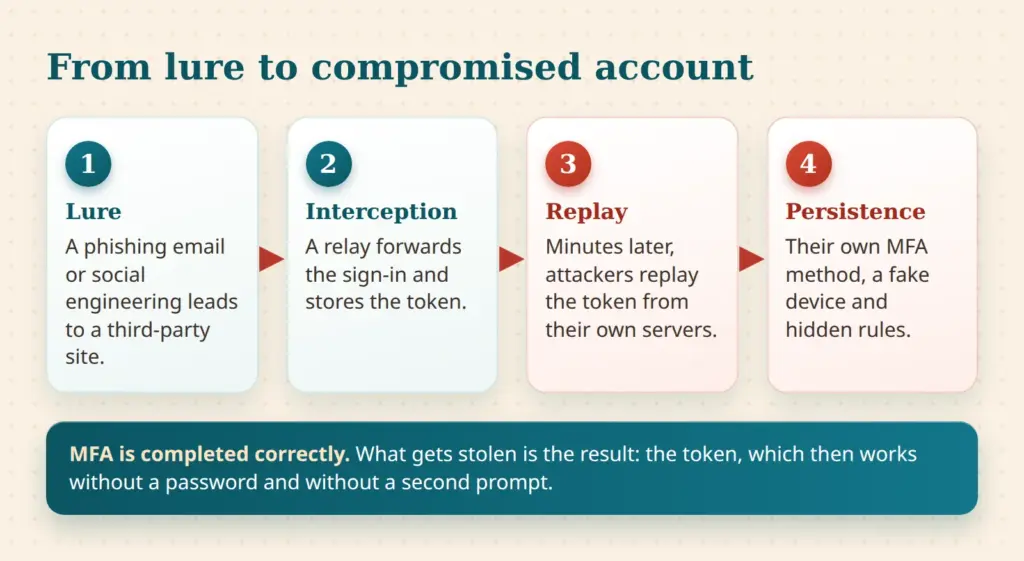
The key point is this: MFA was not cracked. The employee completed it correctly. What is stolen is the result, the token. MFA can therefore only be bypassed here if the token also works outside the employee's device. Codes, SMS and push approvals help against password guessing, but not against this kind of theft.
Huntress found two families of tools. One is a script that identifies itself with the user agent "node" and requests tokens via the Office and Authentication Broker applications. The other replays browser sessions. Sign-ins of the second kind look like ordinary browser access and are correspondingly less conspicuous.
Does MFA alone protect against token spraying in Microsoft 365?
Microsoft monoculture: why Microsoft 365 is the most rewarding target
Microsoft 365 is used in countless businesses in Germany and worldwide. From the attackers' point of view, that is an economic argument: an attack built once can be repeated against a very large number of tenants. The sign-in pages look the same everywhere, the application IDs are the same, and so are the error codes. What works at one business works at many others with small adjustments.
The campaign shows this scaling. Stolen tokens were used automatically and within minutes, spread across 79 organizations. According to Huntress, the attackers did not prioritize by the number of failed attempts, but by where valid sign-in credentials existed. That is how a mass business operates, not a targeted operation against a single company.
The more widespread a platform is, the more it pays to build an attack once and repeat it a thousand times.
Author's assessment
Adoption is the amplifier, not the sole cause
This is not a blanket condemnation. Microsoft supplies the countermeasures itself: Conditional Access, Security Defaults and Token Protection. The risk arises when these tools are not used, or only partially. Attackers tailor their automation to the default settings, because these apply to most tenants. Every deviation, such as a device-bound sign-in or a blocked device code flow, costs attackers effort and removes the basis for mass exploitation.
The spread of Copilot and other services behind the same accounts also increases the leverage of a compromised account. A critical assessment is provided in the article Copilot under the microscope. In Microsoft 365, a single account opens mail, files, calendar and chat at the same time.
Payroll fraud as the goal: what happens after the takeover
After the takeover, the attackers in the campaign created hidden inbox rules. These moved or deleted emails containing payment-related terms, such as salary, deposits or bonus. The target folders had inconspicuous names such as "RSS Feeds" or "Conversation History". In one case, a salary email was sent to an external tax advisor. Replies were marked as read and moved away so that the victim would not notice them.
Behind this is business email compromise (BEC): the aim is to redirect transfers or have salary accounts changed. In another case, a mailbox was misused to send spam to hundreds of external recipients until Entra ID Protection classified the account as high risk.
For small businesses, this is particularly sensitive. Often only a few people work in accounting and HR. A changed account is noticed late, and payroll is frequently handled by third parties. Management then decides on recalling payments and informing the bank, tax advisor and payroll office. That belongs in the emergency plan, not only in the crisis.
Typical traces: new authenticator app, unknown Entra devices, inbox rules
The campaign leaves traces in Microsoft Entra ID, the user management behind Microsoft 365, that can be checked without specialist tools. The following table summarizes the most important ones. The naming patterns come from the Huntress report and may change.
| Trace | Where to check | What stands out |
|---|---|---|
| New authenticator app | Entra admin center, users, authentication methods and audit log | New method or device name the user does not recognize; old methods removed; change shortly after the first sign-in |
| Unknown Entra devices | Entra admin center, devices, by registration date and owner | Names following the pattern "DESKTOP-" plus eight hexadecimal characters, registration from hosting networks |
| Inbox rules | Exchange admin center and PowerShell, including transport rules | Rule names of one to three characters or punctuation marks, target folders "RSS Feeds" or "Conversation History" |
| Suspicious sign-ins | Sign-in logs in Entra | User agent "node" or a bare "Mozilla/5.0" from hosting networks |
| Error code 53003 | Sign-in logs in Entra | Access blocked by Conditional Access; the sign-in credentials were therefore valid |
| Error code 50133 | Sign-in logs in Entra | Session invalid; according to Huntress an indication of token reuse, but not proof on its own |
Error code 53003 deserves attention. A block by Conditional Access is usually seen as a success of the policy. But it also shows that someone outside the company holds valid sign-in credentials or a valid token. Such an entry is a reason to check the account. Inbox rules created via an API do not always appear in the user interface. They become visible via the Exchange admin center or PowerShell.
Small businesses without log monitoring often only see things in hindsight. How long sign-in logs are retained depends on the license and should be clarified in advance, because without logs the scope of an incident remains unknown.
Conditional Access: block the device code flow and require MFA for all client types
The device code flow is a sign-in method for devices without a keyboard or browser. Attackers abuse it in device code phishing by getting users to enter a code on another device. In its documentation on blocking authentication flows, Microsoft recommends getting as close as possible to a complete block and allowing the flow only in well-documented exceptions, such as legacy tools that cannot be updated.
The policy is created in the Entra admin center under Entra ID, Conditional Access, Policies. The condition is "Authentication flows" with the selection "Device code flow", and the access control is "Block access". Microsoft recommends running the policy in "Report-only" mode first and only then enabling it. Two emergency access accounts are excluded, and their list should be reviewed regularly.
License: Conditional Access or Security Defaults
According to Microsoft Learn, Conditional Access requires at least Microsoft Entra ID P1 (prerequisite per the documentation on authentication strengths). Businesses without this license have the Security Defaults, which according to Microsoft require no license. The protective measures listed there include MFA registration for all users, blocking legacy protocols and blocking the device code flow. Microsoft also states that from July 1, 2026, all new Entra tenants block the device code flow as part of the Security Defaults. According to Microsoft, the Security Defaults cannot be customized, only switched on or off. Anyone who needs exceptions or more granular rules needs Conditional Access.
MFA for everyone, without exceptions for apps or clients
A baseline policy should require MFA for all users, all resources and all client types, or block access. This is exactly the demand made in the Huntress report, and gaps often arise from well-intentioned exceptions such as "admin portals only" or "browser only". Legacy protocols such as IMAP, POP3 and SMTP authentication do not support MFA and should be blocked.
Phishing-resistant methods such as FIDO2 security keys or Windows Hello for Business protect much better against AiTM interception than codes, SMS or push approvals. Microsoft names an interaction between the authentication method and the sign-in surface as a characteristic of the "Phishing-resistant MFA" strength (authentication strengths). This page contains no explicit statement about AiTM, so this assessment is the author's conclusion. How to create a baseline policy with authentication strength is described on the page MFA for all users. It makes sense to start with administrators.
Token Protection and its limits
Token Protection is a session control in Conditional Access. It only accepts sign-in tokens that are cryptographically bound to a registered device. A stolen token then does not work on another device. According to Microsoft Learn (page as of August 2026), the feature is generally available for native applications on Windows, iOS, iPadOS and macOS and applies to Exchange Online, SharePoint Online and Teams. Windows 365 and Azure Virtual Desktop are added on Windows. The page contains no separate licensing information, so the license requirement must be clarified separately. As a Conditional Access feature, Token Protection requires at least Entra ID P1, according to the author's own inference. This is not a quote from Microsoft.
The limits are clearly stated. Browser-based applications are supported only in preview and only for selected web apps that use Azure Resource Manager. Outlook on the web is therefore not covered. In addition, devices must be Entra registered, joined or hybrid joined. Apple devices need to be managed devices with the single sign-on extension. For businesses with personal devices, this is a real hurdle.
Token Protection reduces token replay but does not eliminate the risk. Microsoft recommends a pilot group, "Report-only" mode and evaluation of the sign-in logs before a broad rollout. A compliant device as an access condition, restricting consent to new apps and regularly reviewing new enterprise applications also help. Phishing-resistant MFA and device-based access reduce the risk; monitoring detects what still gets through.
Emergency procedure: revoke sessions, clean up devices and MFA methods
The following sequence is the author's recommendation, derived from the Microsoft documentation on revoking access and the Huntress report. It is not an official requirement. The general procedure after a successful attack is described in the article Ransomware: action plan for the first 60 minutes, and parts of it can be applied here.
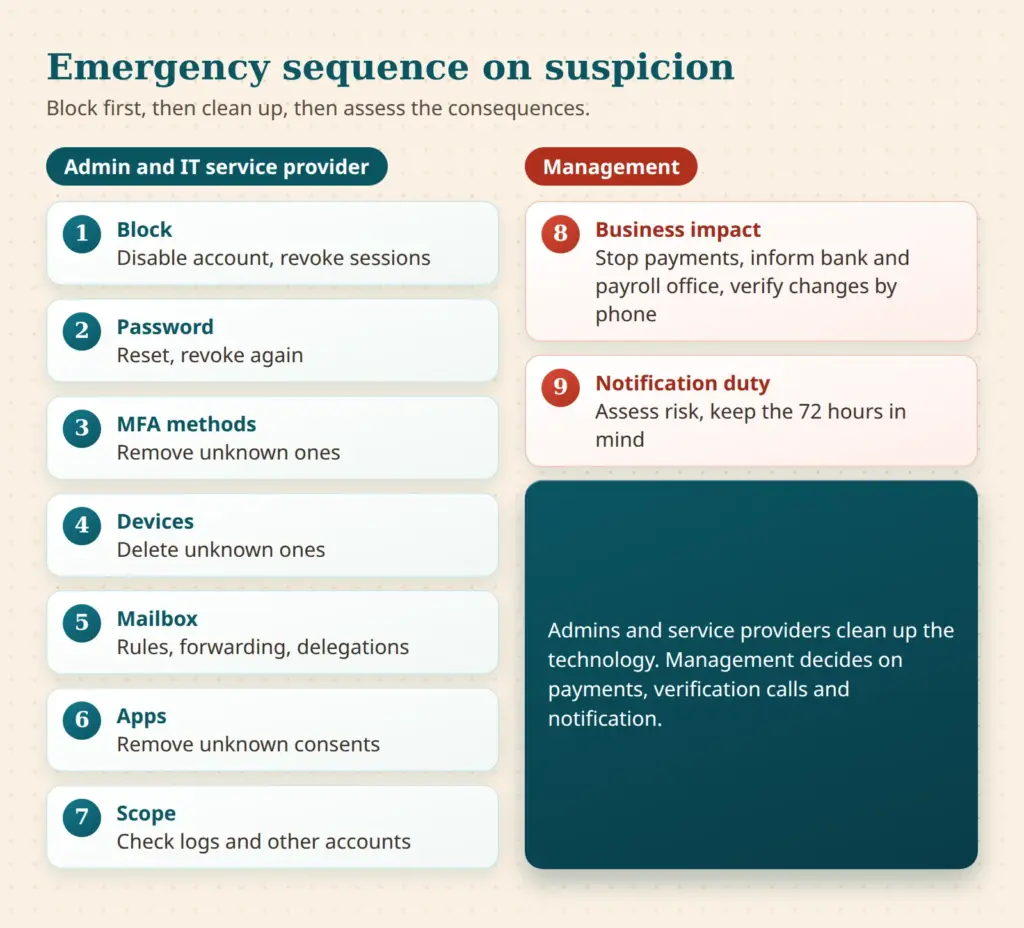
- Block the account and revoke sessions: In the Entra admin center under Users, "Account enabled" is deselected and "Revoke sessions" is chosen, or via PowerShell with Revoke-MgUserSignInSession. This prevents new tokens.
- Reset the password: In hybrid environments, Microsoft recommends resetting the password twice in the on-premises Active Directory. Sessions are then revoked again.
- Check MFA methods: Unknown methods, especially a new authenticator app, are removed. The real user sets up their methods only afterwards, ideally with a confirmation call back by phone.
- Check devices: Unknown registered devices are disabled and deleted. They are a sign of persistence.
- Clean up the mailbox: Rules, forwarding, delegations and transport rules are checked and removed. Sent and deleted items are reviewed for anything unusual.
- Check apps: Unknown enterprise applications and app consents are removed.
- Determine the scope: Sign-in logs from the earliest suspicious point in time are evaluated. Other accounts in the same department should also be considered, as the campaign often affected several accounts per organization.
- Assess the business impact: Have bank details, salary data or invoices been changed? The bank, tax advisor and payroll office are informed, payments are stopped and change requests are confirmed by phone. Management makes this decision.
- Assess the notification duty: Whether a notification to the supervisory authority is required depends on the risk. The deadline is 72 hours after becoming aware (Article 33 GDPR). This is not legal advice.
Why revocation does not take effect immediately
According to Microsoft, access tokens are valid for one hour by default. Revocation blocks new tokens and invalidates refresh tokens, but access tokens that have already been issued remain valid until they expire. For applications with their own session cookies, the application itself must end access. Continuous Access Evaluation (CAE) shortens this time to a few minutes for Exchange Online, SharePoint Online and Teams, according to Microsoft with a delay of up to 15 minutes. Huntress reports that access tokens remained valid for up to around 90 minutes and that a password reset alone removes neither fake devices nor MFA methods. Both belong together: clicking "Revoke sessions" is a start, not the end.
What admins and managing directors can check this week
- Is the device code flow blocked, or are the Security Defaults enabled?
- Does a policy require MFA for all users, resources and client types without app exceptions?
- Are legacy protocols such as IMAP, POP3 and SMTP authentication blocked?
- Are there two emergency access accounts that are excluded from policies and secured separately?
- Have authentication methods, devices and inbox rules in accounting and HR been reviewed?
- Is it clear who decides in case of suspicion and which service provider can be reached outside business hours?
When it comes to the IT service provider, what matters is response time, access to logs, knowledge of the policies and written documentation of exceptions. An external look at the configuration can be useful, for example through the security checks. The company's own website and mail domain are also part of the attack surface. The website check looks at the website from the outside but does not check Entra settings.
Its wide adoption makes Microsoft 365 the default target. Anyone who tightens the default settings, keeps an eye on devices and methods and talks through the emergency in advance takes away the basis for automation. Seen soberly, this is less a matter of panic than of configuration and routine.
 My name is Klaus Meffert. I have a doctorate in computer science and have been working professionally and practically with information technology for over 30 years. I also work as an expert in IT & data protection. I achieve my results by looking at technology and law. This seems absolutely essential to me when it comes to digital data protection. My company, IT Logic GmbH, also offers consulting and development of optimized and secure AI solutions.