

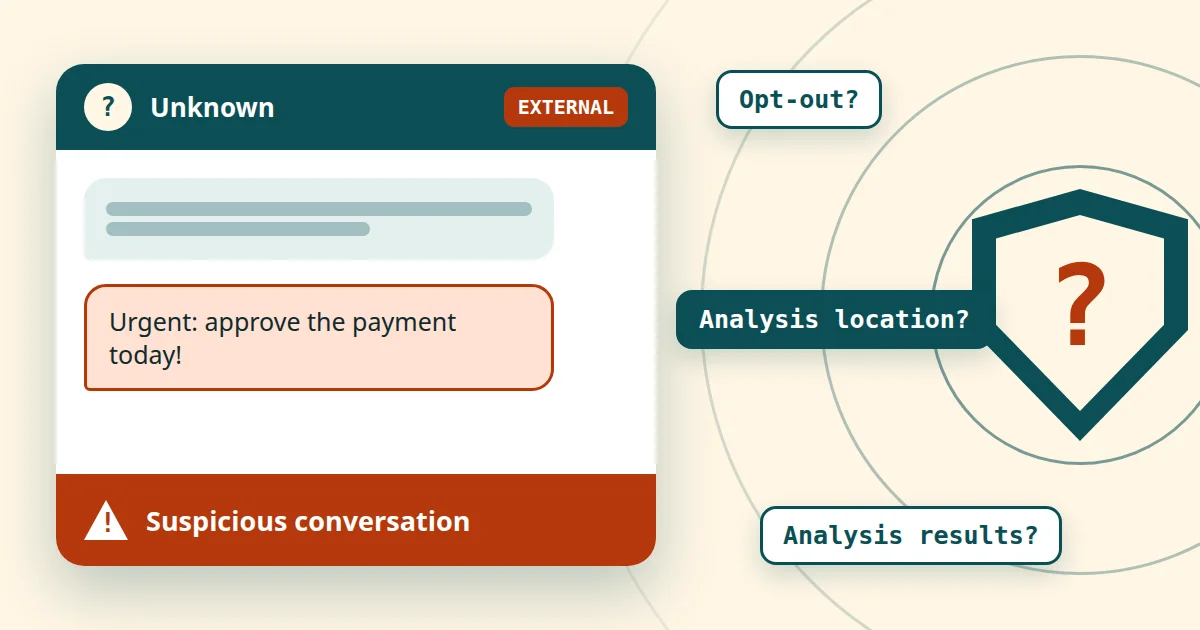
According to Microsoft, Teams AI phishing detection will check chats with unknown external contacts for phishing from November, exclusively for security purposes and without storing message content. Opt-out, the location of the analysis and the use of the analysis results remain open. This creates a need for clarification regarding the records of processing, the impact assessment and the works council.
New AI in Teams: what Microsoft has announced and why it concerns data protection
According to BleepingComputer on 23 October 2026, Microsoft has announced AI-powered detection of phishing and social engineering for Teams in the Message Center (MC1519866). The feature arrives automatically; according to the information available, admins do not have to switch it on. That is exactly where the tension lies: a security feature that evaluates conversation context is being introduced into a tool in which employees communicate every day.
In any case, Microsoft has not stood out in recent years for either transparency or a particularly good security culture – see the many incidents and questionable actions by Microsoft.
Three labels are used for classification: Confirmed is what a named source supports, unconfirmed is what Microsoft has not answered, and assessment is an evaluation that does not claim to be legal advice.
In brief: the security gain is plausible. However, data protection and co-determination questions do not resolve themselves just because the rollout is automatic. Those who document before the rollout remain able to act. A similar case is described in the article on scam detection in Chrome with Gemini.
Teams AI phishing detection: what the feature does and when it arrives
The source for this section is the report by BleepingComputer of 23 October 2026. The Message Center post itself is only visible within a tenant and could not be viewed in the original here. A public mirror and a mirror of roadmap item 575288 merely make access easier and do not count as primary evidence.
Confirmed according to BleepingComputer: The feature analyses the conversation context to detect phishing, social engineering, impersonation and deceptive intent. This is meant to work even without classic indicators such as malicious links or files. The focus is on high-risk situations, for example chats with external contacts who are writing for the first time. If a conversation is classified as suspicious, users receive a warning.
On the schedule, the report gives the following details, which are expressly provisional:
- Start of rollout: early November 2026.
- Targeted Release: expected by mid-November 2026.
- General availability worldwide: expected early to mid-December 2026.
According to the mirrors, however, the roadmap item gives “November 2026” as the date of general availability and the status “In development”. Both details are subject to the usual caveat that dates may change. Anyone planning should use the earlier date as the basis. According to the mirror, the feature applies to Android, desktop, iOS, Mac and web in the standard multi-tenant cloud. This, too, has not been checked against the original.
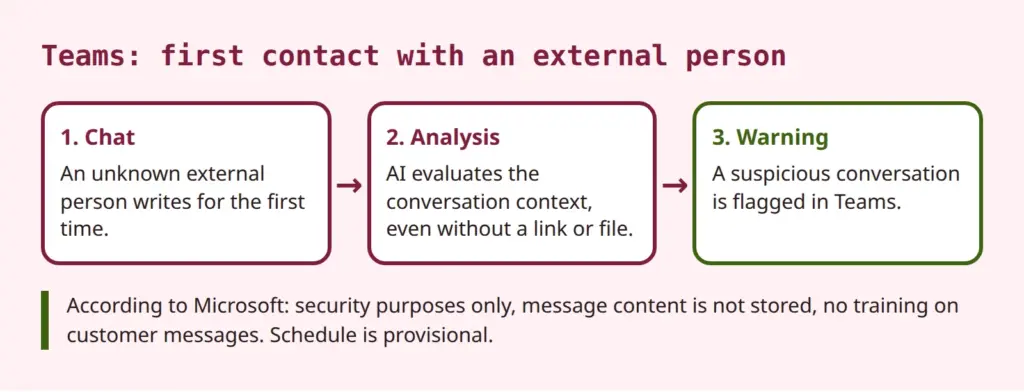
According to Microsoft, admins do not need to do anything to activate the protection. The report does not mention any way to decline or deactivate the feature. It is therefore unconfirmed whether there is a switch. Neither its existence nor its absence is confirmed. It is also open whether the feature requires certain licences such as Defender for Office 365. The report does not name any.
For context: Teams already has protective features. The Microsoft Learn page on Defender for Office 365 in Teams lists, among other things, warnings about dangerous URLs, Safe Links, Safe Attachments, the subsequent removal of malicious messages (ZAP) and reporting by users. According to Microsoft, the new feature is an additional layer that addresses pure text attacks without links. The Learn page does not mention it. Microsoft had previously announced detection of brand impersonation in first contacts (MC910976). The current feature goes further by evaluating the conversation context.
Security gain for first contacts with external parties
Assessment: The focus on first contacts with external parties makes sense. A chat in Teams feels more familiar than an email. People who receive a message in a messenger are less likely to expect a fraud attempt. Attackers exploit this by posing as service providers, managers or IT support. Classic filters struggle to detect such attacks when the message consists only of text. An analysis of the context can help here.
The limits should be just as clear. According to the available sources, Microsoft does not state any detection rates or false alarm rates. Both are unconfirmed. False alarms cannot be ruled out with context analysis. Legitimate partners writing for the first time could be flagged. The opposite is also conceivable: a clever attack goes undetected. The feature therefore replaces neither training nor clear rules.
Measures that make sense regardless of the new AI:
- Control external communication in Teams, for example via allowed or blocked domains.
- Encourage employees to report suspicious chats instead of just closing them.
- Show typical scams in awareness training, including chat attacks without links.
- Check your own attack surface, for example with technical security checks.
The security gain is real, but it is not a blank cheque. It justifies taking the feature seriously. It does not replace examining how it works.
Microsoft Teams data protection: what Microsoft promises and what remains open
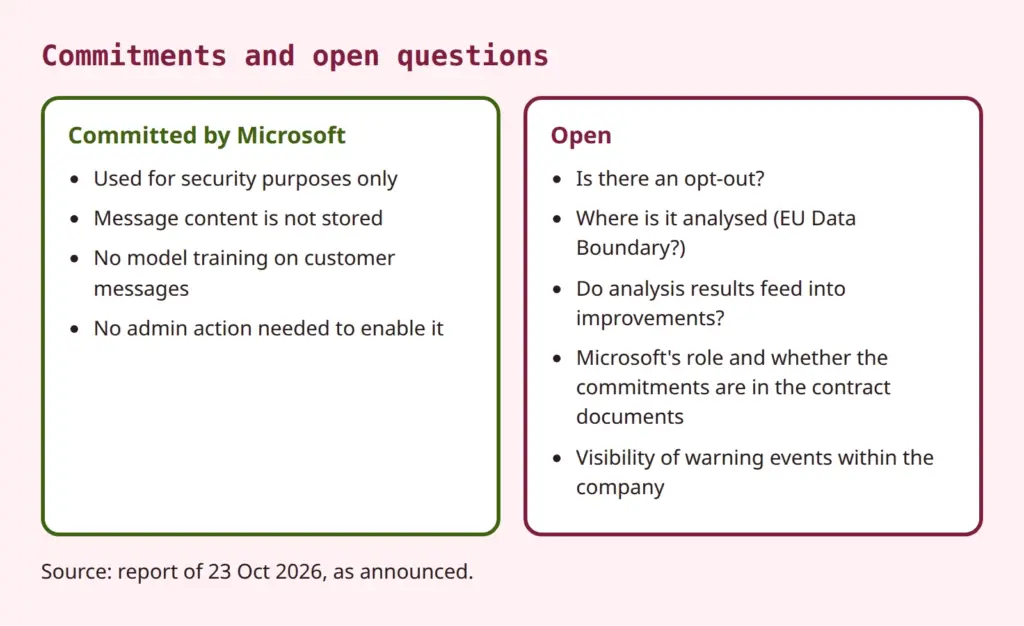
Confirmed as statements by Microsoft (according to BleepingComputer, paraphrased): The feature is used only for security purposes. It is not used for productivity, summarisation, advertising or monitoring users. Message content is not stored by the detection system. It is not used for model training or other secondary purposes. According to the mirror, the roadmap item itself only mentions use “exclusively for security purposes” and leaves details on processing, retention period and data provision open.
These commitments are a good start. However, they appear for now only in the announcement; whether they are part of the contract documents needs to be checked. What counts for the assessment is whether they can be traced in the Product Terms, the Data Protection Addendum or the product documentation.
Not storing data does not mean nothing is analysed.
This distinction is at the heart of the open questions. “Message content is not stored” and “no training on customer messages” are statements about storage and model training. They do not say that no analysis takes place. The analysis is the feature itself. Nor do they say what happens to the results of the analysis. Whether a detection verdict, derived metadata or feedback from user reports feed into improving Microsoft services is not answered by the announcement. This is not a claim that this happens. It is an open question that needs to be clarified before an assessment.
Further points that are unconfirmed and belong on the list of questions for Microsoft or the documentation:
- Opt-out: Is there a switch at tenant level, for groups or for individual users? The report and the roadmap are silent on this.
- Location of the analysis: Does it take place within the EU Data Boundary? The roadmap item only says “Worldwide”. Whether the feature is covered by the data boundary must be shown by the documentation.
- Use of the analysis results: Do derived results feed into improving services? The only commitment is that messages are not used for training.
- Role of Microsoft: Does Microsoft act as a processor or, for security purposes, partly as an independent controller? This depends on the current version of the Data Protection Addendum to the Product Terms. That version could not be retrieved here, so no statement on the new feature is made.
- Warning events: Do hits appear in logs, reports or the Defender portal, and who in the company can see them? This determines the co-determination question in the section after next.
For a general classification of such AI features, the article on the uncomfortable truths behind Microsoft's AI promise provides further background. It deals with Copilot, but the reasoning can be transferred: commitments on product pages must be distinguished from contract documents.
The commitments are not being called into question. What matters is whether they can be verified: a data protection assessment needs documents that can be cited and archived, not just an announcement.
Legal basis, records of processing and data protection impact assessment for phishing detection
Assessment: The most likely legal basis for the evaluation is the employer's legitimate interest in IT security (Art. 6(1)(f) GDPR). Necessity can be justified by the security of processing. In the employment context, Section 26 BDSG (German Federal Data Protection Act) also applies, as does a works agreement as a collective agreement. How far Section 26(1) sentence 1 BDSG still holds after the CJEU ruling on a parallel provision in Hesse (C-34/21, 2023) is disputed. This remains a reference to legal uncertainty here. Going into more depth would go beyond the scope, and the ruling was not checked in the original for this article.
Employees are not the only ones affected. The external senders making first contact are also processed. Their messages are the subject of the analysis. The balancing of interests and transparency towards external parties are therefore part of the assessment, for example via the company's privacy notice.
The record of processing activities is the first practical step. The feature can probably be listed as an addition to the existing Teams processing or to IT security. The purpose, categories of data subjects (employees and external communication partners), data categories (chat content as the subject of analysis, warning events), recipients, possible transfers to third countries and deletion periods need to be checked.
For the data protection impact assessment: first check the existing impact assessment for Microsoft 365 and Teams for changes. A new AI-based evaluation of communication content can change the risk. Whether a new or amended impact assessment is needed depends on the open points, above all opt-out, location of the analysis and use of the results. The threshold analysis and a comparison with the lists of the supervisory authorities serve as decision aids. The message is therefore “check and document”, not “must create a new one”. The basics are covered in the article on Article 35 GDPR and the article on the impact assessment for AI and other digital services.
Another point: the feature generates warnings, not decisions about people. However, if the system automatically excludes messages or blocks contacts, the question of automated decisions could arise. As things stand, this is not to be expected; but it should be monitored in case Microsoft extends the feature.
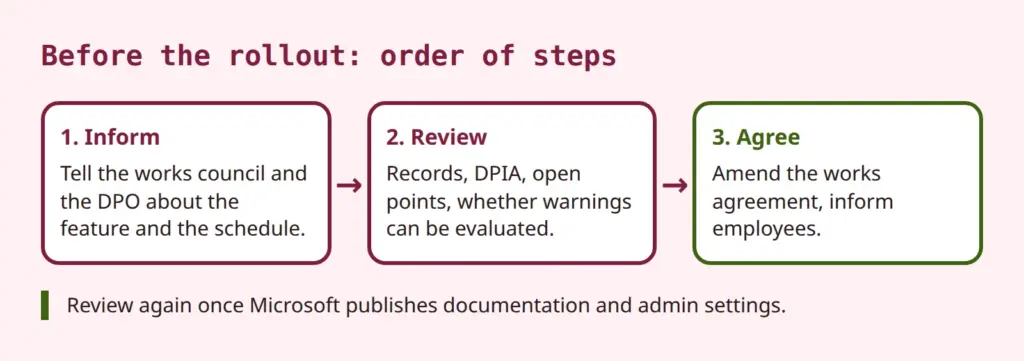
Does AI phishing detection in Teams have to be reviewed for data protection and agreed with the works council before the rollout?
In practice, this means: add an entry to the records, check the impact assessment, create a note on “assessment status and open points” and set a follow-up as soon as Microsoft provides documentation.
Co-determination of the works council for the Teams feature
Under Section 87(1) no. 6 BetrVG (German Works Constitution Act), the works council has a right of co-determination in the introduction and use of technical equipment designed to monitor the behaviour or performance of employees. That is the statutory text. According to the general understanding of case law, it is sufficient that the equipment is objectively suitable for monitoring. The employer's intention is irrelevant. Individual decisions are deliberately not cited here because the originals were not checked.
Assessment: The feature serves to protect against attacks, not to monitor performance or behaviour. What matters, however, is whether data is generated that can be attributed to individual employees and evaluated. This can include warnings, logs, Defender reports or user reports. If so, there is much to suggest a co-determination right. If not, informing the works council is still advisable. No court decision on this feature is known.
In practice: first check the existing works agreement on Microsoft 365 or Teams. Does it cover security features and automatic changes through updates? If so, the duty to inform the works council remains. If not, an amendment needs to be agreed. Teams is an evergreen service; new features appear without any action by the company. A provision on “changes by the provider” that sets out a procedure is therefore recommended, rather than negotiating each feature individually.
Questions a works council can ask:
- Are warnings or hits logged, and who has access?
- Can hits be attributed to individual employees?
- How long is such data retained?
- Is it ruled out that it is used to monitor performance or behaviour?
- How are false alarms handled, and do they lead to any disadvantages?
From management's point of view: the security interest is legitimate, the timetable tight. There is much to be said for involving the works council early and negotiating before the rollout, not afterwards when the feature is already active. That is an assessment. For staff councils in the public sector, the state staff representation acts apply with their own rules. Smaller companies without a works council are not subject to the co-determination right, but need the documentation just as much.
Informing employees: transparency and warnings in everyday work
The privacy notice for employees must be updated as soon as the feature is active. In addition, there should be a short information note, for example on the intranet. It explains what a warning in Teams means, that the feature serves protection and that a warning is not an evaluation of behaviour, provided this has been agreed. The reporting channel for false alarms also belongs here.
From an administration perspective, it makes sense to observe the rollout in Targeted Release and to check the Message Center and roadmap regularly. Support needs an answer to the question of what to do when a warning appears. It also needs to be clarified how to deal with legitimate external partners who are wrongly flagged. A short note to frequent contacts can avoid later queries.
The following overview summarises what should be clarified by the rollout. The allocation of responsibilities is a suggestion and depends on the organisation.
| Task | Responsible |
|---|---|
| Review Microsoft documentation, clarify opt-out, licence requirements and location of the analysis | Administration |
| Update the record of processing activities, check the impact assessment | Data protection officer |
| Inform the works council, check existing agreement | Management, HR |
| Inform employees, define reporting channel for false alarms | Data protection, IT |
| Follow-up when new Microsoft documentation is published | Data protection, administration |
Conclusion: use the protection, catch up on documentation
AI phishing detection in Teams addresses a real gap: text attacks in chat that need neither a link nor a file. The security gain is plausible, but it is not backed by figures. Microsoft's commitments on purpose limitation, storage and training are a start. However, they do not answer all questions, above all not those on opt-out, location of the analysis and use of the analysis results.
Before the rollout, the record of processing activities, the impact assessment and the works council should be clarified. After that, a follow-up applies as soon as Microsoft publishes documentation, privacy information and admin settings. Legal assessments in this article are assessments made without any relevant decision or statement by an authority on this feature and do not replace individual advice.
 My name is Klaus Meffert. I have a doctorate in computer science and have been working professionally and practically with information technology for over 30 years. I also work as an expert in IT & data protection. I achieve my results by looking at technology and law. This seems absolutely essential to me when it comes to digital data protection. My company, IT Logic GmbH, also offers consulting and development of optimized and secure AI solutions.